Expressive Learning: Encouraging Students’ Multimodal Expression to Enhance Content Learning

A New Post by Jill Castek

I’ve been exploring the use of iPads to support literacy and science learning in middle school classrooms throughout the school year.  One of the most powerful ways I’ve found to help students make deep and lasting connections to content learning is to design meaningful classroom projects that engage students in working collaboratively to convey ideas  using digital tools that support multimodal expression.  As student design and create, they purposefully use key vocabulary and integrate examples that illustrate their thinking.  Student projects can be celebrated, showcased, and shared with an authentic audience made up of peers, teachers, and the wider community.  They’re also a great way to formatively assess student learning.

Students work collaboratively on digital projects to support content learning.

The Power of Student Collaboration

By working collaboratively, students are challenged to think through the important processes of choosing a focus, reflecting on what they know and how to represent it, and designing an action plan. As peers enact their plans, they critique and rework their representations iteratively until they’re satisfied their work has achieved the intended goal.

Working with iPads has provided students easy-to-use apps that support drawing and annotating images, inserting photographs, and creating voiceover capabilities. These features make it possible for students to express their understanding in multiple ways through multiple means, an aspect central to Universal Design for Learning (UDL). This post focuses on two examples of digital collaborative projects and the apps that supported their creation.

ShowMe for the iPad

ShowMe (see http://itunes.apple.com/us/app/showme-interactive-whiteboard/id445066279?mt=8) is an FREE iPad app that allows users to use images, drawing tools, and voiceover to communicate ideas.  Once a project is created, it can be shared on the ShowMe website http://www.showme.com/ or embedded into any digital forum (blog, wiki, website, etc.)  While this tool is often used by teachers in a receptive way, for example to deliver short lessons or tutorials to students,  I was interested in getting ShowMe into students’ hands so they could use its features creatively to express their understanding of concepts and ideas (thus enhancing and extending content they had learned).

Using ShowMe to Summarize Important Ideas from Reading

Linda Wilhelm’s 7th graders at Valley View Middle School in Pleasant Hill, CA were studying genetics in their Science class.  ShowMe was used to support an enhanced jigsaw activity where students created were expected to weave key ideas from their textbook and web-based reading into a short project that expressed their understanding of the content and provided examples. There were several subtopics; and pairs were assigned one of four themes to convey:  1) Some genes are dominant while others are recessive, 2) Mendelian laws apply to human beings, 3) All cells arise from pre-existing cells through the process of cell-division, 4) Sex cells have one set of chromosomes, body cells have two.

Students were shown a sample ShowMe project created by the teacher to give a sense of what was possible with ShowMe (which included importing images, drawing features, stop and start capabilities, and voiceover).  Then, a project rubric was distributed and discussed with students to convey expectations for the project.  Finally, students were provided time to plan and record their ShowMe projects.

Although storyboarding on paper was modeled and provided as an option, students preferred to draft their ideas directly into ShowMe.  As they drafted, they created multiple takes that were played back and evaluated by students iteratively.  Critiquing and revising with the ShowMe tool was immediate and satisfying for students and sparked careful re-reading and reflection on the texts provided.  It also sparked discussion on important aspects of visual literacy as students carefully thought through what images would best help illustrate their main points.  Throughout, collaboration was evident and a vital part of the digital content creation process.

ShowMe Student Examples

Click on the URLs provided and the ShowMe projects will open in a new window:

Using iMovie for the iPad to Construct, Explain, and Show Understanding

Leon Young’s 6th graders at Realm Charter School in Berkeley, CA were studying plate boundaries during a plate tectonics unit.  They designed and built their own scientific models to show the characteristics of plate boundaries in different locations around the world.   Students were then invited to create a short video using iMovie to showcase and explain their model to their classmates and school community.

Pairs of students worked together to think through how to convey science content through their video productions.  As they discussed shot selection, they showed a keen awareness of audience and purpose and found meaningful ways to explain scientific terms and concepts for those unfamiliar with the content.  As was the case with the ShowMe projects, students created multiple takes and revised iteratively as they reflected on word choice and overall flow of ideas.  The result was a strong and solid representation of what they learned that showcased both creativity and collaboration.

iMovie Student Example

Using Digital Tools to Support Multimodal Expression

When asked about the making these digital products students said the work was “fun, active, and creative.”  Not only did these projects support engagement with content, they also supported the development of vital 21st century literacies.  Students were able to showcase their learning in ways that involved multimodal expression which requires higher level thinking skills such as synthesis, evaluation, and critique (and are also central to the Common Core State Standards).

If you’re looking for a step-by-step guide for the use of ShowMe, iMovie, or other iPad apps that support literacy and content learning, click on the Step-by-step Guide to iPad apps and HandoutForIRAPreCon.  These presentation materials are from the IRA session that Jen Tilson and I delivered in Chicago, IL in May 2012.  Other speakers’ session materials, including Bernadette Dwyer’s handouts, can be accessed from the IRA TILE-Sig website at http://tilesig.wikispaces.com/Conference2

Add a comment to this post and share ways you’ve had students to create content and reflect on learning through the use of digital tools.  Sharing examples is a great way to get our collective juices flowing and sparks our creativity.  In the process, we’ll learn about a range of new tools and techniques for teaching and learning with technology. Enjoy!

Draw Me a Story; Write Me a Picture

By Thomas DeVere Wolsey

Pictures and words have gone together since the first word emerged from logograms in ancient Mesopotamia over 5000 years ago. One of the earliest illustrated books written specifically for children was Orbis Pictus (Comenius, 1658), and it took advantage of the power of pictures and words combined together. Today, graphic novels and comics are widely popular because, in part, they match words with images that, together, convey more than either might alone. Today, educators recognize the ability of properly chosen words matched with other visual information whenever they select a graphic organizer or teach students to create their own graphic organizers. In this Literacy Beat post, I explore how images can inspire young writers and how young writers might learn how their writing can inspire image-making, as well. Of course, in keeping with the theme of this blog, digital technologies will be central to our exploration.

Often, words accompany images (and vice versa) in such a way that one limits the other. For example, a caption under a photograph may limit the way the viewer of the photograph interprets the image. Charts, pictures, and graphs in an academic text may expand on some idea conveyed by words in the accompanying text. But, I wonder if the professor who taught a group of future teachers, me among them, was onto something when she noted that to really understand a thing, one had to draw it. Sometime later, a statistics professor encouraged a group of doctoral students that to understand statistics, one had to be able to draw the results. Images, these professors suggest, have the power to enlighten and inspire in ways words cannot. This may seem an odd thing for a person whose entire career is built around literacy education, so perhaps an example might help.

Write Me a Picture

As an entrée into poetry, I frequently asked middle school students to turn words into pictures. These concrete poems incorporate words in a physical arrangement that becomes an image. Michael P. Garofalo has created several that may serve as a model for your student writers, some of which make creative use of the online environment. Click the thumbnail to take a look at one.

Concrete Block

Michael P. Garofalo

Pencils and paper still work, too. Click the thumbnail to see a student-created example.

Mexican Mariachi

Mexican Mariachi by an 8th-grade Student

Putting words together with images is a first step in thinking about how images might improve writing. It is also a first step in teaching students about composing multimodal texts that make the best use of the combined media.

Draw Me a Story

Images that inspire writing  can be used insructionally in many ways.  Three of those explored here are student-created images, prompts writing with images, and combined text and images via the infographic.

Student-created images can inspire students to better understand the world through their writing. One science teacher I know asked students to go outside and draw an outline of the landscape and buildings around their homes. Then every hour for four hours in a row, they were to go outside and draw in the moon as it appeared to them relative to the skyline. The images were simple, mainly outlines, but the learning the drawing activity inspired led students to notice something about the very familiar moon that they had never noticed before. These drawing led to inquiry about the motion of the Earth and its moon, and the inquiry with the pictures led to writing that was sometimes filled with the wonder that much school-sponsored report writing often lacks. Others have also asked students to observe natural phenomena closely through drawing and writing field notes in the form of a journal: If you would like to read more about the moon project, click here.

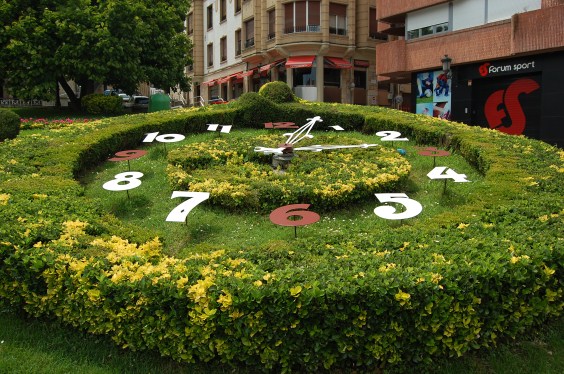
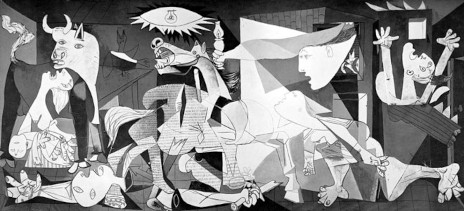
Prompts are the directions teachers give to students to direct them to action, particularly to write. At other times, images created by others prompt learning through writing. Two images juxtaposed might provoke students to the written word. The seemingly serene setting of a park in Guernica (May 2007) in the first image contrasts sharply with that painted by Pablo Picasso in the second image. The images, coupled with discussion, and online reading, might inspire more writing than any set of directions given to students.

Guernica

Guernica by Thomas DeVere Wolsey is licensed under a Creative Commons Attribution-NonCommercial-NoDerivs 3.0 Unported License.

Guernica by Picasso

Pablo Picasso, la exposición del Reina-Prado. Guernica is in the collection of Museo Reina Sofia, Madrid (low resolution image)

Multimodality as an approach to composition, Choo (2010) proposes, can motivate young writers and help them (and their teachers) escape from escape inauthentic writing tasks that attend to surface features, for example the ever-present five paragraph essay. For those interested in learning more about Picasso’s painting and how he came to portray such destruction, visit this PBS webpage.

Infographics present information in a visual way. In this example, words that can be used to describe coffee are displayed as a circular array. Colors link words as the eye travels the path around and through the wheel. A difficult writing task for any author is to represent in words concepts learned through the senses of taste and smell. Students might use and create flavor and odor wheels to assist them in thinking about words and choosing the best word for their writing.

Composing Multimodal Text

Photojournalists use words and images to tell their stories; Choo (2010) offers five questions that might assist students to think about how both are used successfully by considering the strengths of each modality.

  1. How do words function to “anchor” and give an interpretation of an image?
  2. How do words function to “relay” or contribute to the meaning of an image?
  3. Where will the image be placed in relation to the words and why?
  4. How much of the frame-space will the image occupy compared to the words?
  5. Is the focal point of the text on the image or on its words and why? (p. 172)

Using these questions as guides, students attend to the features of the images and words they choose and the multimodal texts that, together, they create. The Literacy Beat bloggers are interested in your multimodal projects and how images help your students write and writing helps them learn from images. Please share your ideas and successes by posting a comment, below.

Reference

Choo, S. S. (2010). Writing through visual acts of reading: Incorporating visual aesthetics in integrated writing and reading tasks. High School Journal, 93(4), 166-176.

Children’s Literature Cited

Comenius, J. A. (1658). Orbis Pictus.

More Resources

Search Engines and Multimodal Representations in this blog by Bernadette Dwyer

CAST Image Collector

CAST’s Science Writer: A free, online tool to scaffold students’ writing of science reports

A post by Bridget Dalton

Before joining Vanderbilt University, I had the good fortune to serve as the Director of Literacy and Technology at CAST, a non-profit research and development organization dedicated  to  improving student learning and engagement through the integration of universal design for learning (Rose & Meyer, 2002), technology, and subject matter content and skills.

Today I want to feature Science Writer, a free online writing tool developed by Tracey Hall, Elizabeth Murray, and CAST colleagues.  It’s a wonderful example of how to scaffold students’ writing in relation to the demands of a particular writing genre, in this case, the science lab report, or more generally, the science report.  The tool is designed for use with middle school and high school students, but might also work for upper elementary students, depending on their skill.

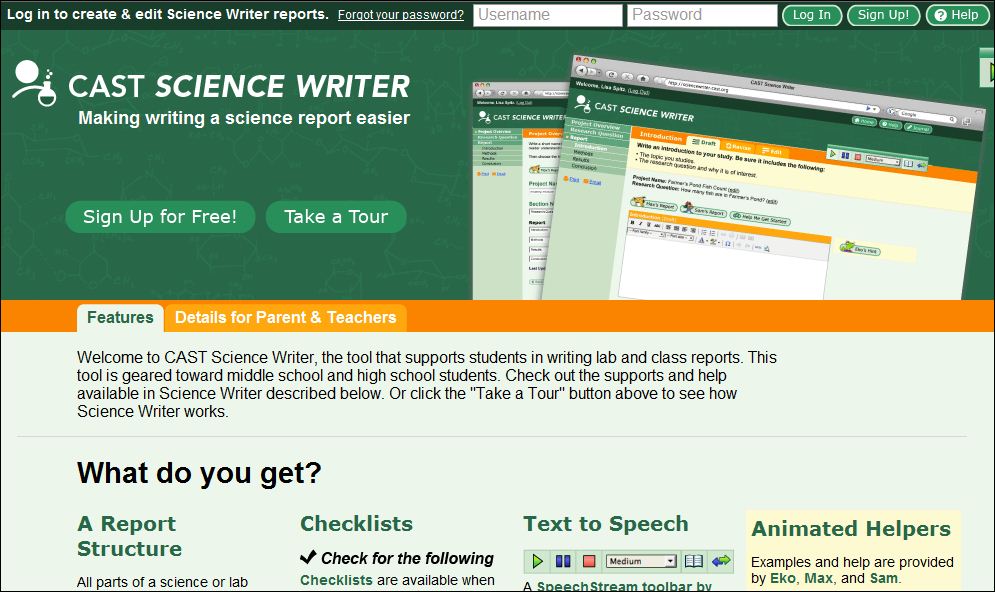
screenshot of Science Writer

Screenshot of CAST’s Science Writer. http://sciencewriter.cast.org

How does Science Writer work?
Science Writer steps students through the process of writing a report with  introduction, methods, results, and conclusion sections. Students draft, revise, and edit their report, using just-in-time support from pedagogical agents who offer models and information about how to write each section. They may also access content and editing checklists to help them evaluate  their writing and make revisions. And finally, students can use the embedded text-to-speech tool to listen to their writing to see if it “sounds right” and to listen to any of the directions and instructional material, as well as accessing vocabulary definitions. Each student has their own Science Writer account and teachers are able to view students’ work and provide feedback throughout the writing process.

Screenshot showing Science Writer features

Science Writer supports students through their writing process.

Is there research support for Science Writer?
In a study funded by the US Department of Education, Hall and Murray (2009) found that students using Science Writer improved writing and science comprehension skills. A field test study is underway and results should be available soon. You can find additional information about their research at http:///www.cast.org/research/projects/tws.html.

I recommend you check out Science Writer – if it’s not the right fit for your grade level or subject matter, please share it with your favorite middle school or high school science teacher!

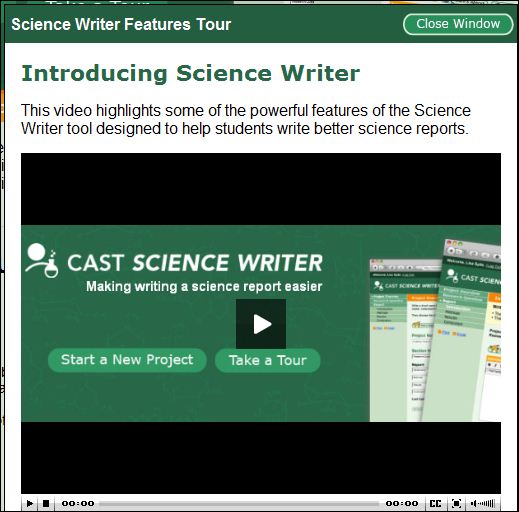
screenshot of Science Writer video

This brief video for students explains how the Science Writer features can help them write a more successful science report.

video link

Resources
For additional information about Science Writer: http://sciencewriter.cast.org

To learn more about universal design for learning: http://www.cast.org/udl/index.html

Rose, D. & Meyer, A. (2002). Teaching Every Student in the Digital Age. ASCD. Available free online: http://www.cast.org/library/books/tes/index.html

Google Lit Trips

A post from Bernadette
Lucy Calkins in the Art of Teaching Reading (2001) urges us to help our students to compose lives in which reading and writing matter. She noted that great literature helps us “to stand, feeling small, under the vastness of the Milky Way”. Google lit trips (the brain child of Jerome Burg, a retired high-school English teacher) allows students to travel beyond the mind’s eye, and take a virtual road trip, by satellite, navigating right across the world, viewing locations from the novel on the way. Lit trips help students, who are unfamiliar with locations within a novel, to recreate scenes  and become fellow travellers with the characters in the novel, visiting places the characters lived, where they struggled and where they overcome adversity. The site has won the 2010 Tech Laureate award. It provides us with a good example of a meaningful way to integrate literacy with technology and indeed the content areas.

Getting Started
Before visiting the Google Lit trip site you need to download Google Earth (a free downloadable program). You will need Google Earth as Google lit trips run off KMZ files. If you are not already familiar with the Google Earth interface take a couple of minutes to familiarise yourself with the tool palette and side bars. Tutorial videos are available here. For example, you can record a tour using the camera icon; view historical imagery of place marks on the clock icon; and create place marks using the pin icon. (On the side bar, in the layers menu, ensure you unclick the layers when creating a Google lit trip so that you will only view locations within the novel).
Visit the Google lit trip web site for helpful webinars and examples of Lit trips created by teachers and their students. Lit trips are organized across grade level from kindergarten through high school to higher education. Google lit trips don’t stop at merely visiting locations or geographical features within the novel. Sample Lit trips on the site show discussion popup windows to help our students ‘linger and look’ (Calkins, 2001) and dig deeper with their responses to literature by making connections to themselves; to other texts they have read and to their own world experiences. Teachers (or their students) can create different levels of questions to spark meaningful discussions; and can provide links to other web sites to access crucial historical background information thereby enhancing meaning.

Sample Lit Trips
There were many readymade lit trips that caught my eye. I’ll mention just three to whet your appetite.
Possum Magic by Mem Fox (aren’t all of her books memorable?) a tale of Grandma Poss who makes Hush invisible to protect her from snakes. Seemed like a good idea except she doesn’t know how to make her visible again! The lit trip takes the reader to seven locations in Australia and provides imagery of various types of Australian food as Grandma Possum tries to undo the mayhem.
Going Home by Margaret Wild is a tale of Hugo, a child anxiously awaiting discharge from hospital. His hospital window overlooks a zoo and Hugo begins day dreaming of the natural habitats of a range of animals, such as, African elephants and Snow leopards. Antonella Albini, the teacher librarian, who created this lit trip provides helpful imagery, audio and video links to child friendly web sites such as, National Geographic for kids.
• My final choice is the compelling The Watsons go to Birmingham -1963 by Christopher Paul Curtis. This is the story of an African American family whose lives become intertwined with the Civil Rights movement of the 1960’s. The teacher creator of the Lit trip, Heather McKissick, provides seventeen Question Stops along their journey with links to historical imagery and questions to spark meaningful discussion among her students.
I’m excited by the possibilities of Google Lit Trips. I am exploring online tutorials on the Google Lit trip site and YouTube videos to start building my own lit trip. Come Spring break I have my eye on The Silver Sword by Ian Serraillier (Red Fox, 1956). Let’s see how I get on!

Url links used in Blog

Google lit trips http://www.googlelittrips.org/

Google Earth http://www.google.com/earth/index.html