Expanding Opportunities for Professional Development: Online Conferences and Professional Learning Communities

A post by Jill Castek

We’re all familiar with the impact of shrinking school budgets over the past few years.  One unfortunate consequence has been the decline in funding for teacher participation in national and international conferences. Avenues for teacher learning have shifted and expanded as technology has given rise to new forms of professional development. When it comes to effectively using new technologies to support student learning in particular, these seeking out professional development opportunities is essential.  The IRA Position Statement, New Literacies and 21st Century Technologies (IRA, 2009) calls for professional development that provides opportunities for teachers to explore online tools and resources expected for use with students.  The statement asserts that it isn’t enough to just make new technologies available to students but to provide options in ways to use them to access information and share ideas. To inspire new ways of thinking about the use of technology, tangible ideas and examples of what knowledgeable teachers have implemented need to be shared widely and discussed.  This post introduces free PD resources and online communities that support teachers in integrating digital technologies into learning activities in meaningful ways.

The IRA Standards for Reading Professionals (2010) encourage teachers to integrate technology into student learning experiences. More specifically, learners are expected to engage in opportunities that utilize traditional print, digital, and online reading and writing and represent various genres and perspectives, as well as media and communication technologies. The integration of technology into literacy learning is also called for in the Common Core State Standards (2010). Students that meet the standards are able to, amongst other aspects, use technology and digital media strategically and capably.
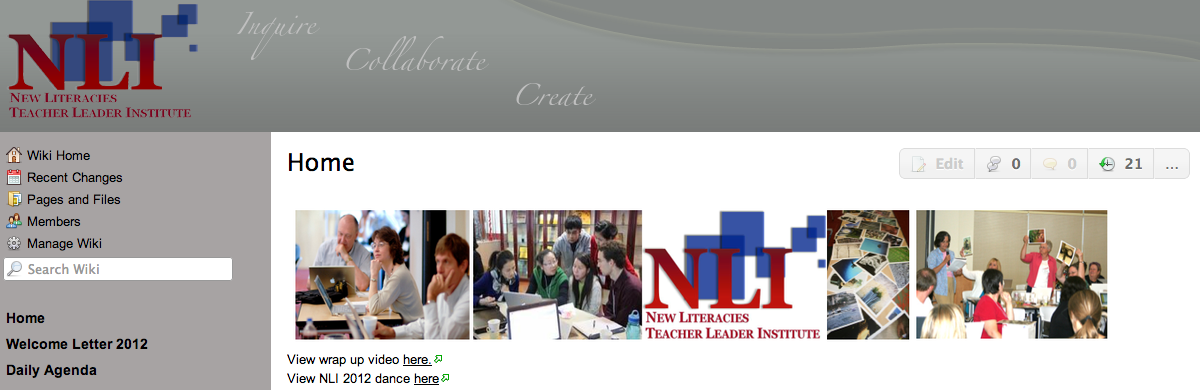
Professional development efforts such as the New Literacies Teacher Leader Institute (http://nli2012.wikispaces.com/Home) offer transformative models that expand beyond the school level and help build extended learning communities that promote lasting change. This week-long institute addresses ways that new digital tools can create challenging and engaging learning opportunities for students and teachers in K-12 and higher education. Participants come together to network, share ideas, boost their leadership skills, and create technology infused curriculum units they can implement in their own classrooms. For teachers who are unable to attend such an institute in person, online resources can be explored and discussed with colleagues to support implementation.

Available resources include videos, instructional suggestions, readings that link theory to practice, and online networking tools which allow teachers to connect with others who have similar goals and interests. Teachers who tap into the wide range of social networking tools that are available to educators can participate in virtual learning experiences that can be customized based on the needs in their own setting.

Special interest groups such as the Technology in Literacy Education Special Interest Group, (http://tilesig.wikispaces.com/) affiliated with the International Reading Association (IRA), the 21st Century Literacies Group, (http://ncte2008.ning.com/group/21stcenturyliteracies) affiliated with the National Council for Teachers’ of English (NCTE), and the New Literacies Collaborative affiliated with North Carolina State University (http://newlitcollaborative.ning.com/ ) put teachers in touch with an extended network of colleagues with whom to discuss instructional approaches, share resources, and collaborate.
Rick Beach (from the University of Minnesota) and I will be giving a talk at the K-12 online conference (http://k12onlineconference.org/) coming up Oct. 15 – Nov. 2, 2012. This is a free online conference open to anyone. This all volunteer event is organized by educators for educators with the goal of helping educators make sense of and meet the needs of a continually changing learning landscape.  Presenters will share ways to integrate emerging technologies into classroom practice.  The schedule of session is available at http://k12onlineconference.org/?page_id=1091.  Our session, entitled Using iOS App Affordances to Foster Literacy Learning in the Classroom is available for download at http://ge.tt/6EtYbCP/v/0.

Literacy Beat aims to build a professional learning community amongst its readership. Please make a comment suggesting other professional development outlets or professional learning communities we can learn and benefit from.  These shared resources will allow us to expand our online networks and be in touch with new resources and ideas that benefit our teaching and our students learning.  We look forward to your comment!

References

Common Core State Standards for English Language Arts and Literacy in History/Social Studies, Science and Technical Subjects (2010). Retrieved from http://www.corestandards.org/the-standards/english-language-arts-standards

International Reading Association. (2009). New literacies and 21st century technologies: A position statement of the International Reading Association International Reading Association. Newark, DE: International Reading Association.

International Reading Association (2010). Standard for reading professionals—revised 2010. Newark, DE: Author.

Reading Complex Texts In Digital Environments: Four Teaching Practices

By Thomas DeVere Wolsey

Go to the parking lot of almost any school and ask ten adults (parents, school staff, faculty, etc.) if technology is helping students to be better readers in general or if it is detrimental to student reading.  While you will have ten very different answers, it is very likely that most of those adults will tell you that digital technology hinders students’ reading capacities.  This need not be the case, however.

Fortunately, teachers hold the answer to improving how their students interact with digital texts. Many have anticipated that asking students to read complex texts also mean asking them to navigate digital environments more often. In this post, we explore effective practices to help students navigate complex digital environments and the texts found there.

As schools move toward increasing the amount and the complexity of texts students read, digital environments will become increasingly important in meeting the goals to prepare students for college and work (CCSS, 2010). Reading online differs in many ways depending on the text itself and the electronic format (e.g., Kindle or Nook, PDF or HTML webpage, etc.). Here are four effective practices for teachers to encourage engagement with complex digital texts. In a future post,  I will explore those four practices in context of four reading tasks students might confront when reading digital texts.

MNOP

Model, Name, Overcome obstacles, Probe

Teachers can do a great many things to help students find, engage, and comprehend complex materials in digital environments.  Four critical teacher practices include modeling, naming, overcoming obstacles, and probing.

M (source: http://www.clker.com/profile-160226.html) Modeling may be the most time-honored tradition of the effective teacher, with good reason, we add.  When students see their teachers or peers employ effective reading habits, they tend to mimic those habits. Moreover, as they do so, they expand their repertoires of skills that serve them when they encounter new or challenging texts.

N (source: http://www.clker.com/profile-160226.html) Naming recognizes that students have skills on which they draw. However, students don’t always know why a skill or strategy might work effectively or under what conditions. When a teacher names the strategy, the student learns that it is an effective approach recognized by others and that it can be replicated.  For example, Howard is a sixth grader who skimmed several search results finding one near the bottom of the page that met his purpose for searching and reading.  His teacher noticed what he had done and specifically named the strategy as “skimming for the best website.”

O (source: http://www.clker.com/profile-160226.html) Overcoming obstacles suggests that novice readers of digital content often arrive in class with preconceived notions of what reading online is all about.  Sometimes those ideas are accurate, but at other times, these ideas present obstacles to comprehension of digital content.  For example, readers of webpages typically use a skimming strategy that resembles the shape of an ‘F.’ They read the top line, skim the left margin, and occasionally read a portion of a line partially down the page.  The strategy is effective when readers try to determine if a site is worthwhile for their purposes; however, it may hinder reading of complex content if the same skimming strategy is employed.

Read more about the F-shaped pattern on this blog: https://literacybeat.com/2012/08/28/text-complexity-digital-reading/

P (source http://www.clker.com/profile-160226.html)Probing involves teachers watching their students read online and probing for insights into their thinking processes as they read. For example, Sheila’s tenth-grade social studies teacher noticed that she selected a link with challenging vocabulary about a Civil War battle site instead of an easier site intended for younger readers.  He asked her why she chose the site, and she explained that the easier site presented information she already knew; she wanted to challenge herself.

Next month, we explore how these four teacher practices can be applied as students work with complex digital texts.

  1. Find and read materials that meet academic and other purposes
  2. Determine the best approach for reading digital material
  3. Synthesize multiple sources to create a deeper understanding
  4. Integrate multimodal resources into their reading experiences

Reference

Common Core State Standards Initiative. (2010). Common core state standards for English/language arts and literacy in history/social studies, science, and technical subjects. Retrieved from http://www.corestandards.org/assets/CCSSI_ELA%20Standards.pdf

Images source

abaverman. (2012). Letters M, N, O, and P. Retrieved from http://www.clker.com [creative commons CC0 public domain dedication]

What the NAEP2011 Writing Assessment Means for Technology Use in Schools

What the NAEP2011 Writing Assessment Means for Technology Use in Schools

On September 14, I attended a Webinar on the outcomes of the Writing 2011 National Assessment of Educational Progress for Grades 8 and 12. The full report can be accessed at http://nces.ed.gov/nationsreportcard/writing/.

As we know, NAEP assessments have occurred since 1969 and provide a pretty reliable snapshot of educational progress in the U.S. The 2011 writing assessment is the first that has used technology as part of the assessment.

All 8th and 12th graders who participated in the assessment did so using a word processing program on the computer, rather than using pencil and paper. Because of this, new scales and achievement levels were established and webinar presenters (including Arthur Applebee and Elaine Chin) were careful to stress that the findings could not be directly compared to past results for that reason, although results indicate students have the same strengths and weaknesses as revealed in the past by pencil and paper tests.

Also in the 2011 assessment, the types of writing required of students are in alignment with the Common Core State Standards (CCSS, 2010) stressing the reinforcement of three writing capacities. These three types of writing prompts were used with different proportions of use for the two grade levels:

%  Assessment 8th %  Assessment 12th
Persuasion 35 40
Explanation 35 40
Convey an Experience 30 20

Scores were based on six performance ratings and scored as “first drafts” rather than polished writing samples. The ratings may be found in the report.

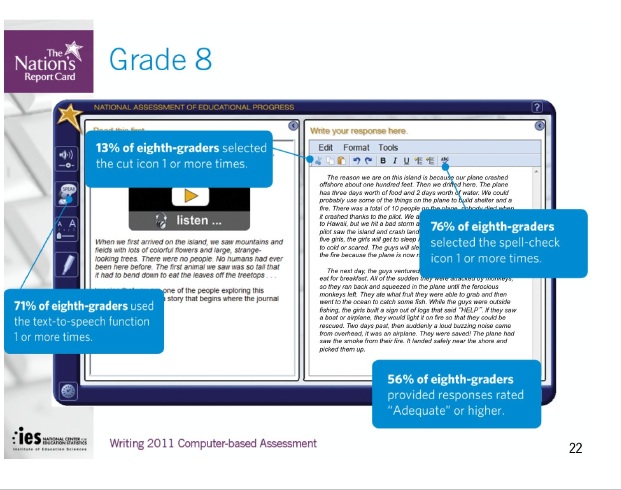
Writing prompts were provided with interesting technology. On a computer screen divided vertically like the pages of a book, the left half contained the prompt with specific types of multimedia, including an audio prompt at 8th grade and a video prompt at the 12th grade. In the webinar, a prompt for conveying information asked students to describe a desert island and the multimedia added the sound effects for the prompt.

There were a number of program tools that students could elect to use as they wrote (prompts were based on Universal Design) and students’ tool use was tracked and generally associated with higher scores…but more on that later.

Findings

The major assessment findings were that at both 8th and 12th grades, only about 24% of those assessed scored at the “proficient” level, as is seen in the screen shot from the website (below). About half the students assessed scored at the Basic achievement level.

Gaps continue to exist among ethnic groups and there is also significant variance for student performance by gender and school location.  For example, at the 8th grade level, the scaled scores showed Asian students scoring the highest at 165, while the lowest scoring ethnic group were Black students at 132.

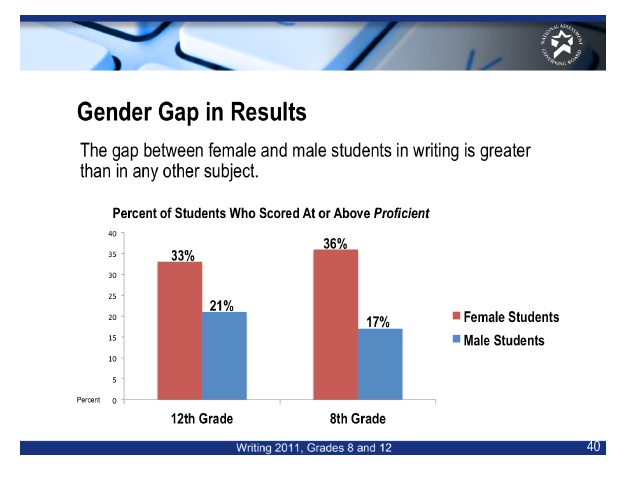
There is also a rather large gender difference with the scaled score for 8th grade males at 140 and for 8th grade females at 160. Scores for 12th graders were closer, but the gap is still sizeable.

The following screen capture illustrates this point:

Finally, the school type and location appears to matter. While public schools comprised 92% of the sample, scores for students in private schools scored higher overall with students in Catholic schools scoring the highest.  Suburban school districts had higher scaled scores than did those in cities, towns, and rural locations. These scores can be seen in Table A:

At 12th grade, the highest scoring ethnic group was White at 159, while the lowest was Black at 130. The gender gap was somewhat less stark but still extant, as was the benefit of attending school in a suburb.

Poverty continues to make a substantial difference in students’ scores. Those eligible for free lunch had a scaled score of 134, while those who were not eligible had a scaled score of 161.

Technology Use

Beyond overall scores, there are many implications for educators. One question appears to have a positive answer: the use of word processing tools for the assessment appear to be more engaging.

Of interest to those who enjoy the intersections of literacy and technology are the findings that emanate from the word processing actions used by students. Questionnaires were given to teachers of 8th grade students completing the assessment. Teachers reported on how frequently they had students using computers to write and revise drafts. The data showed that 44% of students had teachers who reported using technology in writing; these students scored higher than those who had teachers who did not use technology as much in their writing.

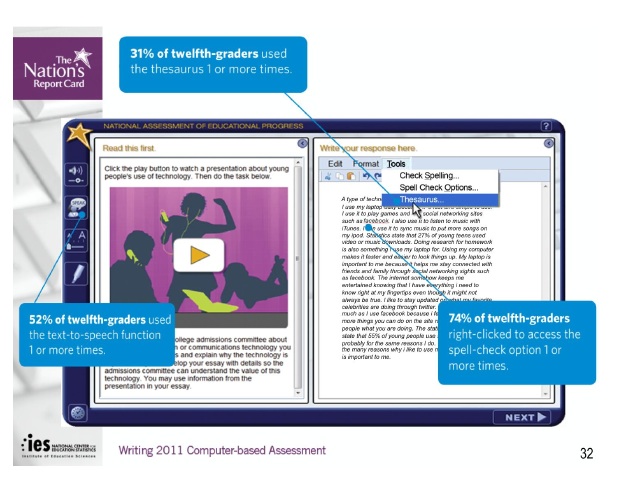
As noted above, students who used the tools available (cut/paste, text-to-speech, spell-check, thesaurus) scored higher than students who did not use these tools.

For 12th graders the technology was a little more sophisticated, as the prompt included video as well as audio. In this sample prompt, students were asked to speak to an audience of college admission committee members to persuade them how technology is important and valuable to them. The video provided statistics of technology use.

Both 8th and 12th grade students who said the use a computer more frequently to edit their writing scored higher than students who did not.

Implications

For all educators, there is an urgent need to embrace technological tools for communication and composition in our homes and schools. There are examples everywhere of sound technology use in schools (see my blog on Literacy Beat dated August 22, 2012 on the use of Strip Designer for writing at the Kindergarten level).

This summer I taught a class on reading fluency and the students and I discussed writing as a part of reading fluency. The experienced classroom teachers in my class had a spirited discussion about the use of spell-check in composition, with half arguing that over-reliance on this would negatively impact students’ writing at the early elementary grades. While I am unaware of research that directly addresses this question, I believe that tool use is a hallmark of human beings and should be encouraged.

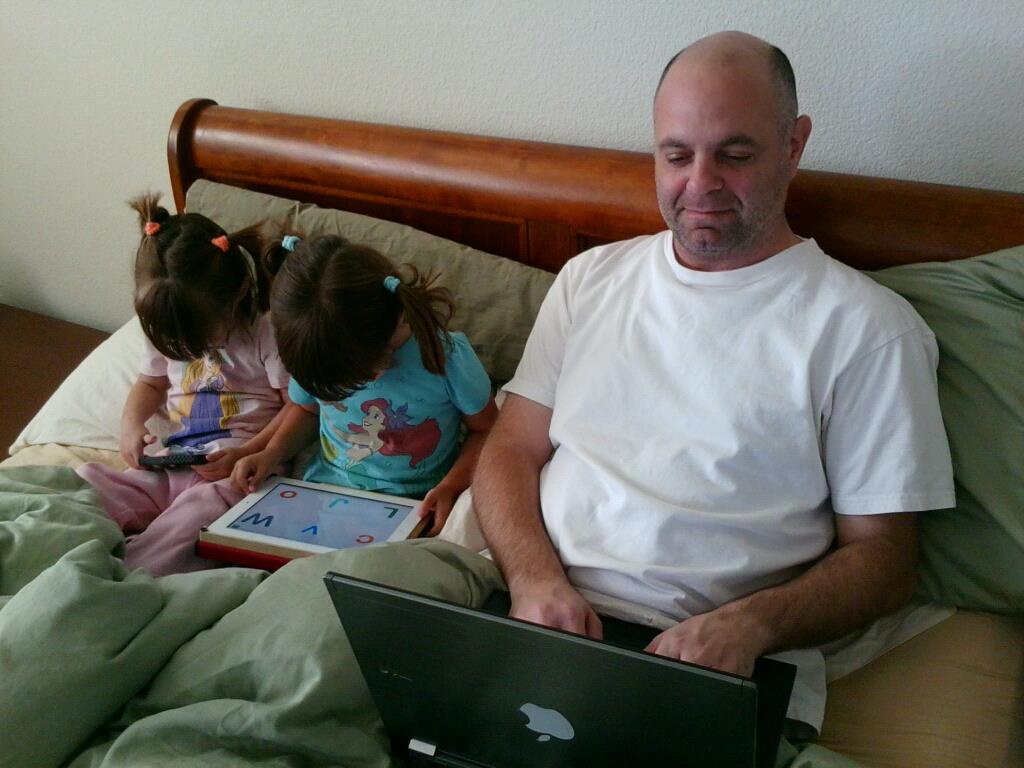
While the 2011 Writing Assessment did not include 4th graders, there was a separate study conducted to assure NCES that 4th graders could use the tools. While findings have not yet been released, they appear to be positive for tool use.  Right now, NCES is recommending that Keyboarding skills begin at third grade. Interestingly, early childhood education groups are recommending children learn to keyboard much earlier. I recall, from my own teaching in the early 1980s, teaching keyboarding skills to my first graders in a California public school.  I also offer this photograph of my son-in-law and my twin granddaughters (aged 3 and 1/2) on a “Digital Morning” with the understanding that teachers will increasingly see  tech-savvy students like these in their classrooms.

There are an increasing number of resources for learning about and using technological tools in the classroom. Most organizations are now providing online assistance to teachers in using technology. For example, ASCD now has a website with tools for teachers to learn to use the CCSS (http://educore.ascd.org/) and the International Reading Association is now merging their Engage feature with Reading Today Online to form a new blog. Such assistance is becoming more common. Of course, there are books out there, too, such as the one DeVere and I published with Guilford this year (see Bridget Dalton’s blog on Literacy Beat dated August 7, 2012).

Thus, I have ventured to suggest some recommendations for educators, as shown below.

Teachers need to:

1)   Find ways to incorporate technology into their classrooms with the tools (however limited) that they already have.

2)   Argue on behalf of technology, using the research evidence at hand—such as the 2011 NAEP Writing Assessment outcomes.

3)   Seek workshops and professional development opportunities to develop their own expertise in technology use.

Administrators need to:

1)   Support teachers’ use of technology in the classroom.

2)   Argue at the district level on behalf of technology use.

3)   Seek workshops and professional development opportunities for themselves and their teaching staff.

Teacher Educators need to:

1)   Work collaboratively within the university to distribute technological use across the teacher preparation programs instead of relying on  “Ed Tech” courses.

2)   Seek workshops on technology use for themselves.

3)   Where possible, seek student teaching placements for teacher candidates where technology is being used productively.

If you have other ideas, I welcome your responses!

References:

Wolsey, T.D. & Grisham, D.L. (2012). Transforming writing instruction in the Digital Age: Techniques for Grades 5-12. New York: Guilford.

Common Core State Standards Initiative (2010). Preparing America’s students for college and career. Washington, DC:  National Governors’ Association and CCSSO. Retrieved from: http://www.corestandards.org/the-standards.

Finding the needle in the haystack

A post from Bernadette

Successful online readers access information speedily, effectively and efficiently (Leu, Kinzer, Coiro & Cammack, 2004). However, given the sheer volume of information available online, finding relevant information for a task focus can be laborious, rather daunting and somewhat overwhelming and akin to finding a ‘needle in a haystack’.

Two issues warrant attention. The first issue relates to judging the relevance of a search result blurb for your inquiry focus. As Eileen (a struggling reader in 6th grader) noted to me, “The blurb might tell you something but when you go inside it, it’s something different. Don’t get your hopes up if it says what you want to find ’cause it mightn’t always be inside it”.

The second issue relates to remembering ‘aha’ websites. Given the amount of time we all spend online finding your way back to particularly relevant websites, which you have previously visited, can be rather taxing. In this post I will explore two digital tools (Yolink and Diigo) which may help to enhance search functionality.

Yolink (http://www.yolinkeducation.com/education/) is an add on browser extension tool that scans web pages, search engine results and digitized books to find your inputted search terms and deliver information that is relevant to your inquiry. Yolink is a supportive digital tool in two ways. Firstly, it enables the reader to dig deeper behind the links without painstakingly navigating to and opening each website link in turn. It does this by previewing and filtering the search results and highlighting snippets of information from relevant sections of search results for the reader. Secondly, Yolink can also search within bodies of texts (e.g. digitized versions of books) for key words or phrases to find information relevant for a particular research focus. Yolink helps you move, as the developers say, ‘from search to find’.

Sample lesson plans and resources are available on the Yolink education site (http://www.yolinkeducation.com/education/teachers.jsp).

For example, the lesson plan for ‘Polar Bears in a Changing Climate’, prepared by Julene Reed, is an example of a Challenge Based Learning unit using Yolink, and is based on the Apple Learning Interchange. Students are assessed on abilities in areas, such as creativity and innovation, communication and collaboration, research and information fluency and critical thinking, problem solving and decision making.

Bookmarking relevant sites by adding them to your favorites tab is one way to collect and retrieve websites that you visit. Creating subfolders with meaningful names is helpful when you want to revisit a particular website. However, if like me, you engage in squirreling behaviors where you tab multiple web sites on an hourly/daily basis you can end up with hundreds of websites in multiple subfolders. Just why you wanted to bookmark a particular website can be lost in the moment of tabbing! It is also difficult to backtrack quickly to a specific website when you want to locate information. So the proverbial haystack looms again!

A digital tool for organizing research online is Diigo or Digest of Internet Information, Groups and Other Stuff. (http://www.diigo.com/ ). Diigo is a cloud-based information management tool that enables users to collect, highlight, bookmark, tag, clip, share and annotate websites.

Teachers can create an educator account with Diigo. This will enable you to generate student accounts and establish collaborative research groups within your classroom. Diigo is helpful when conducting research, creating personal learning environments and collaborating with others. Some of the features of this tool which are useful include:

  • Annotating and highlighting snippets of information on websites with sticky notes.
  • Saving a screen shot of a web site on a particular day and revisiting to review changes over time or simply to archive the website.
  • Categorizing relevant information through the use of tags and lists on websites for quick retrieval of information.
  • Creating collaborative groups where teams of students can research information and post their findings and annotations for others in the group to review. Members can then interpret, critique and synthesize information from a variety of online sources.
  • Accessing your own digital library, as part of a personal learning environment, from any computer or through apps on Ipads and Android Tablets or smart phones.
  • Developing professional learning opportunities for teachers through Diigo created educator groups.

Reference
Leu, D. J., Kinzer, C. K., Coiro, J., & Cammack, D. (2004). Towards a theory of new literacies emerging from the Internet and other Information and Communication Technologies. In R. B. Ruddell & N. Unrau (Eds.), Theoretical models and processes of reading (5th ed., pp. 1570-1613). DE: International Reading Association.

My Pop Studio: Develop critical thinking and media skills with this free online game from Renee Hobbs and the Media Education Lab

post by Bridget Dalton, 9//13/12

Usually I blog about digital tools and instructional strategies, but today I want to introduce you to someone whose work I’ve followed for a number of years – Renee Hobbs. Renee is Professor and Founding Director of the Harrington School of Communication and Media at the University of Rhode Island. Renee is quite unusual in that she combines ‘making stuff’ in the Media Education Lab, with conducting research on media literacy and consulting on copyright and fair use policy. You can get a sense of the breadth and depth of her work by accessing slide shows of her many presentations available at http://www.slideshare.net/reneehobbs.

If you would like to hear directly from Renee about her leadership role in media literacy, view this video of an interview with her at the 10th Anniversary of the National Association for Media Literacy Education:

photo of Renee Hobbs

My Pop Studio

Today, I want to feature My Pop Studio, a free online ‘creative play experience’ developed by Renee and colleagues at the Media Education Lab. The goal of My Pop Studio is to engage young adolescents and teens in creating, manipulating, critiquing, and reflecting on mass media that is directed at girls. It includes a Magazine Studio, a TV studio, a Music Studio, and a Digital Studio. My Pop Studio is designed for use at home and at school (teachers can download a curriculum guide at http://mypopstudio.com/for_parents.php

screen shot of My Pop Studio

If your students and/or children try out My Pop Studio, please consider posting a comment about your experience.

Insights From A Service Learning Project: Creating Digital Projects with iPads to Encourage Safe Driving

A new post by Jill Castek

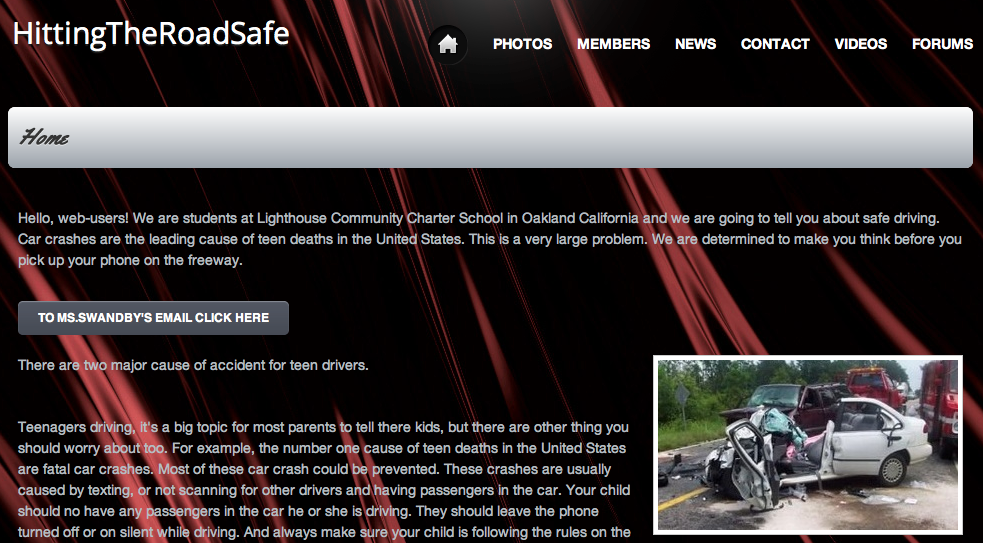
Melanie Swandby, a 7th grade teacher at Lighthouse Community Charter School in Oakland, CA was conducting a service learning project geared toward promoting safe driving habits.  Melanie was happy to explore digital content creation with her students, extending her original vision for the project with the goal of producing clear and coherent writing in which the development, organization, and style were appropriate to task, purpose, and audience (CCSS Initiative, 2010). She invited Heather Cotanch and I to explore the use of iPads to create digital products that would resonate with teens and the wider community. We were excited to witness the content creation process which included elements of collaboration, experimentation, and flexible grouping to support peer facilited tech-help.

Why Digital Content Creation?

Digital tools are transforming what it means to be literate in today’s world. In the past, it may have been that decoding words on a page was enough to consider a student literate. Today, we live in a world with ever increasing importance on digital tools and technologies as a means of accessing and sharing ideas.  Students need to become facile with the full range of communicative tools, modes (oral and written), and media. Having the ability to comprehend, critically respond to, and collaboratively compose multimodal texts will play a central role in our students’ success in a digital information age (Partnership for 21st Century Skills, 2007; IRA, 2009).

Setting the Context for Digital Content Creation

Melanie’s class  worked to actively create projects that resonated with their intended audience without needing elaborate direction with the use of iPad apps. First, we provided a basic overview of the affordances of three digital composition apps (ShowMe www.showme.com, VoiceThread www.voicethread.com, and iMovie for the iPad www.apple.com/ipad/from-the-app-store/apps-by-apple/imovie.html – these three content creation apps were chosen because they allow users to integrate still images, include a drawing tool, and have the capacity to include voice and sound effects).  Then, we shared an example product from each app and students were off and running. They soon discovered many features of the apps themselves as they worked.  This new knowledge was distributed throughout the classroom as peer support and flexible grouping was implemented.

Students completed digital products can be viewed from their student-created website Hitting The Road Safe http://hittingtheroadsafe.webs.com and at Safe Driving VoiceThreads https://sites.google.com/site/swandby/safe-driving-voicethreads and also ShowMe http://www.showme.com under the username jill.castek@gmail.com and password safedriving.

iMovie. While using iMovie, students worked in groups and took on different roles such as creators, actors, and editors. Collaboration came in many forms, for example, some students did not want to appear on camera, but were willing to write a script and film a partner.

 Other groups took turns incorporating found pictures and discussing sequencing to communicate a strong, clear message. Because of the ease of use and multiple options within the iMovie app, the editing process can become never ending.  To support a more skilled use of the app, we pointed students toward a YouTube editing tutorial. Students who found themselves with extra time added captions or experimented with the background music offered within the tool. These “extras” gave the movies a professional feel while extending the students’ knowledge of the technology and supportive the processes of reflection and revision.  While the iMovie app proved easy for students to navigate, explore, and edit, teachers would be well advised to guide students through ample planning of their project during their first few interactions with this tool.

ShowMe.  Possibly the greatest successes were achieved with students use of the ShowMe app. Like iMovie, it produces a video, but its affordances allowed students to deliver the most complete, succinct messages of all three tools (student work is available at showme.com under the username jill.castek@gmail.com and password safedriving). During the showcase at the end of the project, the student audience commented on the ability for students to appropriate humor about a serious topic to be showcased. This was achieved through the use of voice, drawing, and integration of selected images. This app has limitations in the amount of media that can be uploaded and may have prompted the students to choose wisely from their options, making the message clear rather than being lost in elaborate visuals.

From the first introduction of this app, the students demonstrated an eagerness to peruse the tools and begin incorporating images, drawing and voice together rather than compiling images for a later use (a pattern we noticed with other tools). Even after several projects were lost due to glitches with the system, students simply started over learning from their mistakes, making strategic use of the drafting process, and integrating their new knowledge into final products.

VoiceThread.  This tool offered the most structured means of conveying ideas and the students took to the tool readily.  Once slides containing images were created, they could be moved around as the message was drafted and revised. Once sequenced, students could voice over the visuals to communicate their message.  Completed VoiceThreads can be viewed at https://sites.google.com/site/swandby/safe-driving-voicethreads.

Students created multiple drafts of their VoiceThread project and practiced their voiceover several times to ensure the tone and quality of the message was spot on. Unfortunately, the VoiceThread interface selectively saved some of voiceovers, which required students to re-create their projects more than once.  However, this redrafting wasn’t something students balked at and the message conveyed in each subsequent draft was more extensive, and richer in vocabulary and details.  The limits of the technology were not discouraging, but rather a valuable introduction to the process of creating technology-based multimodal products.

What Did We Learn?

Students completed projects included a logical sequence but also incorporate personal touches through the use of music, voice, sound effects, and pictures remixed and used in creative ways.  By including a specific focus on intended audience, Melanie’s students were readily able to form and frame a persuasive message. For example, students who chose parents of teen drivers as the target audience drew on experiences from their out-of-school lives and combined them with statistics from a school-based text. This resulted in charts and graphs representing percentages, an articulated message free from teenage jargon and pictures free from gore (as opposed to an increased shock value to presentations geared toward teen drivers).

Collaboration is key. Collaboration was widely fostered by encouraging students to turn to each other as resources and to help each other figure out how to accomplish their goals. For example, one group of students was using the ShowMe app and wanted include text in their presentation (there is no feature in which students can type using a keyboard). Students offered each other a workaround demonstrating the use the notepad feature and taking a screenshot to import it into the project. Other students offered another option and hand-wrote text on a piece of paper in bold marker and took a picture to import into the project.  Still others shared how to use their finger to write the message manually. As was the case here, students often knew what feature that they wanted and found innovative ways to use the app to meet their goals. These observations reinforce the idea that step-by-step instruction by a teacher is not necessary before students use new apps.  We discovered taking the time was not worthwhile and may, in fact, detracted from the collaborative and discovery nature of the work and curtail digital competence.

Time for experimentation is vital.  We recognized at the outset of the project thatstudents were eager to learn how to use the apps offered to them in the act of content creation.  While our instincts told us to model for students, it became increasing clear to us that experimentation with the apps supported student learning much more efficiently.  It became evidence that when technology is being used, a new role for the teacher is created.  She is no longer the “sage on the stage” and must be more comfortable circulating to support implementation by being the “guide on the side.”

Creativity and humor were strategically to convey ideas. As students created their projects, they infused persuasiveness through their use of creativity and humor.  Creativity extended well beyond being able to draw well.  When asked to reflect on the project, students reported being more engaged in the digital creation process, than the paper and pencil task (even though they needed to develop digital skills quickly to use the tools).  They also enjoyed viewing the projects created by other classmates (even though they were very familiar with the content contained within them).  Students created multiple digital drafts of their project (and were glad to do so).  They appeared to use the multiple drafts to improve the project iteratively.  If a student wanted to revise or rethink a portion of the digital creation, the opportunity to do this was manageable as opposed to the static poster version from which the students began. As pairs worked collaboratively, new ideas for improvement were shared amongst partners, which led to subsequent (improved) drafts. Even though students might have stumbled through the first couple of tries, they got better at it each time. Persistence was key!

Student Insights

Through the implementation of this project, we aimed to test a process by which students could create digital products (including drawings, images, and voice)  that could be shared with a school and community audience.  At the end of the project, students were asked to share what was different about digital content creation. One student remarked, “It’s more creative and more fun to play around with. It’s more exciting. You can put your voice into it and you can make it more fun.” This student aptly points out that digital projects are flexible.  If a student wants to revise a portion of the digital creation, this is manageable. In contrast, changes on a static page can be messy or difficult and offer little room for rethinking of an idea. Another student shared, “You can use funny pictures but you can still have a serious message.”  This learner points out that students could develop and incorporate their own multifaceted literacies. Although humor was never mentioned as a component of the project, students freely infused their personalities through media to reach their intended audiences on a level that demonstrated a high degree of literacy skill. A third student pointed out, “It’s a lot faster than when we usually do projects, you can write in different ways like voicing your message.”

Communicating with a Real Audience

In viewing the final projects,  the audience (made up of members of the school and community) found the addition of suspenseful music, images, and the story-lines conveyed through multiple modes generated a tangible impact that was memorable. Witnessing the audience’s reaction interaction was one way that the students owned their success. It was clear that all students felt accomplished and through the act of digital content creation, they became more skilled in the digital literacies that are a vital  part of our 21st century world.

References

Common Core State Standards Initiative. 2010. Common Core State Standards for English Language Arts and Literacy in History/Social Studies, Science, and Technical Subjects. Available at http://www.corestandards.org/assets/CCSSI_ELA%20Standards.pdf

International Reading Association. (2009). Integrating literacy and technology in the curriculum: A position statement.  Newark, DE: International Reading Association.

Partnership for 21st Century Skills. (2007). Learning for the 21st century. Available at http://www.21stcenturyskills.org/reports/learning.asp

Text Complexity in the Digital Age: An F for Online Reading?

By Thomas DeVere Wolsey

If you are reading this, chances are good that you are a teacher or education professional. As a result, the subtitle probably caught your attention right away; but this blog post is not about the ill effects of digital reading. Instead, we are going to explore what reading online might mean at a time when we will all be searching for ways to increase the amount and quality of text students read and the complexity of those texts. Shortly, you will see why an F in digital reading can be a useful tool.

Why Do Digital Texts Get an F?

To understand how text complexity can be promoted in the online environment, it helps to know and understand how readers approach reading many webpages. As you probably know, readers’ eyes move across text sweeping from left to right (a saccade) and stopping on some words to take in the content and perhaps focus on more challenging terms or phrases (fixations). However, when readers go online to a search engine, their reading tends to skip wide swaths of text as they search for the content they need. Eye movements can be tracked, and during perusal of a search result, the places where the reader’s gaze tends to be most concentrated resembles an ‘F’ shape. It would not be productive to read every word of a search result. Rather, the reader takes in key terms most often on the left side of the screen and sweeps across in some places forming the arms of the ‘F.’ Would you like to see what eye movement tracking of a search result might look like? Check this out:

An image from Clickrmedia: Eye Movements on a Search Page

More important, once readers do select a web source to read, they tend to follow the same pattern during initial reading of the webpage. Because reading on the screen is somewhat different than reading on paper, web designers actually take advantage of this F-shaped pattern and write text using headings and key words that fall within the F-zone in an effort to gain the reader’s attention. This results in important concepts from the site being conveyed to the F-zone reader, and perhaps entices the reader to go beyond the F-zone and read more closely. This is a good thing for the same reasons we cannot and should not read every word on a search page. The challenge for teachers and the readers in their classes is deciding when to use this strategy and when to go beyond this approach and read a bit more thoroughly and perhaps slowly. In this photo, you can see what the F-shape looks like when eye movements are tracked. The redder the color, the more time the reader spends looking at the content on that part of the page.

An image from the Nielsen Norman Group: Eye Movements on Three Webpages (Notice the general shape of the ‘F’)

F-shaped Pattern

See eyetracking in action (real-time): http://www.vimeo.com/40021154 (source: The Nielsen Norman Group)

…and eyetracking in action (slowed-motion version):  http://vimeo.com/40021215 (source: The Nielsen Norman Group)

Is F-Shaped Reading a Problem?

Some voices in education believe this F-shape reading pattern is part of a larger problem that demonstrates how online reading in some way detracts from a reader’s ability to comprehend complex and longer texts. While we certainly need more research in the area of digital reading and how it affects young readers (and older ones, too), we can use what we know about the F-shaped pattern to our advantage in the classroom. Slow and careful reading need not be impossible in digital environments.

Effective reading online involves complex skills that can build what Newkirk (2012) calls a growth mind-set. This mind-set “…is the capacity to view difficulty as an opportunity to stop, reassess and employ strategies for making sense of problems” (p. 122). When readers encounter uncertainty, they may quickly navigate away from the webpage causing doubt; however, teachers can assist readers to make clear and conscious choices to seek out uncertainty, confront doubt, and consult many sources. Moreover, maintaining a healthy skepticism that promotes further inquiry even as some uncertainty is reduced, new doubts will surface. A  reason the Common Core State Standards Initiative (2010) includes qualitative elements represents recognition that young readers and their teachers have a role in deciding how they may challenge themselves to greater growth as proficient readers.

A really neat thing about the human brain is that it is very capable of changing its own behavior. Metacognition theories tell us that thinkers (in this case, thinking through reading) can be aware of their learning behaviors and consciously choose to adapt them to suit varying purposes and contexts. Because the Internet is full of worthwhile and complex texts, the online environment presents a challenge for young readers. Fortunately, the challenge is one educators are well-equipped to take on. Reading online has many facets, and four of them appear in the list below. In this post, we have zoomed in on reading habits in online environments. Others will be explored in subsequent posts.

  1. Finding the most appropriate reading material
  2. Determining the best approach for reading that material
    1. Monitoring reading habits
    2. Reading text in a non-linear manner (cf. Reinking, 1997)
  3. Synthesizing multiple sources
  4. Integrating multimodal resources

A Challenge to Readers of Literacy Beat

As you read the remainder of this post, here are some reader challenges for you. Did you use the F-shaped pattern in selecting this blog post from a search engine? Did you use the F-shaped pattern as you read the post at first (remember, this is a good thing)? Did you read “below the fold” or the point at which you had to scroll to get at more content? At what point did you decide to abandon the F-shaped pattern and choose a different approach (you did, didn’t you?). Why did you change your approach? Finally, if you are a teacher, how have you helped your young readers to understand and effectively read online sources?

Tools and thinking habits for evaluating the reliability of online sources are well-known (e.g., Schrock, 2002). Therefore, we won’t spend more time with these tools here. A good point to add, though, is that online readers often do not apply principles successfully for evaluating sources even if they know they should do so (e.g., Leu, Zawalinski, Castek, Banerjee, Housand, Liu, & O’Neil, 2007). Effective instruction in choosing reading material online that suits the purpose for the search and challenges the reader to think deeply about the topic of the search is critically important. To that, I should emphasize that students need to be taught how to select online reading that is appropriately challenging to them rather than defaulting to the easiest material available.

While the F-shaped pattern seems to be the default reading pattern for reading on the web, there are appropriate times when readers should slow down and read closely. In Module 1 on the TextProject site, we defined close reading in rather concise terms:

“Close reading is characterized by the use of evidence from the text to support analysis, conclusions, or views of texts. For example, responses to the definition of text complexity would begin with a reference to the place in the text where the term is defined” (Wolsey, Grisham, & Heibert, 2012, p. 2).

The F-shaped pattern and close reading of complex texts need not be exclusive of each other. There are times when scanning content is appropriate and other times when slowing down and reading closely is the better choice—even for web content.

Please use the comment feature of this blog to explore this topic with us.

  • How do you help your students choose increasingly complex texts that challenge them as readers to work with uncertainty?
  • In what ways do you help students monitor their reading behaviors such that they move from the F-shaped pattern of most web reading tasks to the slower close reading tasks associated with complex text?

References

Common Core State Standards Initiative (CCSS). (2010). Appendix A: Research supporting key elements of the standards; Glossary of key terms. In Common Core State Standards for English language arts & literacy in history/social studies, science, and technical subjects. Council of Chief State School Officers and the National Governors Association. Retrieved from http://www.corestandards.org/assets/Appendix_A.pdf

Leu, D. J., Zawilinski, L., Castek, J., Benerjee, M., Housand, B., Liu, Y. & O’Neil, M. (2007). What is new about the new literacies of online reading comprehension? Retrieved from http://www.newliteracies.uconn.edu/pub_files/What_is_new_about_new_literacies_of_online_reading.pdf

Moje, E., Overby, M., Tysvaer, N., & Morris, K. (2008). The complex world of adolescent literacy: Myths, motivations, and mysteries. Harvard Educational Review, 78(1), 107-154.

Newkirk, T. (2012). The art of slow reading. Heinemann: Portsmouth, NH.

Reinking, D. (1997). Me and my hypertext:) A multiple digression analysis of technology and literacy (sic). Retrieved from ReadingOnline: http://readingonline.org/articles/art_index.asp?HREF=/articles/hypertext/index.html

Schrock, K. (2002). On a good website you can tell… Retrieved from http://kathyschrock.net/abceval/primary/index.htm

Wolsey, T. D., Grisham, D. L., & Hiebert, E. H. (2012). What is text complexity? Teacher Development Series. Retrieved from http://textproject.org/tds

Using Strip Designer for Literacy Learning

Using Strip Designer for Literacy Learning

“In order to be read, a poem, an equation, a painting, a dance, a novel, or a contract each requires a distinctive form of literacy, when literacy means, as I intend it to mean, a way of conveying meaning through and recovering meaning from the form of representation in which it appears.” (Eisner 1997, p. 353)

It has been 15 years since Eisner eloquently reminded us that we are moving from a text-based world to a multimodal one where we learn to learn from a fresh variety of sources and communicate generatively with a vast array of tools at our disposal. Schools around the U.S. have not always been quick to adopt such new tools and in some cases have moved to discourage the use of new literacies and evolving technologies in the classroom. In other places, such technological innovation is not only welcomed, but also supported.

We find a welcome case of such support in Napa, California, where a non-profit institution, NapaLearns (napalearns.org) has become a benefactor of technological innovation, providing grants to schools in the area for the purchase of tools and training. You may learn a great deal about the efforts of NapaLearns by visiting their website.

Here I would like to highlight one of the projects that NapaLearns funded. The project takes place in a public school and in the Kindergarten classroom of a very talented teacher, Ms. Martha McCoy. Martha and I became acquainted through her graduate program in Innovative Education at Touro University, where I taught research methods last spring.

In Martha’s words:

This year our kindergartners embarked on a great journey to explore the ways technology can be used to enhance their learning. In addition to crayons, paper, pencils, playdough, puppets, puzzles, play, manipulatives, and realia, we are learning with iPads.

Our students are primarily English Language Learners, 100% of whom are living in poverty based on qualifying for free or reduced lunch. Less than 2% of the students’ parents graduated from high school in the U.S. and 17/18 students only speak Spanish at home.  These students are at the greatest risk of school failure.

The strategy for use of the iPads was to provide early academic intervention focused on building English language vocabulary and school readiness in our most ‘at risk’ students. The iPad enhanced kindergarten project began as a partnership between NapaLearns, a nonprofit organization, Calistoga Family Center, a family resource center, and Calistoga Joint Unified School District. The partners share in NapaLearn’s mission to “re-imagine learning for all children in Napa Valley …to promote implementation of education innovation and promote student- centered 21st century learning…so our students can compete in a fast paced technology enhanced world.” (NapaLearns Mission Statement, 2010).

********

Martha completed an action research report to ascertain the effects of a partnership in her school between her kindergarteners (who knew iPads) and 6th graders at the school (who knew about writing). The Kinders and the 6th graders worked in cooperative pairs to create comic strip posters to show preschool children (who would be in K the next year)  what a typical day in Kindergarten looks like.

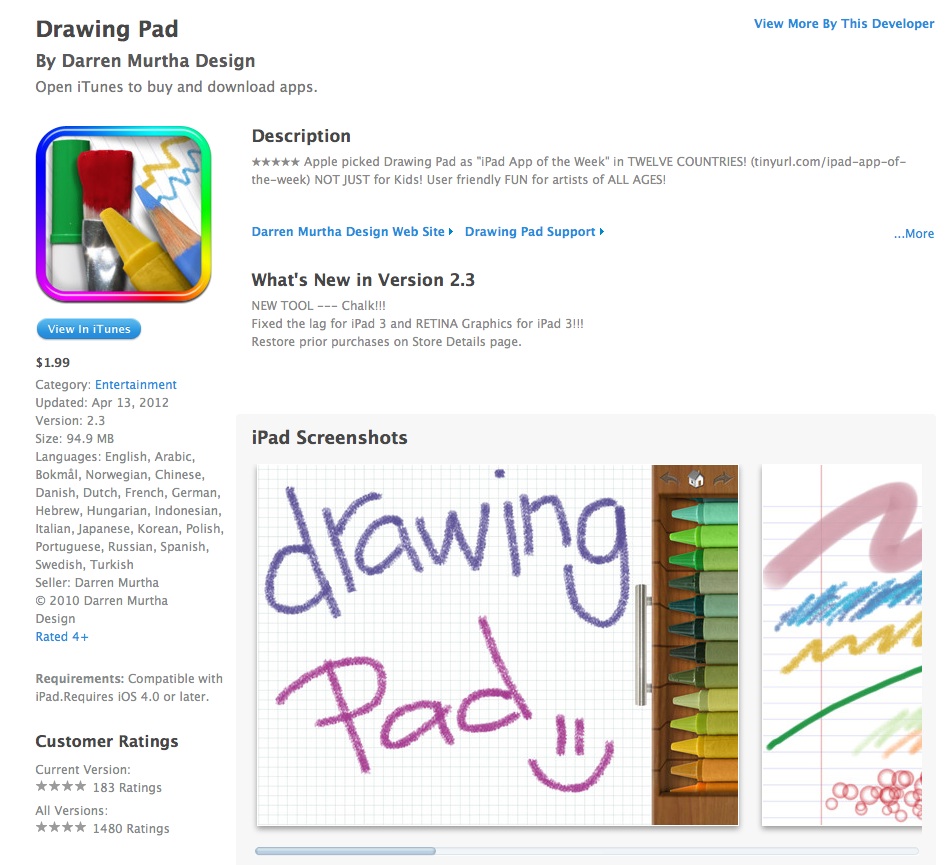
The Kindergarteners used their iPad cameras to take pictures of typical scenes in a Kindergarten day. They also drew pictures using Drawing Pad (see screen capture below).


The drawing pad application costs $1.99 and I purchased it to try it out. Don’t laugh (I’m not an artist!), but learning the program was simple and here is a terrible example.

For those of you who know my husband, Marc, he is well represented by a firetruck (we own one from 1949). Me, I’m always up in the air.

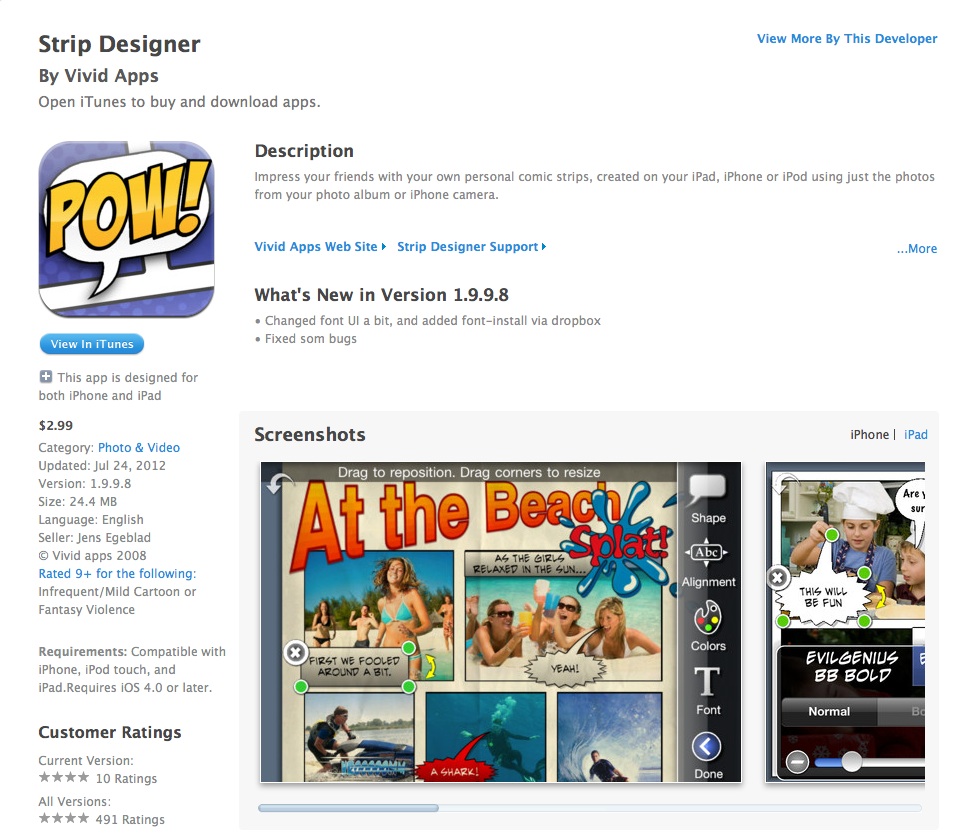
The students put this photos and text together using another iPad (and iPhone) application called Strip Designer (see screen capture below). This program costs $2.99 and I also downloaded and tried it out using photos.

Strip Designer also has a tutorial and is relatively easy to learn.  I’ve done a couple of the comic strips, but instead of sharing mine, I have Martha’s permission to share one her student did:

But probably the best way to get the essence of Martha’s work is to view her Animoto on the project, also created for the Innovative Learning program at Touro (under the auspices of Program Director, Dr. Pamela Redmond). You can view this at http://animoto.com/play/xLgpKJU7wrQjLe1qaVfWuQ.

You can also get more information about Martha on her weebly website: http://msmccoysclasswebsite.weebly.com/

One project is complete, but new learning continues. Martha is busy planning new efforts for this academic year. She has already designed lessons on digital citizenship for the K-6 team. She plans for 6th graders to learn about Internet safety, cyberbullying, and respectful (and responsible) digital behavior to prepare for teaching their Kindergarten buddies.  Then they will design posters, digital books, and skits with their Kindergarten buddies about how to be safe and respectful online. Martha plans to weave elements of Internet safety throughout their projects all year long and build it into their rubrics.

I can hardly wait to see the results!

In the meantime, I am planning a little research of my own with the collaboration of four high school teachers who will use Strip Designer to scaffold the literature they will be using in their classrooms. Much more on that later.

There are so many ways that the above two inexpensive programs can be used to scaffold our students’ learning. The Drawing Pad art can be emailed and archived, as well as placed in “albums” and books to be viewed online or printed out. Strip Designer is very productive also. I have written before with colleagues on the uses of graphic novels in special education (Smetana, Odelson, Burns, & Grisham, 2009; Smetana & Grisham, 2011), while having used them with mainstream classes. Storyboarding and graphic novel writing is made easy with Strip Designer. There must be many more uses of this that readers of this blog can envision! A very positive part of this is that one iPad can be used to do all of this. Martha has iPads for all her students, but even if you have one in your classroom, you can provide enormous benefits to your students with very little expenditure.

What are YOUR ideas for using these new tools? All ideas and comments are very welcome!

References

Eisner, E.  (1997). Cognition and representation: A way to pursue the American Dream? Phi Delta Kappan, 78, 349-353.

Smetana, L., Odelson, D., Burns, H. & Grisham, D.L. (2009). Using graphic novels in the high school classroom: Engaging Deaf students with a new genre. Journal of Adult and Adolescent Literacy, 53, 3, 228-240.

Smetana, L. & Grisham, D.L. (2011). Revitalizing Tier 2 interventions with graphic novels. Reading Horizons, 51, 3.

Bringing it Together: Utilizing Digital Tools for Collaborative Learning Opportunities

A post from Bernadette

Digital tools can promote collaborative and social learning opportunities, enhance literacy development and extend the boundaries of the classroom. Digital tools can be used in ways that support receptive, expressive and generative processes. This coming semester I want to explore, with my teacher candidate students, the possibilities presented by a range of digital tools. In this post I will explore the possibilities presented by Voicethread and Thinglink

Voice Thread

Voicethread for educators (http://ed.voicethread.com/#home ) provides an interactive online forum for conversations and student collaboration. Voice threads are collaborative multimedia slide shows which integrate images, documents, and sound files. A voicethread workshop, with easy to follow instructions of how to create a voice thread, can be found here or you can view online tutorials.

Voice threads allow for anytime, anywhere conversations, and allow participants to annotate and comment asynchronously in five different ways: using voice (via a microphone), text (using a keyboard), audio file, video (with a web cam) or annotation through doodling. Participants click on ‘Record’ or ‘Type’ to add a comment which then appears around the border of the image, slide or video. Teachers can create free education accounts for their students. Participant identities are represented through images or avatars (created in for example, Doppelme.com) which are added to the accounts. The interplay of multimedia and commentary are essential parts of the process and encourage student response. Students can respond through for example, asking questions; offering opinions; or making text-to-self, text-to-text or text-to-topic connections.

At voicethread4education wiki (http://voicethread4education.wikispaces.com /) you can view 26 different ways to use Voicethread for language arts and the content areas in the classroom.

Here are some of my favorites for language arts from the list:
#1 A mystery scene: What is happening and what might have caused it? What vocabulary can be used to describe the scene?

#5 Video : view, comment on and review a short video. For example, comment one of the vocabulary videos produced by the class group.

#7 Novel: comment on a character or protagonist from a novel.

#10 Inferencing: what were they thinking? Providing an image from the creative commons on Flickr and asking students to comment. Great for developing inferencing and reinforcing vocabulary.

#14 Digital Portfolio: Students could create a digital portfolio using images video and text.

Thinglink

Thinglink (http://www.thinglink.com/ ) is a digital tool that allows students to explore topics through collaborative discussions. Students can insert interactive links to tag an image by adding pop up multimedia hot spots. Hotspots can link to music, audio files, video, descriptions, definitions or quotations.

In the Thinglink example from http://auntytechideas.tumblr.com / images were added to illustrate the target word Perseverance.

Thinglink Hot Spots for the target word Perseverance include a dictionary definition, a quotation using the word and a short video showing how people from a range of backgrounds (e.g. sports, music, politicians) persevered against the odds. You could also add examples for the target word used in a context, an audio file for pronunciation (great for English Language Learners), or a vocabulary video to illustrate usage ( Bridget  previously blogged about vocabulary videos on Literacy Beat ).

A photo collage created in Photovisi (http://www.photovisi.com /) could be created by groups of students to tag each image with a pop up of descriptive adjectives, synonyms or antonyms. Further information on Thinglink can be found on Donna Baumbach’s list of ways to use Thinglink in the classroom on Google docs or alternatively you can visit Pininterest to view how teachers have used Thinglink in the classroom  here

So in the dying embers of your summer vacation do take time to mess around, play with and explore the possibilities presented by these digital tools to enhance literacy development in your classroom. Happy exploring! Good luck with the new semester!

Transforming Writing Instruction in the Digital Age

a post from Bridget Dalton, Aug. 7, 2012
book cover of"Transforming Writing Instruction in the Digital Age"

Dana Grisham and Thomas DeVere Wolsey’s new book, “Transforming Writing Instruction in the Digital Age: Techniques for Grades 5-12”. is a wonderful resource for all of us who are striving to integrate technology and writing instruction in ways that make a meaningful difference for our students. I was honored to write the foreword for this outstanding volume and have provided it below for your information. I’ve been re-reading the book in preparation for the fall semester and was struck by its timeliness and relevance to the Common Core State Standards. This adds even more to its value!

The book is available at http://www.guilford.com/p/wolsey

From Transforming Writing Instruction in the Digital Age: Techniques for Grades 5-12 by Thomas DeVere Wolsey and Dana L. Grisham. Copyright 2012 by The Guilford Press. All rights reserved.

Foreword
My friend calls out, “The water’s amazing! Jump in!” I hesitate. “Hmmmnn, shall I? It looks cold. Are those clouds on the horizon? I like to swim, but snorkeling is relatively new to me.” I stand at the edge of the dock, watching my friend enjoy herself. I know she is an experienced snorkeler and this is one of her favorite spots. I grab hold of my gear and step off the edge. “Okay, here goes, I’m JUMPING! Wow, this feels great!” And away we go, my friend and I, swimming over the coral reef, ready for an adventure together.

Thomas DeVere Wolsey and Dana L. Grisham have written a book about technology and writing that invites us to “Jump in!” and join them in the adventure of integrating technology into the teaching and learning of the millennial generation. They invite us to jump (or step, if you are feeling a bit more cautious) into the exciting and sometimes turbulent waters of teaching writing in today’s schools. They guide us to focus on what’s important about writing, learning, and the role that technology and media can play in improving the quality of our students’ compositions, their use of writing to transform learning, and their engagement with academic literacy.

Leaders in the scholarship and practice of digital literacies, DeVere and Dana are expert guides who share the wealth of their knowledge and experience in this book, which is designed to help teachers take the next step forward in using technology to engage students in writing that is worth doing. The book artfully combines theory and practice, presenting numerous examples and vignettes to offer a vision of what is possible, along with the concrete suggestions and practical tips that are essential to success. I had barely started reading the manuscript and taking notes to prepare me for writing this foreword when I found myself opening a second document file to take note of teaching ideas, digital tools, and resources that I knew would be useful to me in my own work. The book had a larger effect on me, how- ever, stimulating my thinking about our underlying models of composition in a digital world and the urgent need to improve both theory and practice. It also reinvigorated me. The status quo is not working for too many of our students. It’s not working for many of us who are teachers. Using technology to help students create, communicate, connect, and learn is one way to change things. I believe that teachers, literacy coaches, teacher educators, and curriculum specialists will find this book to be a valuable resource, one that provides multiple entry points and pathways to follow in accordance with their individual goals, subject areas, and levels of technology expertise. In the following section, I highlight some of the key features of the book that I think make it a particularly valuable resource.

Student learning and writing pedagogy drive technology integration, not the other way around.
I love “cool tools.” In fact, my colleague Debbie Rowe and I lead a multimodal composition research group for doctoral students that begins each session with one of the members sharing a digital tool that has interesting implications for research and practice. DeVere and Dana offer a rich array of digital tools and resources throughout their book. However, it is abundantly clear from the Introduction through to the last page that their book is about writing, is about learning, and is about engagement. Technology and media are essential to making that happen. We need the nuts and bolts to build something, but we also need to have a vision for what we’re building, to understand why it’s important, and to know how we go about constructing it. Before we begin, we want some evidence that what we’re doing is supported by previous experience and success.

Dana and DeVere set their vision in the Introduction and then extend and apply it in each chapter. They draw on Bereiter and Scardamalia’s (1987) models of writing as either “knowledge telling” or “knowledge transformation.” While they acknowledge the role of “writing to tell,” their passion is in helping students use writing for knowledge transformation. I appreciate the way they structure each chapter to open with sections on “What is it?” and “Why is it important?” before moving on to how technology can help. Theory and research are embedded throughout (and where the research is limited, they suggest practices that are promising). The continuing message is that technology is both medium and message, and that it is their particular use by knowledgeable teachers and their students that will move us forward.

Writing is not just for English; writing is discipline specific.
Often there is a divide between folks who love to teach writing for literary purposes and those who love to teach their content and view writing as a vehicle to communicate learning. DeVere and Dana offer a more integrative perspective. They make a strong case for why writing is part of academic literacy. Writing is not just a matter of genre and text structure; rather it’s a way of thinking and using language and symbol systems to communicate within our community. A real strength of this book is the range and depth of examples from English, social studies, and science classrooms that illustrate how technology and media can transform the learning process and offer new opportunities for students’ creative expression, social interaction, and learning. Students compose to grapple with challenging content and accomplish purposes specific to the subject matter. While composing tools might be considered somewhat generic, Dana and DeVere illustrate how it is what you do with them in relation to particular academic content and skills that can make all the difference between a “just okay” and an “amazing” student- learning experience and outcome.

We’re all in this together, or teachers and students are making it happen.
In public speeches about educational reform and in professional devel- opment efforts, we often hear that teachers are leaders and that our notion of “what works” should expand to include practitioners’ expertise and expe- rience. The democratization of publishing on the Internet has offered many teachers the opportunity to communicate directly with an audience that is interested in learning from and with them as they go about the daily work of teaching in schools. Blogs, websites, and wikis are just a few of their online venues. However, teachers’ voices are less well represented in published text- books. One of my favorite features in this book is the inclusion of in-depth classroom examples in each chapter. Some examples are written by teachers, whereas others are written by DeVere and Dana at a level of detail that shows their intimate knowledge of the teacher, his or her classroom, and students. It is the combination of Dana and DeVere’s expertise with the expertise of some amazing classroom teachers that give this book depth and credibility.

Affect matters—for students and for us.
Have you ever taken a course or a workshop because of the way the instructor teaches, as much as the content of the course? The importance of affect and the social basis of learning is just as true for adults as it is for children—perhaps even more so, since we bring firmly entrenched beliefs and dispositions along with vast stores of knowledge and skills to each learning encounter. Clearly, DeVere and Dana are highly expert and experienced in the field of writing and technology and there is much to be learned from the information in this book. They are somewhat unusual, I think, in the way that they have shared some of who they are through their writing of this book. Their writing style and tone are conversational as they think out loud, conjecture, joke, and share strong feelings and convictions. They respect teachers and children. They understand and have experienced the realities of real teaching, real kids, and the unpredictability and promise of teaching with technology. They are resilient and hopeful about the future of students in our schools and the role of technology and writing in making change happen. By the end of the book, I was very glad to have had Dana and DeVere’s guidance and to know that they are continuing their adventures in writing and technology. Jump in and try an adventure of your own—I know I will.

Bridget Dalton, Ed.D.
Vanderbilt University

Order Transforming Writing Instruction in the Digital Age: Teaching Practices That Work on Amazon.