Supporting English Learners’ Literacy Development in a Digital Age

A new post by Jill Castek

Lit Beat is back in action!  It’s wonderful to have had a bit of the summer to relax, refresh, and explore new ideas.  Wishing you an upcoming school year filled with promise.  I hope this post sparks your thinking.  Please post a comment to share additional connections or implementation ideas.  We look forward to hearing from you!

Supporting English Learners’ Literacy Development in a Digital Age

The diversity present in our classrooms requires us to think differently about the literacy instruction we offer our students. We need to offer new opportunities for students learning English to enhance and extend their language, literacy, and content learning.  This new post suggest ways to (1) use digital videos and animations to promote students’ vocabulary development and content knowledge, (2) use bilingual texts to encourage language and content learning across the curriculum, and (3) involve students in sharing ideas with the aid of digital tools.

Using Digital Videos and Animations to Promote Vocabulary Development and Content Knowledge

ELLs benefit from a multi-faceted approach to learning that makes use of interactive visuals.  The Internet offers easy access to a great many of these visuals across a range of topic areas. Providing students opportunities to view media that presents ideas both textually and visually creates a meaningful learning context that supports the acquisition of academic vocabulary in writing and speaking (Dalton & Grisham, 2011).  Using digital resources brings concepts to life for students. Pairing them with opportunities to read, write, and share ideas helps support and enhance ELL’s content understanding.

Sea Otter Interactive

Children of all ages and backgrounds seek to better understand the fascinating animal species found in our world.  The Monterey Bay Aquarium, home of several sea otters and other marine creatures, makes reading about animals an adventure.  The Sea Otter Interactive http://www.montereybayaquarium.org/media/all_about_otters/whatsanotter01.html  is one of many resources that will spark students’ curiosity about the natural world.  The visual support offered by the animated otter, along with the illustrative diagrams and animations, provides visual support that aids students in making connections across languages.

Sea Otter Interactive developed by the Monterey Bay Aquarium

Providing opportunities for students to discuss the interactive in their native language before participating in whole-class discussion can reinforce these connections.  The native language discussion serves as a form of language rehearsal where students can organize their thinking, plan, test their ideas, and make appropriate revisions before sharing their thoughts with the whole class. Discussion techniques such as Turn and Talk or Think-Pair-Share are some examples of ways to provide opportunities for language rehearsal.

When introducing a new interactive to your class, set up a digital projector and talk through one part of the resource as a demonstration while generating guiding questions together as a class. Then, offer students time to explore the digital resource in small groups during literacy center time.  This second self-guided viewing will provide a means to read for a purpose, investigate the questions posed, and deepen students’ interest.

Below is a brief list of videos and animations that connect to common content topics covered in elementary and middle grades:

BBC Schools Science Clips

Carbon Cycle

Discovery Dino Viewer

Endangered Animals 

Habits of the Heart

NASA eClips

PBS Play Amazon Explorer (Rainforest) 

Water Cycle Interactive from Discovery Education

To locate additional resources in curriculum areas you teach, search Google by typing in your topic area + interactive (e.g. solar system + interactive).

Using Bilingual Texts to Encourage Language and Content Learning

Effective literacy instruction makes connections to students’ linguistic, literacy, and cultural resources. These resources can be used to support learning in their second language. Utilizing educational resources in both languages builds students’ cognitive flexibility and increases meta-linguistic awareness (Gort, 2008). Bilingual websites such as Monterrey Bay Aquarium’s Pup’s Supper/La Cena del Cachorro http://www.montereybayaquarium.org/lc/activities/book_pups_supper.asp encourage home school connections and encourage learning across the curriculum.

Bilingual English/Spanish e-book about Sea Otters developed by the Monterey Bay Aquarium

NASA’s Sun-Earth Day Multimedia Children’s Books http://sunearthday.nasa.gov/2006/multimedia/books.php are free animated multimedia books that present concepts both visually and textually.  Because these resources make it possible to see and experience phenomena such as aurora, they support the development of language, literacy, and content simultaneously. Accessible in both English and Spanish, each book poses essential questions and presents concepts that help students address them. Related resources such as an image gallery and dictionary, extend ideas presented in the text.

The Rainforest Alliance Virtual Story Books http://www.rainforest-alliance.org/kids/stories offer engaging and colorful fiction and non-fiction books in three languages English, Spanish, and Portuguese.  These texts engage young readers by introducing them to children who live in areas that surround rainforests.  The imagery and first hand accounts captured in these unique texts make students more aware of these diverse environments and the wildlife that inhabit them. Exploring these engaging texts extends emergent bilingual students’ comprehension and vocabulary while helping them make connections between languages.

The International Digital Children’s Library http://en.childrenslibrary.org/ is a portal site that makes children’s books from around the world available in a variety of languages. Over 2,800 books are available in 48 languages, free of charge. The simple search feature makes it easy to find books that match the age range and interest level of all students. Each text includes a feature that allows the reader to switch the language for instant translation. Because the books on this website do not require a trip to the library, students can access them at school and at home.

Sharing Ideas with the Aid of Digital Tools

The Internet has made it possible to write in a variety of forms and reach a wide audience almost instantaneously. By introducing new outlets for sharing ideas, ELLs can make important connections between reading and writing.

Wordle http://www.wordle.net/  is a resource that makes it possible for students to generate word pictures using an assortment of words that they chose (in any language).   How frequently the inputted terms appear determines the size, placement, and prominence in the final product. The interface eliminates common words such as “the” or “and” so that key words take on greater emphasis. The selection of layout schemes can be used to highlight ideas and relationships among terms.

This easy-to-use resource provides students a powerful tool for expressing their developing understanding of words, concepts, or ideas in a motivating and engaging way.  For example, Wordle can be used to extend quick write activities.  For example, after reflecting, students can be paired up in small groups to input their writing into the interface. Printing out students’ Wordles and creating a gallery walk can be a useful review and reflection activity to summarize what they have learned about a topic they’ve studied. Repetition of similar learning statements in this case would be beneficial since key concepts would pop visually and aid students in recalling important ideas. These alternatives for formal writing activities would also provide teachers a way to formatively assess students’ understanding of content studied.

ELL students can create Wordles in their home language.  Below is one that Iliana created to reflect the concepts she had learned about the sun and its importance the solar system.  She placed a tilde ~ between words that she wanted displayed together, such as sistema~solar so that these terms would appear side by side.

Iliana’s Spanish wordle about the sun and its importance the solar system

RealeWriter (“Really Writer”) http://www.realewriter.com/ is a free Web site that invites users to upload images or drawings, write their own text, and publish professional looking books that can be printed or posted online. Educators have used RealeWriter to author books collaboratively as a class project and also as a tool for individual student authors. Innovative educators all over the world have used these resources to help students express ideas.  The ease of the software enriches the writing experience and helps English learners find their voice as writers.  RealeWriter  turns writing into an experience that is enjoyable, authentic, and social.

To get started with RealeWriter, explore the wide selection of student published books.  Topically focused texts can be found by typing key words into the site-specific search engine at the top of the page. Clicking on the featured or popular books tab to view examples that will appeal to all ages and interest levels. El Mercado  is a delightful Spanish/English bilingual book that takes readers on a trip through a market place in Mexico City in search of a birthday present for six-year-old Sean.

Reflecting on Implementation

As new technologies continually emerge, new skills and strategies will be required by students to effectively make use of them. Though many teachers have yet to possess these skills themselves, it is nonetheless our responsibility as educators to provide an educational context in which all students can acquire them.  Extending these digital learning opportunities is central to students becoming participatory citizens and achieving success in school, higher education, and the workplace.

References

Dalton, B. & Grisham, D. (2011). eVoc strategies: A dozen ways to use technology to build vocabulary.  The Reading Teacher, 64, 306–317.

Gort, M. (2008). “You give me idea!”: Collaborative strides toward bilingualism and biliteracy in a two-way partial immersion program. Multicultural Perspectives, 10(4), 192-200.

What is Text Complexity: TextProject Resources

By Thomas DeVere Wolsey and Dana L. Grisham

Have you heard the term “text complexity” and wondered what it means for you and your students? Dana and I, along with Freddy Hiebert, have developed a series of teacher development modules that we want to share with you. These can be incorporated into professional development activities or course syllabi for graduate degrees and teacher education programs. The modules may also be used by individuals who just want to explore what text complexity will mean in their classrooms. Right now, a preview version of the first module is available online on the Teacher Development Series page of TextProject.  The full series of five modules will be available on August 16, 2012.  In the meantime, we hope you find this preview useful and informative.

Text Complexity

from the Common Core State Standards Initiative

More on text complexity on this blog: Follow the link.

Gone Fishing…Back in August

photo of fisherman casting at foot of falls

The Literacy Beat team is taking a summer break. We’ll be back posting the first week of August.
Happy summer days,
Bernadette, Dana, DeVere, Jill and Bridget

Differentiation Meets Digital Technology

A Planning Process for Differentiated Instruction with Digital Tools

By Thomas DeVere Wolsey

Differentiating instruction is a time-tested way of thinking about meeting students’ needs as they make progress toward achievement or learning targets.  Differentiation is an elegant mindset that suggests to teachers a framework that permits them to engage students while focusing on learning results, and digital technologies offer many opportunities to differentiate instruction in meaningful ways.  However, differentiating instruction takes a concerted planning effort on our parts as teachers and teacher educators. This is especially so as we develop a mindset that differentiation can be effective. In this post, I propose a three-phase approach to planning differentiated instruction:

  1. Where do we start planning for differentiated instruction with technology?
  2. What are considerations for who we teach, what we teach, and how we plan?
  3. How do I put it all together?

Throughout this post, you will notice a pattern of threes based on where, what and who, and finally how. Because examples often help, this post will close with one which I hope will inspire you to even better differentiation with technology.

Where Do We Start the Planning Process?

  • Curriculum: What standards and lesson objectives are appropriate?
  • Results: What are the key attributes of the target concept to be learned? What is acceptable evidence that students are learning?
  • Resources: What human, digital, and traditional resources are available?

Let’s start with a premise: Planning differentiated instruction enhanced by technology is a perfect fit for the principles of understanding by design (Wiggins & McTighe, 2005) in which teachers plan instruction based on the results they intend for their students.  This means that before any digital tools are chosen, before a single activity is determined, before assessment instruments are designed, the intended results must be decided. Results are informed by standards and further refined by lesson objectives. They are carefully honed predictions for student learning that require the teacher to determine the key attributes of target concepts and consideration for what acceptable evidence of learning might be. Once we know we have this down, the rest falls into place.

Right now, you might be wondering, “Hey, where’s the technology?” At this point in our three-phase approach, we can ask ourselves what human, digital, and more traditional resources are available to support these learning events.  It will be tempting to think something like, “I really love Prezi and Glogster” so I’ll design my activity around those two tools.” An analogy might be helpful here as a kind of caution about choosing the technology before moving forward with other aspects of instruction.

In my backyard, I have decided to build a shed to store potting soil, extra pots, shovels, and so on. I know I have a claw hammer and a sledge hammer. I like my hammers, so I decide that those are the tools I will use.  Already, you can see this will not work out well. I may need other tools, and I may even have to borrow one from a neighbor or go to the hardware store and buy a tool for this task.  To be successful, I will need a pretty good inventory of the tools that are required for the job, the tools I own, and the tools I will borrow or buy. Planning to use technology to improve differentiated instruction is like that, too.  The technology should match the demands of the tasks.

What Do I Differentiate + Who and How?

  • Differentiate curriculum by process, product, or content
  • Based on readiness for learning relative to the standards and objectives, student interests relative to the standards and objectives, and the way they learn in general
  • While considering overall lesson design and time requirements

Once we have a firm grasp on what results we expect based on standards and objectives, we can begin to think about the best ways to challenge our students. Embedded in what we differentiate are considerations for who our students are and what we know about them along with what aspects of the curriculum might result (there is that word again) in effective student learning.  Curricular elements we can differentiate commonly include the processes of learning, the products of learning, and the content on which learning is based (Tomlinson, 2001).  Juxtaposed with those elements are the needs of the students including their readiness for learning relative to the standards and objectives, their interests relative to the standards and objectives, and the way they learn as a general rule. Learning needs and curricular elements or demands can be thought of as a matrix, as represented in figure 1. What cell on the matrix might produce the best learning results for the specific students sitting in the classroom? Finally, we need to decide what part of the lesson will be differentiated, how much time is available, and how this lesson fits in broader learning goals.

Differentiation Matrix

Figure 1: Differentiation Matrix

How Do I put it All Together?

  • Develop options and choices for learning
  • Based on identified learner needs relative to the standards and objectives
  • While keeping in mind key attributes of the target concept and intended learning results

Options: High-quality differentiation typically means different students doing different things that lead to achievement of a common learning goal.  Developing options is an effective way to put differentiation into effect. Sometimes the options are choices students can make based on the information they have about their own learning needs. At other times, the options are decisions that teachers make for students or are choices students make with guidance and nudging from their teachers. Options for learning in high-quality differentiation are always made with the key attributes of the target concept and effective learning results in mind.

Teachers develop options that meet identified learner needs while keeping key attributes of the target concepts and results in mind.

Checking for Differentiation: To check the effectiveness level of differentiated instructional tasks, fill in this sentence with details from your own lessons. Choose the element from the list in brackets or fill in your learning objectives or standards:

Based on what I know about the curriculum and my students, their [interests, readiness, or learning profiles] are [identify those interests, readiness levels, or learning profiles] relative to the objective of [insert the objective]. The [process, product, or content] will help students [achieve the objective] because…

So, Why Technology?

Early in this post, I asserted that technology offers the potential for powerful differentiation that results in high-quality learning. How digital technologies are embedded in the learning tasks is vitally important. They can be simple tinkering (or micro-differentiation, as Tomlinson, 2001, asserts) or those digital tools can vastly improve how students learn and how they interact in our digital world.  In choosing tools to be part of the options or choices available to students, three (remember our rule of threes for each phase?) questions can guide our thinking about what tools are appropriate and useful.

  • What tools do my students know or might they learn to use?
  • What digital technologies are available to the students in the classroom, at school, at home? And a corollary: What digital technologies can students bring with them to school to assist in their learning?
  • Will the digital technologies that are part of the options for students really improve their learning relative to standards, objectives, and intended learning results?

Another example of high-quality differentiation using technology is available in this video:

An Example from a High School English Classroom

Imagine a high school English course in which students are expected to understand and analyze characters in novels they selected as part of a coming of age unit.  The standard, drawn from the Common Core State Standards Initiative (CCSS, 2010) informs these differentiated tasks.

RL.9-10.3. Analyze how complex characters (e.g., those with multiple or conflicting motivations) develop over the course of a text, interact with other characters, and advance the plot or develop the theme.

The lesson objective relates directly to the CCSS standard; that is, students will be able to form inferences about characters from dialog and from their actions. Making inferences about characters from dialog and actions are key attributes that the teacher will use in guiding students as they work on differentiated tasks, and that will inform feedback she provides to students as they work.  In the following example tasks, notice how the tools enhance the learning rather than restrict it; at the same time students are encouraged to use new literacy skills in learning as they complete the tasks. In these examples, presented as directions to students, tasks are based on student choices, provide flexible grouping arrangements, and encourage a limited range of technologies that align with the intended learning result.

Differentiation of Product by Student Interests (based on the novels they selected to read):

1.  Sometimes what characters in novels we read say speaks volumes about them. Work with someone who read a book that is different than your own. Using Voicethread or a podcast, each partner should choose a character from their respective books. Create a dialog between those two characters that is clearly based on inferences you made about your respective characters. If you choose to work with Voicethread, choose appropriate images to correspond with the dialog you create. Ask yourselves, what would these two characters from different novels say to each other about their coming of age experiences? Challenge: Can you include, in your dialog, references to  characters’ actions that lead you to believe characters would respond in a certain way?

2.  Sometimes what characters in novels we read do tells us volumes about them. Work on your own to create a tree diagram, which includes several levels. If you would like to see an example of a tree diagram, click here. Use one of the interactive graphic organizer tools you find on the class webpage (for readers of this post, some possibilities are listed among the many tools here). At level one, identify the character and include the title of the novel. At level two, identify three or four characteristics of your chosen character that are based solely on their actions. At level three, find three or four actions in your novel that support your choice of attributes. Hint: You may want to choose the actions and categorize them, then identify the characteristics based on those attributes. Challenge 1: Share your graphic organizer with another member of your group and ask that person to add to your graphic organizer by either expanding the list of characteristics or adding to the possible actions that support the characteristics you chose. Challenge 2: Can you add a fourth level with an example from what characters say that supports the characteristics you chose?

3.  Sometimes what characters in novels we read do and say tells us volumes about them. Using the Twurdy search engine, find three reviews of your novel that include analysis of the characters in the novel you read.  Post your findings along with a paragraph indicating why you agree or disagree with the reviews you found. Be sure to include evidence in the form of inferences you have drawn from dialog or actions. Three to five examples will serve as evidence.  Work with a member of the class who read a different book than you did to determine if there are common attributes for the characters in the two different novels. Use Google Docs to create a matrix similar to the one you see here. Share your link on the class wiki. Challenge: Can you identify a character from your novel that is like any of the characters in our reading of a Shakespeare play (or other touchstone text) earlier this year?

In each example task, the students act on the interest in the novel they have read, and they create a product that is true to the standards and objectives.  Each can be assessed based on the intended results that are embedded in the standards, and each includes technology components that might increase student learning through collaborate to further enhance learning. Using the sentence frame suggested above, the teacher checks for differentiation:

Based on what I know about the curriculum and my students, their [interests ] are [grounded on the novels they selected to read for literature circles] relative to the objective of [character analysis]. The [product] will help students [analyze characters] because they must attend to the critical attributes of a character’s actions or interactions in dialog.

In your classroom, what successful tasks have you designed with the end in mind that were built on solid principles of differentiation and use of digital technologies? Use the comment button to add your thoughts to the conversation.

References

Common Core State Standards Initiative. (2010). Standard RL.9-10.3. Common Core State Standards for English language arts & literacy in history/social studies, science, and technical subjects. Council of Chief State School Officers and the National Governors Association. Retrieved from http://www.corestandards.org/the-standards/english-language-arts-standards/reading-literature-6-12/grade-9-10/

Tomlinson, C. A. (2001). How to differentiate instruction in mixed-ability classrooms, 2nd ed. Upper Saddle River, NJ: Pearson.

Tomlinson, C. (1999). Differentiated classroom: Responding to the needs of all learners: Alexandria, VA: ASCD.

Wiggins, G., & McTighe, J. (2005). Understanding by design (Expanded 2nd ed.). Alexandria, VA: Association for Supervision and Curriculum Development

Multimodal Supervision of Literacy Lessons

Since my retirement from the California State University in 2010, I have become a self-styled “Internet Freeway Flier.”  A freeway flier is what we used to call instructors who were employed part-time by several community colleges or universities. Those intrepid individuals “flew” over the freeways of Southern California from one assigned class to another.  I like teaching online—although I also like teaching in the brick and mortar university—so in the past two years, I have been asked to teach online classes at five different universities in five very different programs. Each assignment has allowed me to investigate the intersections (pardon the pun) of literacy and technology.

Most recently I was asked to teach an online supervision course in the Reading Language Arts Authorization (RLAA) program at Fresno State University. The RLAA is a graduate level literacy program designed primarily for experienced teachers as part of a larger Master of Arts in Teaching program. Usually, teachers come to a brick and mortar clinic where children also come to be tutored. The teachers are supervised by university faculty to make sure that they learn how to assess the students, how to address students’ identified strengths and needs through tutoring, and how to evaluate the outcomes of instruction in order to plan their next instructional steps. This recursive process requires feedback from the supervisor to the teachers. I have taught in such brick and mortar clinics before.

In this case, Dr. Glenn DeVoogd, Chair of the Literacy and Early Education (LEE) program at Fresno State asked me to do an experimental class, which he and I will be writing about at length in other venues. But for this blog, I’d like to immediately share how this course was structured, how teachers responded to it, and what they say they learned from the process.

Teachers were enrolled at Fresno State in a course, LEE230, which used to be taught on campus.  This class was taught in a 5-week time frame, so the pace was intense, and the teachers and I never met face-to-face. Teachers were required to spend 20 hours of tutoring a small group of students. Instead of coming to a clinic, teachers could select the small group from their own classrooms, from that of another teacher, or volunteer in a classroom if they were not currently teaching. All of these scenarios played out during the course.

Teachers turned in weekly lesson plans twice; on the Sunday before the school week and Friday or Saturday, after the school week, they re-submitted the same lesson plans with detailed reflections on their teaching. We met twice on Elluminate for class sessions to talk about readings. Students participated in discussion boards on pertinent topics and did a WebQuest (https://literacybeat.com/category/webquest/) on the CCSS.

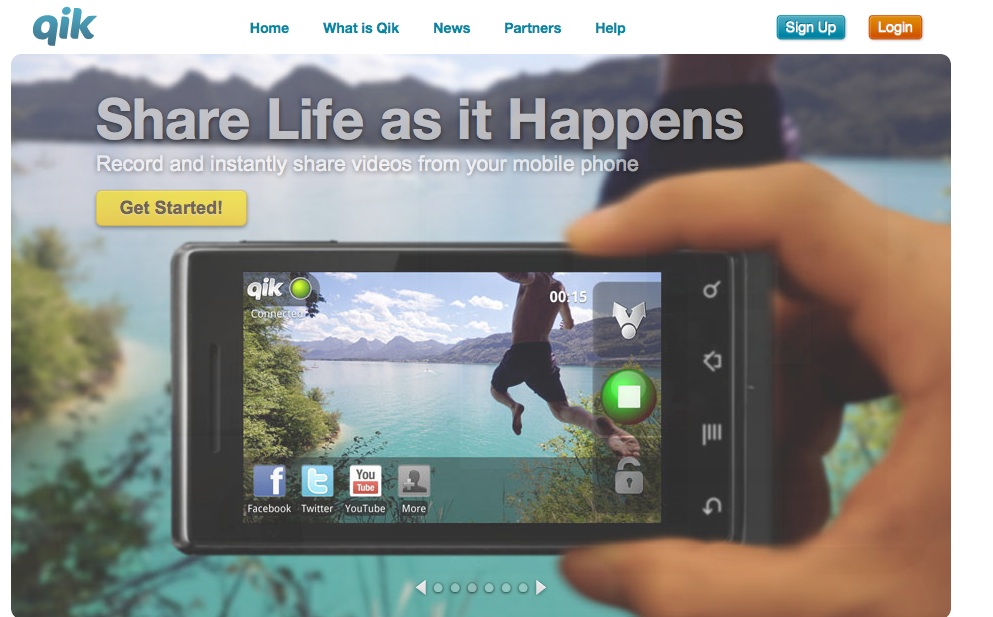
But the centerpiece of the clinical course was the use of a smart phone application, known as Qik (http://www.qik.com) which teachers used to record 5-10 minutes of a lesson three times over the five-week course.

About Qik

Virtually every smart phone is supported by Qik and there is a published list of those on the Qik website. You can pay for Qik, but the free application allows you to store 25 videos, more than enough for our purposes. You can also use Qik on your iPad.

Teachers could point the phone and press record and make a video immediately. The videos are directly uploaded and  stored on the teacher’s Qik site, which is totally private, and teachers can invite others to view their videos in several ways—for example, videos could be shared via Facebook, Youtube, or Twitter. For this class, teachers extended an email invitation to me so that I could view their work.

Prior to the start of class, I sent a Qik introduction of the course to all the teachers enrolled before class began.

To view my introduction to the course, go to: http://qik.com/video/50810210

Students found it easy to make the videotapes, but capturing the lessons was more difficult unless they had someone to help them. For example, one teacher propped her smart phone on the table, but the student got enthusiastic, knocking against the table and the phone fell over. After two times, the teacher asked the student to be careful. Another teacher held the phone herself and only videotaped her students.

Other teachers asked students to hold the camera on the action and the example you will see enlisted the help of a fellow teacher.

Once students learned how to share the videos by email invitation (see the double arrow at the top of the figure below), I could access them and provide a response.

Responses

 Interestingly, the responses I provided were much appreciated by the teachers, who loved the personal nature of audio (MP3) files. Previously, in this blog I have shared teacher candidate podcasts (https://literacybeat.com/2011/04/15/podcasting-to-teach-content-literacy) and in another project special needs students made audio retellings of a folktale in a PowerPoint presentation (Castek, Dalton, & Grisham, 2012), so I had some experience with making MP3 files.

But none of us likes what we look like on video or sound like on audio. I am no exception! So I gathered up my courage and decided to give audio responses to teachers’ lesson videos.

Being a Mac user to the core, I employed Garage Band to record my responses. First, I watched the teachers’ videos and made notes. I compared what I had seen in the video to the written lessons the teachers had posted in advance to Blackboard. Then, I recorded the responses, which varied from about 90 seconds to almost 4 minutes over the three videos submitted by all 13 of the teachers for a total of 49 responses overall.

Once the recording was made in Garage Band, I “shared” it with iTunes, converting to the MP3 file format. Then I downloaded the MP3 files and attached each one to an email to the teacher.

Based on questionnaires administered after the course, everyone LOVED the responses.  They felt a connection. I believe that teachers need validation for the work they do. Teachers can also accept criticism, as long as it is couched in positive terms. Writing can be very impersonal, but the voice can convey support.

In response to the question about the MP3 responses, here are what two teachers wrote:

“Again, something new to me in this class, but incredibly useful. The audio feedback was terrific. It made me feel like I was in an in-person class. Very personal. I think every online class should have this.”

“I enjoyed being able to gain almost immediate feedback from the videotaped lessons. It was nice to know that someone with experience could see areas of concern and help me shape my teaching more effectively.”

An Example of the Lesson and the Response

Written permissions were obtained for students to be videotaped and the teacher whose videos you see here granted permission for me to share her video.  The second file is the audio response to this lesson.

https://qik.com/video/51301456

LopezV3PedalPostReadResp

Concluding Thoughts

The growing number of online and/or hybrid classes is remarkable. Technology changes were referred to as “deictic” by Don Leu back in 2000 and deictic means a veritable onslaught of transformations that are irresistible and ever-evolving.  Combined with an economic downturn and increasingly diminished higher education budgets, administrators may increasingly turn to the more economic option of online classes. It is popular right now to regard online classes as somehow “less” than brick and mortar classes, and in some cases this may be true.

But online classes offer access to many graduate students who cannot attend a brick and mortar university. In another course that I teach at a different university, a middle school teacher from Happy Camp, California (way up in rural Klamath County), was able to improve his practice by learning in an Innovative Masters Degree program that afforded him new ideas, new strategies, new collaborations with colleagues, and new ways to serve his mostly Native American population of students.

In addition, we have new technologies (such as Blackboard, Elluminate, smart phones, and applications of all kinds) that permit us to make the online courses more personal and more relevant to the students we teach. We can give of ourselves as teachers and mentors through these new technologies. Our students can benefit from what we do online, as shown by the reactions of teachers to the LEE230 class.

I am greatly interested in what others think about online learning and hope you will read this blog and share your own experiences!

Digital Technologies for Literacy in Early Years Classrooms

A post from Bernadette

There is considerable evidence that young children (aged from 0 to 6) are immersed in a digital world from birth. For example, surveys conducted in the U.K. revealed that young children were active users of digital technologies engaging in a range of multimodal experiences (Marsh, 2005).

However, recent research has highlighted a dissonance between technology use in the home and at school and indeed a general under-utilisation of digital technologies in early years classrooms (Aubrey & Dahl, 2008).

Given that young children are engaging with digital technologies and digital practices in the home the possibilities afforded by these early digital experiences need to be more fully explored and accommodated within the classroom curriculum.

So how can we utilise digital technologies in ways that support children as readers, writers and thinkers? How can we use technologies to support the development of essential early literacy skills and increase motivation and engagement with literacy and learning?

I have been reflecting about this recently and here are some tentative musings and suggestions.

• Young children should engage with digital literacies in ways that encourage “playfulness, agency and creativity” (Burnett, 2010). Indeed, research has shown that children can draw on narratives and characters from their use of multimedia in their own play (Pahl, 2005).

• Digital technologies should not replace ‘busy’ workbook type activities in the classroom in drill-and-practice type scenarios. Freddy Hiebert noted, in her Frankly Freddy column, that “tricked out rote exercises will not support children’s love of language and literacy in the long run” (Hiebert, 2012).

• Digital technologies and multimodal texts offer the potential to support the development of early literacy skills. They present multiple means of representation, provide robust supports to meet the diverse needs of pupils in the classroom, and reduce the barriers to text (e.g. decoding difficulties) through embedded supports.
BookBuilder from CAST (CAST.org ) is a particular favourite of mine and I have previously blogged about how BookBuilder can enhance the Language Experience Approach

• Digital technologies should complement or supplement teacher read aloud. For example, children can listen to or re-read favourite class room texts though storyline online, developed by the screen actors guild (http://www.storylineonline.net/) or through apps such as, a Story Before Bed-Personalized Children’s Picture books.

• Digital technologies should build on the creativity of children, provide opportunities for engagement and response and encourage children to become authors and producers of text. In addition digital technologies should encourage experimentation and expression with regard to the generation and construction of a story or message. Apps such as, Sock Puppets allow child to create a story, choose a background and record their voices. The sock puppets then automatically lip-synch to the child’s recorded voice. Other examples include Strip designer, for creating comics; Book Creator for Ipad and Story kit for creating stories to share with an audience outside the classroom walls.

• Digital technologies can supplement the development of fine motor skills for handwriting. Apps such as, Dexteria, which was developed for children with special needs, develops fine motor skills e.g pincer movements, finger strength and hand movements and letter formation. Watch the You tube video and you’ll see how appealing this app is. I would caution, however, that to my mind, nothing replaces concrete materials, like pegs and peg boards, sand trays, and making letters with plasticine for the development of fine motor skills for handwriting.

Would love to hear your views on ways to embed and integrate digital technologies to support literacy development in the early years classroom. Jill has recently blogged on Expressive Learning: Encouraging Students’ Multimodal Expression to Enhance Content Learning and using apps for education so do read her blog here.

References
Aubrey, C. and Dahl, S. (2008). A review of the evidence on the use of ICT in the Early Years Foundation Stage. BECTA. Accessed online May 2009 at: http://partners.becta.org.uk/uploaddir/downloads/page_documents/research/review_early_years_foundation.pdf

Burnett, C. (2010). Technology and literacy in early childhood educational settings: A review of research. Journal of Early Childhood Literacy, 10(3), 247-270.

Hiebert, E.H. (2012) Children’s literacy learning and screen time accessed June 2012 at http://textproject.org/frankly-freddy/children-s-literacy-learning-and-screen-time/

Marsh, J., Brook, G., Hughes, J., Ritchie, L., Roberts, S. Wright, K.(2005). Digital beginnings: Young children’s use of popular culture, media and new technologies. Literacy Research Centre, Sheffield

Pahl, K. (2005). ‘Narrative spaces and multiple identities: Children’s textual explorations of console games in home settings’ In: J. Marsh (2005) (Ed.), Popular Culture, New Media and Digital Literacy in Early Childhood, pp. 126-143.London: Routledge.

CNN’s iReport Toolkit: Tell your Story Like a Pro

A post by Bridget Dalton

The power of multimodal communication

I believe in the power and relevance of multimodal composition and storytelling for today’s children and teens.  My belief is not abstract – it comes from my work with students on different types of multimedia projects.  I also enjoy experimenting with my own multimodal pieces, especially integrating text and images.   However, I remain a novice in this arena,  never losing the feeling that there is so much that I don’t know that could potentially be helpful to me, and to my students.

CNN.com’s  iReport Toolkit

Thus, I love it when I find help from those who are expert at what they do!  In this case, it is the reporters and staff from CNN.com who are sharing their expertise.  As part of their participatory news initiative, CNN has developed an iReport Toolkit that is available online at http://ireport.cnn.com/toolkit.jspa.  The goal of the toolkit is to help you “Tell your story like a pro”.  Of course, for CNN, stories represent all kinds of genres – from the investigative news expose to the human interest story.

The toolkit includes four main sections, Storytelling, Photos, Video, and Audio.

screenshot of CNN.com iReport Toolkit

To begin, start with the story to be told

These expert reporters and storytellers start with Storytelling — highlighting the ingredients of a good story and then offering key advice such as getting the basics first, attending to pace, and talking like a human being (that is my personal favorite!). Additional links expand on different aspects of storytelling, allowing you to pursue your own storytelling needs and interests.

Tell your story with photos, video, and sound

For each of the next three sections – photos, video, and sound – the CNN folks zero in on what is unique about that mode for storytelling and communication purposes. The storytelling guidance is integrally connected to technical advice, such as framing your shot, or audio recording in a place with a noisy background.

Get tips from the professionals

I especially enjoy the pieces that feature advice specific reporters and production staff. While researching for this blog, I found a piece, ‘Editing Video like a Pro’, by reporter/producer Brandon Ancil (http://www.cnn.com/2011/IREPORT/09/09/edit.video.bootcamp.irpt/). It caught my eye because I’m preparing to create a mini-documentary about two youth composing a digital story together. This is a new experience for me, so I’m eager to try out Ancil’s method for organizing his video during editing and production. I will let you know how it goes in a future post!

Use the iReport Toolkit for teaching and learning

This type of resource can be used at two levels – to support your own experimentation with multimodal composition and to support your teaching efforts. If you are teaching middle or high school students, your students will be able to read and use the site on their own, with your guidance as to which sections to attend to for their particular project. If your students are younger, much of the information is applicable, but you will need to apply it as appropriate for your students.

Try it and see! And, please share strategies and resources that you have found to be particularly helpful in teaching multimodal composition to your students.

Expressive Learning: Encouraging Students’ Multimodal Expression to Enhance Content Learning

A New Post by Jill Castek

I’ve been exploring the use of iPads to support literacy and science learning in middle school classrooms throughout the school year.  One of the most powerful ways I’ve found to help students make deep and lasting connections to content learning is to design meaningful classroom projects that engage students in working collaboratively to convey ideas  using digital tools that support multimodal expression.  As student design and create, they purposefully use key vocabulary and integrate examples that illustrate their thinking.  Student projects can be celebrated, showcased, and shared with an authentic audience made up of peers, teachers, and the wider community.  They’re also a great way to formatively assess student learning.

Students work collaboratively on digital projects to support content learning.

The Power of Student Collaboration

By working collaboratively, students are challenged to think through the important processes of choosing a focus, reflecting on what they know and how to represent it, and designing an action plan. As peers enact their plans, they critique and rework their representations iteratively until they’re satisfied their work has achieved the intended goal.

Working with iPads has provided students easy-to-use apps that support drawing and annotating images, inserting photographs, and creating voiceover capabilities. These features make it possible for students to express their understanding in multiple ways through multiple means, an aspect central to Universal Design for Learning (UDL). This post focuses on two examples of digital collaborative projects and the apps that supported their creation.

ShowMe for the iPad

ShowMe (see http://itunes.apple.com/us/app/showme-interactive-whiteboard/id445066279?mt=8) is an FREE iPad app that allows users to use images, drawing tools, and voiceover to communicate ideas.  Once a project is created, it can be shared on the ShowMe website http://www.showme.com/ or embedded into any digital forum (blog, wiki, website, etc.)  While this tool is often used by teachers in a receptive way, for example to deliver short lessons or tutorials to students,  I was interested in getting ShowMe into students’ hands so they could use its features creatively to express their understanding of concepts and ideas (thus enhancing and extending content they had learned).

Using ShowMe to Summarize Important Ideas from Reading

Linda Wilhelm’s 7th graders at Valley View Middle School in Pleasant Hill, CA were studying genetics in their Science class.  ShowMe was used to support an enhanced jigsaw activity where students created were expected to weave key ideas from their textbook and web-based reading into a short project that expressed their understanding of the content and provided examples. There were several subtopics; and pairs were assigned one of four themes to convey:  1) Some genes are dominant while others are recessive, 2) Mendelian laws apply to human beings, 3) All cells arise from pre-existing cells through the process of cell-division, 4) Sex cells have one set of chromosomes, body cells have two.

Students were shown a sample ShowMe project created by the teacher to give a sense of what was possible with ShowMe (which included importing images, drawing features, stop and start capabilities, and voiceover).  Then, a project rubric was distributed and discussed with students to convey expectations for the project.  Finally, students were provided time to plan and record their ShowMe projects.

Although storyboarding on paper was modeled and provided as an option, students preferred to draft their ideas directly into ShowMe.  As they drafted, they created multiple takes that were played back and evaluated by students iteratively.  Critiquing and revising with the ShowMe tool was immediate and satisfying for students and sparked careful re-reading and reflection on the texts provided.  It also sparked discussion on important aspects of visual literacy as students carefully thought through what images would best help illustrate their main points.  Throughout, collaboration was evident and a vital part of the digital content creation process.

ShowMe Student Examples

Click on the URLs provided and the ShowMe projects will open in a new window:

Using iMovie for the iPad to Construct, Explain, and Show Understanding

Leon Young’s 6th graders at Realm Charter School in Berkeley, CA were studying plate boundaries during a plate tectonics unit.  They designed and built their own scientific models to show the characteristics of plate boundaries in different locations around the world.   Students were then invited to create a short video using iMovie to showcase and explain their model to their classmates and school community.

Pairs of students worked together to think through how to convey science content through their video productions.  As they discussed shot selection, they showed a keen awareness of audience and purpose and found meaningful ways to explain scientific terms and concepts for those unfamiliar with the content.  As was the case with the ShowMe projects, students created multiple takes and revised iteratively as they reflected on word choice and overall flow of ideas.  The result was a strong and solid representation of what they learned that showcased both creativity and collaboration.

iMovie Student Example

Using Digital Tools to Support Multimodal Expression

When asked about the making these digital products students said the work was “fun, active, and creative.”  Not only did these projects support engagement with content, they also supported the development of vital 21st century literacies.  Students were able to showcase their learning in ways that involved multimodal expression which requires higher level thinking skills such as synthesis, evaluation, and critique (and are also central to the Common Core State Standards).

If you’re looking for a step-by-step guide for the use of ShowMe, iMovie, or other iPad apps that support literacy and content learning, click on the Step-by-step Guide to iPad apps and HandoutForIRAPreCon.  These presentation materials are from the IRA session that Jen Tilson and I delivered in Chicago, IL in May 2012.  Other speakers’ session materials, including Bernadette Dwyer’s handouts, can be accessed from the IRA TILE-Sig website at http://tilesig.wikispaces.com/Conference2

Add a comment to this post and share ways you’ve had students to create content and reflect on learning through the use of digital tools.  Sharing examples is a great way to get our collective juices flowing and sparks our creativity.  In the process, we’ll learn about a range of new tools and techniques for teaching and learning with technology. Enjoy!

Thomas DeVere Wolsey Joins the Literacy Beat Team

Jill, Dana, Bernadette and I are absolutely delighted that Thomas DeVere Wolsey (DeVere to his friends) has joined the Literacy Beat team.  Check out his May 17 post, “Draw Me a Story; Write Me a Picture”, as well as his earlier guest post on April 6, “Personal Learning Environments; Making Sense and Keeping it All Under Control”.  Great stuff!

Oh, and did I mention that DeVere and Dana have a new book,   “Transforming Writing Instruction in the Digital Age: Techniques for Grades 5-12”?  It’s an excellent resource for literacy teachers interested in integrating technology and media into their writing instruction.

Draw Me a Story; Write Me a Picture

By Thomas DeVere Wolsey

Pictures and words have gone together since the first word emerged from logograms in ancient Mesopotamia over 5000 years ago. One of the earliest illustrated books written specifically for children was Orbis Pictus (Comenius, 1658), and it took advantage of the power of pictures and words combined together. Today, graphic novels and comics are widely popular because, in part, they match words with images that, together, convey more than either might alone. Today, educators recognize the ability of properly chosen words matched with other visual information whenever they select a graphic organizer or teach students to create their own graphic organizers. In this Literacy Beat post, I explore how images can inspire young writers and how young writers might learn how their writing can inspire image-making, as well. Of course, in keeping with the theme of this blog, digital technologies will be central to our exploration.

Often, words accompany images (and vice versa) in such a way that one limits the other. For example, a caption under a photograph may limit the way the viewer of the photograph interprets the image. Charts, pictures, and graphs in an academic text may expand on some idea conveyed by words in the accompanying text. But, I wonder if the professor who taught a group of future teachers, me among them, was onto something when she noted that to really understand a thing, one had to draw it. Sometime later, a statistics professor encouraged a group of doctoral students that to understand statistics, one had to be able to draw the results. Images, these professors suggest, have the power to enlighten and inspire in ways words cannot. This may seem an odd thing for a person whose entire career is built around literacy education, so perhaps an example might help.

Write Me a Picture

As an entrée into poetry, I frequently asked middle school students to turn words into pictures. These concrete poems incorporate words in a physical arrangement that becomes an image. Michael P. Garofalo has created several that may serve as a model for your student writers, some of which make creative use of the online environment. Click the thumbnail to take a look at one.

Concrete Block

Michael P. Garofalo

Pencils and paper still work, too. Click the thumbnail to see a student-created example.

Mexican Mariachi

Mexican Mariachi by an 8th-grade Student

Putting words together with images is a first step in thinking about how images might improve writing. It is also a first step in teaching students about composing multimodal texts that make the best use of the combined media.

Draw Me a Story

Images that inspire writing  can be used insructionally in many ways.  Three of those explored here are student-created images, prompts writing with images, and combined text and images via the infographic.

Student-created images can inspire students to better understand the world through their writing. One science teacher I know asked students to go outside and draw an outline of the landscape and buildings around their homes. Then every hour for four hours in a row, they were to go outside and draw in the moon as it appeared to them relative to the skyline. The images were simple, mainly outlines, but the learning the drawing activity inspired led students to notice something about the very familiar moon that they had never noticed before. These drawing led to inquiry about the motion of the Earth and its moon, and the inquiry with the pictures led to writing that was sometimes filled with the wonder that much school-sponsored report writing often lacks. Others have also asked students to observe natural phenomena closely through drawing and writing field notes in the form of a journal: If you would like to read more about the moon project, click here.

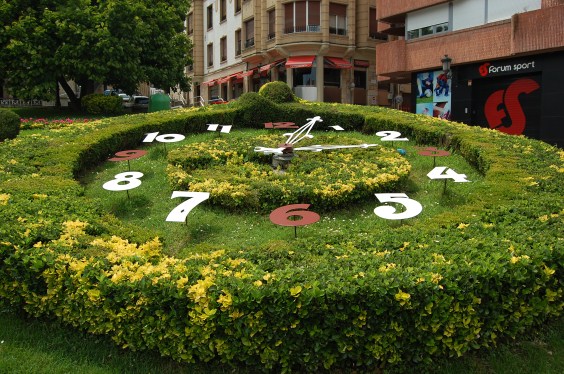
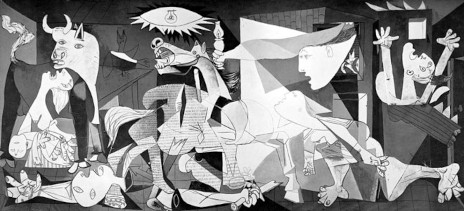
Prompts are the directions teachers give to students to direct them to action, particularly to write. At other times, images created by others prompt learning through writing. Two images juxtaposed might provoke students to the written word. The seemingly serene setting of a park in Guernica (May 2007) in the first image contrasts sharply with that painted by Pablo Picasso in the second image. The images, coupled with discussion, and online reading, might inspire more writing than any set of directions given to students.

Guernica

Guernica by Thomas DeVere Wolsey is licensed under a Creative Commons Attribution-NonCommercial-NoDerivs 3.0 Unported License.

Guernica by Picasso

Pablo Picasso, la exposición del Reina-Prado. Guernica is in the collection of Museo Reina Sofia, Madrid (low resolution image)

Multimodality as an approach to composition, Choo (2010) proposes, can motivate young writers and help them (and their teachers) escape from escape inauthentic writing tasks that attend to surface features, for example the ever-present five paragraph essay. For those interested in learning more about Picasso’s painting and how he came to portray such destruction, visit this PBS webpage.

Infographics present information in a visual way. In this example, words that can be used to describe coffee are displayed as a circular array. Colors link words as the eye travels the path around and through the wheel. A difficult writing task for any author is to represent in words concepts learned through the senses of taste and smell. Students might use and create flavor and odor wheels to assist them in thinking about words and choosing the best word for their writing.

Composing Multimodal Text

Photojournalists use words and images to tell their stories; Choo (2010) offers five questions that might assist students to think about how both are used successfully by considering the strengths of each modality.

  1. How do words function to “anchor” and give an interpretation of an image?
  2. How do words function to “relay” or contribute to the meaning of an image?
  3. Where will the image be placed in relation to the words and why?
  4. How much of the frame-space will the image occupy compared to the words?
  5. Is the focal point of the text on the image or on its words and why? (p. 172)

Using these questions as guides, students attend to the features of the images and words they choose and the multimodal texts that, together, they create. The Literacy Beat bloggers are interested in your multimodal projects and how images help your students write and writing helps them learn from images. Please share your ideas and successes by posting a comment, below.

Reference

Choo, S. S. (2010). Writing through visual acts of reading: Incorporating visual aesthetics in integrated writing and reading tasks. High School Journal, 93(4), 166-176.

Children’s Literature Cited

Comenius, J. A. (1658). Orbis Pictus.

More Resources

Search Engines and Multimodal Representations in this blog by Bernadette Dwyer

CAST Image Collector