Classroom Websites for Literacy

District and school websites are ubiquitous, particularly in view of the reporting requirements on student achievement. For example, in California, a law was passed that dictates the type and quality of achievement data that must be reported and most districts report this via website. This is nice, but how are districts, schools, and teachers using websites for instructional purposes? In this post I will present two websites in some detail, but at the end of this post is a list of several websites that may be used as resources for your planning.

Mrs. Renz, Redmond, Oregon

Mrs. Heather Renz of Redmond, Oregon, has had a website since 2000. If you link to http://www.mrsrenz.net/ you will arrive at the home page for her fourth-grade classroom. On this home page, you can see choices of links for students, parents, and other teachers. You can also meet Mrs. Renz and find out about her 31 years of teaching, a little about her life, and her interest in establishing a website. There is also a list of awards that Mrs. Renz has won for her teaching, including Disney Teacher of the Year honoree for 2006 and Microsoft Innovator 2005.

Under links for students, one finds math website links, past classroom projects, pen pal project, class creed and a host of other topics to link to. On the “Stars Page” students can access both literacy and math puzzles and games.  Under “Alex and Pearl’s Page” students can find science, math, and reading and listening sites to visit. Example of a science link:  Trees are Terrific—a Movie (it is really an audio-enhanced slide show, which is new to the site. Travel with Pierre is a series produced by University of Illinois Extension, from their Urban Programs Resource Network.

Under the parents’ link, one finds information for parents, the classroom schedule, each child’s classroom projects and photos, tonight’s homework, field trip schedules, and other information useful to parents. There’s also links to the teaching team and awards Mrs. Renz has won. There is also an Open House handout and slides from previous Open Houses. There’s a place to contact Mrs. Renz.
Site for Teachers

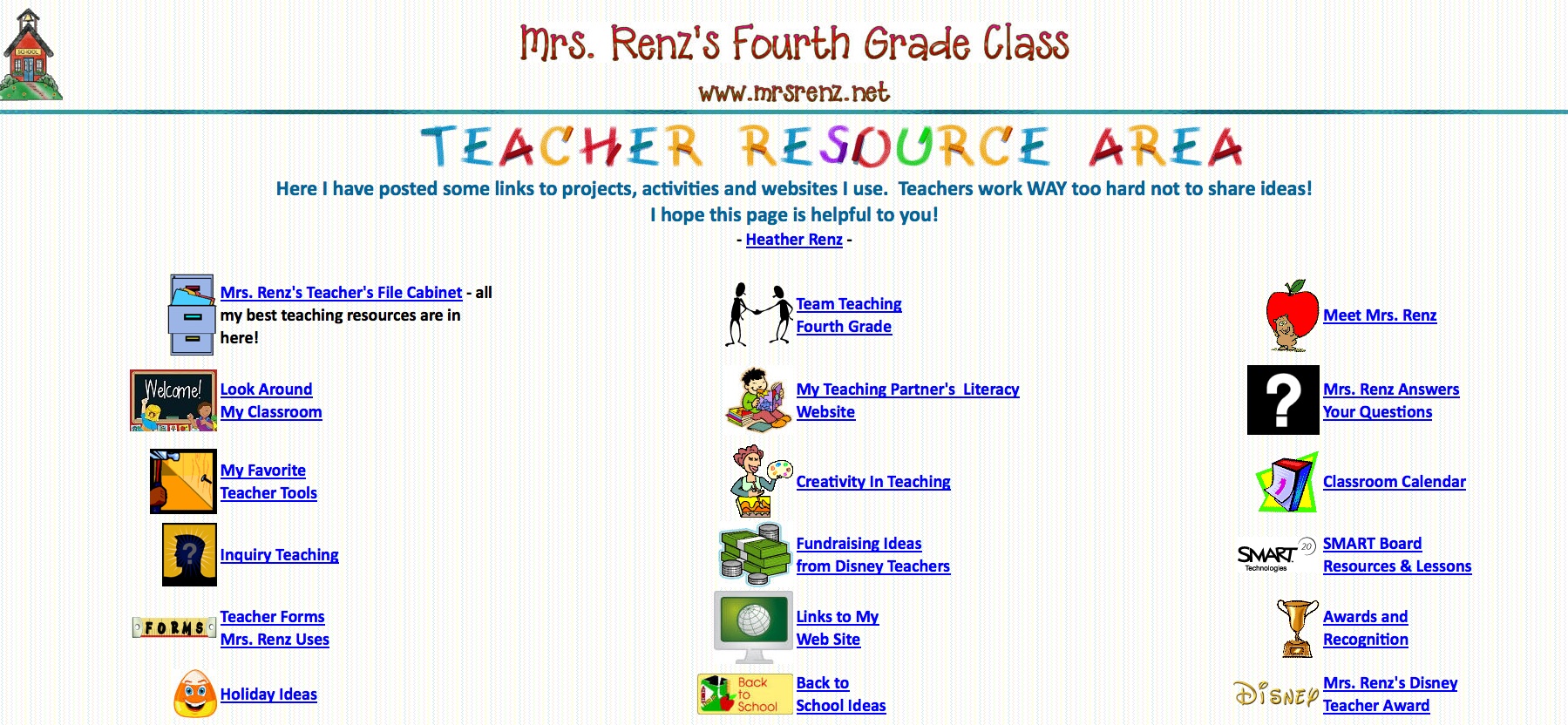
Mrs. Renz' Site for Teachers


Under the teachers’ link, there are a number of resources that teachers will find useful. With Mrs. Renz’ permission, I’ve made a screen shot of the teacher’s page for our information. She is incredibly generous in sharing her resources!

Mr. Coley, Murrieta, California

As we have seen, one of the uses of a class website is to share with parents what students are learning about. Instead of the teacher updating the website, students can be regular contributors, by asking students to write about what they are learning on a daily basis. Mr. Coley’s fifth-grade website exemplifies this (http://www.mrcoley.com/blog/index.htm).

Mr. Coley Homepage

Mr. Coley’s website differs from Mrs. Renz’ website in more than just the organization. There are many departments in the website and many of these feature student postings (http://www.mrcoley.com/blog/index.htm). Each day, a student in Mr. Coley’s classroom is assigned to be a “Roving Reporter” who writes a piece about what takes place in class on that day.  The student may use a computer at home or one of the word processors in the classroom. Students word process the article and turn them in to Mr. Coley in several ways (email, CD, etc.).  Students thus get an opportunity to write using technology and the teacher uploads them to The Daily Blog.

With Mr. Coley’s permission we include examples of the blog for May 13, 2011.

Friday, May 13, 2011
Reported by Ethan #6

Hi, I’m Ethan #6, and I’m going to be the Roving Reporter for today.  I got to school at 8:00 in the morning, and I played basketball with my friends until the bell rang.  I ran to class, got in line, and waited for the nice, warm day to start.

First we had Friday Flag.  During Friday Flag, Mrs. Picchiottino, our assistant principal, and Ms. Groff, our librarian, announced Birthday Book Club, the Shark Bite winners, and the Spirit Count winners.  Mr. Fanning usually does a song, but he didn’t do one today.  For the lower grades, Mrs. Romano won Spirit Count, and for the upper grades, Mr. Glendinning won again.

To really start the day we did Fitnessgram testing. In Fitnessgram testing you have to do push-ups, sit-ups, the sit and reach, and the trunk lift.  My partner was Myles, and he went to do push-ups first, I had to count them.  He did 25 push-ups, and over a 12-inch trunk lift.  I was next, and I did 23 push-ups and I also went over 12 inches on the trunk lift.  Myles did 48 sit-ups, and a 10-11-inch sit and reach.  I did 50 sit-ups, and a 13-14-inch sit and reach.  We both did really well on the test.

To relax, we then watched Mr. Henning and his students do the rocket launches.  Each person in that class made a rocket the size of a liter soda bottle.  They put water in it, and then they pumped air into the bottle.  They count down until the student hits the trigger and launches it high into the sky.  Jill’s went the highest.  Drake got second, and Claire got third.

Next it was time for Lit. Circles.  The blue group, Conner, Ryan, Marcus, and I, is reading CloserCloser is the fourth book in the long Tunnels series written by Roderick Gordon and Brian Williams.  We have two meetings left, so we decided to read the rest of the book.

It was then time for recess.  I ate a pack of fruit snacks when I was heading off to go play basketball with my friends.  I was on Myles’s team.  It was Mrs. Becker’s class vs. all.  We won 11-10, but it was a close game.  After that was done, we talked about it on the way back to class.

After that, we had to work on our writing prompt. This time we had to write a persuasive essay to convince Dr. Scheer, our school district’s superintendent, whether we should have school uniforms or not.  Most people said we shouldn’t, but some disagreed.

To have some fun after the boring writing prompt, we did Friday Business.  Last week we didn’t have time so we did two games of Deal or No Deal.  Last week’s winner, Emma, got to go first.  Marcus got to click the cases and we began.  Emma took a deal of $72,000, which is three pieces of licorice.  Jonathan got picked for this week’s game and Mr. Coley got to click the cases.  Jonathan stuck with his case and got $400,000, which is 11 pieces of licorice!

Then we had lunch.  I ate quickly so I could talk to my friends.  When Mr. Eddie released us, we ran off to play basketball again.  This time I was on the Becker team.  We didn’t really keep score though.

After returning to class we had to have the nurse, my mom in this case, measure our height and weight.  While one of us was inside doing that, the rest of us were reading outside.  When everybody was done, we walked back to class.

Upon returning to class, we started talking about Pathfinder.  We got a list of what we need to pack, and we talked about what the kids that would be staying behind do. We talked about clothing and other necessary items.  At the end we answered everybody’s questions.

Finally, the bell rang, we stood up, and I walked out the Room 34 door.  Mr. Coley said, “Bye, everybody,” and I was off.  Once again, I’m Ethan #6 and I was your Roving Reporter today.


There is also a Book Blog on Mr. Coley’s site, a place where students can review and recommend Accelerated Reader and Literature Circle books that they are reading. Students log in to Kidblog.org to write a short post about the book. Kidblog.org is a free site designed especially for students by teachers. Teachers have administrative control over student blogs and student accounts when they set up a classroom site. The site is password protected for the students and only viewable by the teacher and classmates and no student email addresses are required. The site states that no person information from either the teacher or the students is collected and that comment privacy settings block unsolicited comments from outside sources. On Andrea’s blogsite the May 10, 2011 post is on The Secret Garden and a week later there are three student comments posted in response.

A productive use of multimedia that requires students to grapple with new ideas and content is to use podcasting for student presentations. A podcast is a digital recording that can be shared over the Internet, and there are many online resources for creating and sharing podcasts Audio podcasts, usually MP3 files, are easiest to implement in your classroom, even if there is only one computer. Mr. Coley’s classroom website hosts the ColeyCast section, where audio podcasts are posted. We believe that audio podcasting is also composing, because planning and writing must be done to make the audio podcast. At the time of this writing, there are 52 ColeyCasts posted on the classroom website with everything from parts of speech to Amazing America (fascinating facts about the 50 states). You can listen to the podcasts on the website or subscribe to them on iTunes. If you would like to listen to some of the ColeyCasts, please visit the website at http://www.mrcoley.com/coleycast/index.htm.

Like Mrs. Renz, Mr. Coley posts information about himself, the class, and specific information for parents. Mr. Coley also hosts his own blog.

Some Thoughts

Both of our featured teachers will tell you that establishing and maintaining a website is astonishingly challenging, but both teachers will also speak about their passion for teaching and learning. If we want to teach our students how to cope with 21st century technologies, then we need to lead by example. What are your thoughts and experiences with classroom websites or other technologies used in your classroom?

Online Resources

http://sites.google.com/site/educ436537/home/teacher-websites is hosted by Pacific University in Oregon and provides a great deal of information about setting up a website, including examples and discussion on the topic

http://webschoolpro.com/ A free site to make a website with examples posted.

http://www.education.ky.gov/KDE/About%20Schools%20and%20Districts/Kentuckys%20Schools%20and%20Districts/High%20School%20Web%20Sites.htm This website is hosted by the Kentucky Department of Education and shows various high school websites

http://www.ccsd.net/schools/schoolWebsites.php is hosted by Clark County Nevada School District and is a searchable site for teacher/school websites

http://www.sitesforteachers.com/ provides a list of popular websites to link to.

http://newyorkscienceteacher.com/sci/pages/teacher-sites.php Great resources in science for your website

http://www.readwritethink.org/ and companion Thinkfinity.org are sites for literacy and technology.


Scaffolded Digital Reading Environments

A post by Bernadette

Ebooks and online learning environments introduce a number of possibilities for learner control to support literacy development. “Scaffolded digital reading (SDR) ”   (Dalton & Proctor, 2008) environments, provide embedded supports to both enhance access to texts and enable the construction of meaning for a range of diverse learners, such as struggling readers or English Language Learner (ELL) students. Embedded supports introduce physicality to the interaction between text and readers. Text-to-speech supports enable students to bypass the decoding bottleneck and so enhance listening comprehension, develop automaticity in reading fluency and word recognition. Studies have shown variance in the effectiveness of such supports where in terms of self-regulation students over or under utilise them (see for example, Dalton & Strangman, 2006; Mc Kenna, 1998).
As I discussed in my April blog, the Centre for Applied Special Technology (CAST) (www.cast.org)  has developed a number of free digital software tools based on the principles of Universal Design for Learning (UDL) (Rose & Meyer, 2002). UDL principles are underpinned by the concept that text should in the first instance be accessible to all readers rather than compensated or fixed at a later stage for the struggling reader or ELL student. This is achieved through the provision of a myriad of learning supports, such as hyperlinked glossaries, multiple means of representation in audio and visual modes, and ways to build engagement and expression. Avatar coaches are embedded in texts to provide prompts for students to activate comprehension skills and strategies such as, activating prior knowledge sources, making predictions, asking questions, and encouraging affective responses.
A recent study published in the Journal of Literacy Research (Dalton, Proctor, Uccelli, Mo, & Snow, 2011) explored the contributions made by vocabulary, comprehension strategy support and a combination of both vocabulary and comprehension support. The Improving Comprehension Online (ICON) study was conducted with 5th grade bilingual and monolingual students and provides evidence of the support offered by SDR. Students were assigned to one of three conditions: vocabulary support; reading comprehension strategies support and a combination of reading comprehension strategies and vocabulary support. The students read eight multimedia and informational texts (CAST Folktales).
Listen to a podcast of Dr. Bridget Dalton discussing this study with Dr. Elizabeth Baker in the voice of literacy podcast at this link http://www.voiceofliteracy.org/posts/42574
Significant variation was reported for standardised measures and researcher designed measures for students in the vocabulary and combination groups. Interestingly, the effects were non-significant for the reading comprehension strategies support group.

This study raises many interesting questions. For example, were the findings due to the needs of ELL learners where vocabulary support is of upmost importance? Or do these learners need vocabulary support in tandem with comprehension strategy support for optimum literacy development? Are comprehension strategy prompts only useful as strategies-in-use and not as an end in-and-of themselves? What is the optimum level of support for elearning environments? Could too many supports lead to a cognitive overload? Perhaps, as the authors speculate, the current level of interactivity and dialogic conversation between the reader and text (programmed coach avatars) is too limited. Interaction between reader and text (or avatars) needs to be dynamic and truly bi-directional to enable a dialogic response. What is the role of social learning and peer-to-peer collaborations in elearning environments? So many interesting questions are raised by this study!

Future research needs to focus on teasing out the nuanced interactions between reader, text, activity and context and thus provide software developers with options for designing customised elearning and literacy environments to accommodate and support the unique individual needs of a diverse student population of readers.
References
Baker, E. A. & Dalton, B. (2011, April 18). Designing technology to support comprehension among monolingual and bilingual students. Voice of Literacy. Podcast retrieved from http://voiceofliteracy.org
Dalton, B., Proctor, C. P., Uccelli, P., Mo. E., & Snow, C. E.(2011).Designing for diversity: The role of reading strategies and interactive vocabulary in a digital reading environment for fifth-grade monolingual English and bilingual students. Journal of Literacy Research , 43(1) 68-100.

Dalton, B., & Strangman, N. (2006). Improving struggling readers’ comprehension through scaffolded hypertexts and other computer-based literacy programs. In M. C. McKenna, L. D. Labbo, R. D. Kieffer, & D. Reinking (Eds.), International handbook of literacy and technology. Volume II (pp.75-93 ). Mahwah, NJ: Erlbaum.

Mc Kenna,M.C. (1998). Electronic texts and the transformation of beginning reading. In D. Reinking, M. C. McKenna, L. D. Labbo, & R. D. Kieffer (Eds.), Handbook of literacy and technology: Transformations in a post-typographic world (pp. 45-59 ). Mahwah, NJ: Lawrence Erlbaum Associates.

Reflections from the International Reading Association Conference in Orlando May 8-May11

Jill, Bridget, and Bernadette @ the Peabody Hotel Duck Fountain (Dana is present in spirit!)

It was a fun and fulfilling IRA conference – a great opportunity to gather inspiration from some of the most innovative thinkers in the literacy field! We’re so glad to have had the chance to catch up with friends, meet new colleagues, and attend several amazing sessions. The Technology in Literacy Education Special Interest Group (TILE-Sig)  session (see http://tilesig.wikispaces.com/Conference) was well attended and sparked many new ideas for using digital tools to support literacy learning.  As last year’s recipient of the Outstanding Research Award, David O’Brien (University of Minnesota) gave the keynote entitled Bridging Traditional and Digital Literacies: From Apprehension to Affordances which he skillfully presented from his iPad.  His talk sparked thoughtful reflection about the break-neck speed of change in the range of digital media and its potential to support and enhance learning. The keynote was followed by six round-table sessions that were both engaging and interactive.  Tons of new teaching ideas for using digital tools in the classroom were shared.  Many of the resources featured, as well as the best list we can find of the latest new online resources, can be found on the cool tools page http://tilesig.wikispaces.com/Cool+Tools.  On the same TILE-Sig wikispace, check out the slides and resources shared from the Pre-conference Technology Institute 

We each attended Literacy & Science: Exploring Connections that Promote Engaged Learning and met many new colleagues who focus on connections between science and literacy (and technology, too!)

The pre-conference institute entitled Science and Literacy:  Exploring Connections that Promote Engaged Learning (see https://sites.google.com/site/literacyandscience/) was chalked full of new ideas for addressing content learning.  Bridget’s delivered an outstanding presentation that addressed Reading and Learning Science with Digital Text and Media. The talk bridged research and practice and challenged participants to explore what it means to be a reader in the 21st century. Using a Universal Design for Learning framework, she shared several tangible examples that illustrated the power of digital tools to support literacy and content learning.   Laurie A. Henry and her colleagues from University of Kentucky and the University of Louisville connected 21st Century Literacy and Science in the Middle School Using the 5e Learning Model and showcased a range of effective teaching techniques.  Bridget’s and Laurie’s slide, as well as other resources, can be downloaded from the institute website! Videos of all the sessions will be added soon.

Bernadette was a finalist for the IRA Dissertation of the Year award!

We love that IRA brings us in touch with international perspectives that expand our literacy viewpoint.  Bernadette’s  poster summarized her dissertation study entitled Scaffolding Internet Reading:  A Study of a Disadvantaged School Community in Ireland and drew attention from numerous interested participants.  Bernadette skillfully described her development of an integrated inquiry-based curriculum which included cross curricular units that linked literacy, science, and the Internet in an authentic classroom-based study. She monitored in-depth the progress of three triad groups within each class cohort during Internet workshops and also conducted a series of Internet Inquiry Progress Tasks across the study. We congratulate Ber on her groundbreaking study.  Her findings have helped the literacy community worldwide better understand the nature of collaboration in Internet-inquiry and online learning.

If you’re looking for a high quality professional development experience that links literacy and technology, the New Literacies Teacher Leader Institute is holding an event that can be attended virtually or in person on July 25 – 29, 2011. To register for this exciting professional development experience go to: http://fi.ncsu.edu/form/new-literacies-teacher-leader-institute

VocabVid Stories: Developing vocabulary depth and breadth through live action video

A post from Bridget

Language is hard to express in words. Voltaire

Last week, Jill blogged about a chapter we wrote on developing vocabulary through multimodal expression (Castek, Dalton & Grisham, in press). I wanted to expand on the Vocab Vid strategy (Dalton & Grisham, 2011) and share some examples created by students in my graduate course on adolescent literacy. Their videos “show not tell” the potential of this multimodal word learning strategy. I have also included a handout at the end of the post that you can adapt for use with your students. I’ve learned that some structuring of the process results in more creative and effective videos.

The way that I‘ve been thinking about VocabVids is in the form of a short, live action story (30-45 seconds). Language learning is social – we learn with and about vocabulary as we experience it in specific contexts (Gee, 2004). We also know that many students benefit from multimedia learning, especially in relation to vocabulary (Mayer, 2005; Dalton, Proctor, Uccelli, Mo & Snow, 2011).

To create VocabVids, students work in small groups to develop a scenario for use of the word, discussing the nuances of word meaning and relationships between words. The planning process involves getting to know the word through initial research with tools such as an online thesaurus and an image search of the term. Students brainstorm a context for the word, asking who, what, where, when and why would this word be used? Skits are improvised, filmed, reviewed, and reshot if necessary. I deliberately have kept the process short – the video is planned and filmed in about 15 minutes – and the product is a live action video that does not involve editing. The final products are presented in class for discussion of the words and digital video skills, with an option to publish to a larger audience on the school website, YouTube, Teacher tube, etc.

But what about word choice? I would choose words for different purposes. To begin, you might ask students to select from a list of words that meet Beck and McKeowan’s notion of tier 2 words – words that are important to know and which aren’t part of everyday word knowledge. Or, you might want to open it wide and let students choose their own words, which could be quite specific to their interests, linked to a novel they are reading, or to a unit they are studying in science and social studies. Encourage them to choose a word that lends itself to being acted out (don’t avoid abstract words – they can be excellent candidates).

Student-designed Vocab Vids
The following 6 videos are posted with permission of the authors who are graduate students in my class, EnEd 3400, Reading and Learning with Print and New Media. I’ve highlighted the targeted word and story context for your information. However, I recommend that you and your students try watching the video without knowing the targeted word to see how quickly you can generate a range of guesses. Use the related words and storyline as clues to engage your students in active word learning.

VocabVid 1: ‘Ritual’ by Meridith and Ashley

With a coffee cup and the words ‘routine’, ‘pattern’, and ‘customary habit’, Ashley and Meridith illustrate a morning ritual many of us enjoy – drinking coffee.

VocabVid 2: ‘Conspicuous’ by Leah and Max

Playing Hide and Seek?  As Leah chides Max, it is very important to be ‘discreet’.  Since Max is usually ‘obvious’, ‘blatant’ and ‘eye-catching’, will he be able to find a hiding spot that is not ‘conspicuous’?

VocabVid 3: ‘Diminutive’ by Katie R and Laura

Laura convinces Katie that the spot on her jeans is ‘little’, ‘tiny’, ‘petite’, even ‘Lilliputian’.  It is ‘NOT huge’, as Katie fears, but “diminutive”!  Personally, I loved the Lilliputian reference from Gulliver’s Travels.

VocabVid 4: ‘Eerie’ by Erin

Flashing lights and strange noises in the bathroom result in a ‘weird’, ‘spooky’, ‘creepy’, and ‘eerie’ experience for Erin.

VocabVid 5: ‘Lurk’ by Neil and Yumeng

When does ‘lying in wait’ and ‘peeking’ turn into ‘lurking’?!  Yumeng helps Neil understand the difference.

VocabVid 6: ‘Braggadocio’ by Russell and Simon

Technical alert – this video is sideways, but funny!

Why would Russell call his friend a ‘bombast’ and scorn him for his ‘pomposity’ and lack of ‘humility’?  Watch ‘braggadocio’ Simon to find out!

STUDENT HANDOUT: 30 Second VocabVid Stories

 Your goal:  To show, not tell, the meaning of a word in a 30-second digital VocabVid  Story

VocabVid Stories are short (about 30-45 seconds) videos that illustrate the meaning of a word through a short skit.  The goal is to situate the word within a meaningful context to help us learn and remember the word.  And, you will learn something about designing short videos along the way!

 Plan

1.  Research your word to find synonyms, antonyms, and other related words that you can include in your story dialogue. Don’t forget to make note of different forms of the word. The Visual Thesaurus or other online thesaurus tools are great resources for exploring the meaning of your word.

2.  Brainstorm possible contexts for how the word might be used.  As you’re brainstorming, think about how you can act out your video skit.

  •  Where might you hear this word?
  • Who might be saying it?
  • What is happening?
  • When is the word being used?
  • Why are they saying it?
  • What kinds of feelings might be associated with this word?

3.  Do you need any simple props?

4. What is your location? Where will you film? (Since we are in school, I have made arrangements for you to use this class, the hallway, outside the door at the end of the hall, etc.)

5. Make a sign showing your word in writing (print the word large and clear so that it can be read on screen). You will show this sign at the end of the video.

 Film

6. Improvise your skit, giving each other feedback as you go along.

7. Film your skit and review (see the technical advice section on shooting your video and using a Flip camera).

8. Try filming again if needed and select the best one.

Show (and perhaps publish)

9. Share your videos in class and discuss what you learned about these words, as well as what you learned about creating VocabVid Stories.

10. Consider posting your video to a class website, blog, or YouTube (be sure to have everyone’s permission to post)

 Technical Tips for Shooting your Video

1. Don’t shoot into the light! (Avoid standing in front of windows).

2. Actors need to face the camera or each other at an angle that still allows them to be seen and heard. It is common for people to turn away from the camera, especially if they are in groups. Watch out for this.

3. Actors need to speak clearly! Be dramatic!

4. Find a quiet spot.  Test your volume at the beginning, so you know who needs to be louder or who needs to speak more clearly.

5. Show your vocabulary word on a piece of paper at the end.  I have provided markers and paper for you to use.

 Flip Camera Directions

  • How to Turn Your Camera On: Slide the gray button on the top right side of the camera down. Your camera will automatically turn on.
  • How to Begin Shooting: Hold the camera in the vertical position (otherwise, you will get sideways video!). Press the red button to begin filming.
  • How to Stop Shooting: Press the red button again.  There is no way to pause your videos, so you will have to complete them in one take. But, please film a few takes and compare so that you can choose the best one!
  • Zoom In/Out: Press the + button to zoom in and the – button to zoom out.
  • How to Play Videos Back: Press the Play button to the left side of the screen. Press it again to go to the next video.
  • How to Delete Videos: If you want to delete a video, press the trash can twice.

ONLY KEEP THE FINAL VERSION OF THE VIDEO ON THE FLIP CAMERA. DELETE ALL OTHER VERSIONS BEFORE RETURNING THE CAMERA to Robin – she will download on Bridget’s computer.

 References:

Castek, J., Dalton, B., & Grisham, D. (in press). Using multimedia to support students’ generative vocabulary learning. In J. Baumann and E. Kame’enui (Eds.) Vocabulary Instruction: Research to Practice (2nd ed.). New York, NY: Guilford Press.

Dalton, B., Proctor, C.P., Uccelli, P., Mo, E. & Snow, C.E. (2011).  Designing for diversity:  The role of reading strategies and interactive vocabulary in a digital reading environment for 5th grade monolingual English and bilingual students.  Journal of Literacy Research, 43 (1), 68-100.

Dalton, B. & Grisham, D. (2011).  eVoc strategies: Ten ways to use technology to build vocabulary. The Reading Teacher, 64(5), 306–317. DOI:10.1598/RT.64.5.1


Active Word Learning Using Web 2.0 Tools

A post from Jill

Jim Baumann (University of Missouri) and Ed Kame’enui (University of Oregon) are editing a second edition of Vocabulary Instruction: Research to Practice (forthcoming, Guilford Press) to be published in 2011. Bridget, Dana, and I were invited to submit a piece that addressed special topics in vocabulary instruction.

In our chapter, Using Multimedia to Support Students’ Generative Vocabulary Learning (Castek, Dalton, & Grisham, in process) we suggest that the use of digital media in vocabulary learning should not only be receptive (e.g., viewing vocabulary graphics), but also generative (actively engaging students in using language and media to express themselves and to create products that represent their new knowledge). We assert that the act of creation supports ownership, introduces authentic reasons for learning, and tangibly links reading, writing, and communication in ways that mirror learning outside of school. This post draws ideas from the chapter and suggests ways to promote students’ active word learning using Web 2.0 tools.

Create Vocabulary Videos:Today’s students have grown up with YouTube as part of daily life. As a way of extending word learning, consider having students’ produce their own vocabulary videos — 60-90 second videos that situate word learning in a specific context.  The varied student-created examples found at VocabAhead (e.g., the entry for amble, for headstrong, and fecund) illustrate how video creation and multimodal expression make the word learning experience more memorable for both the video producers as well as the viewing audience. For tips and tools for creating videos, see the VocabAhead Teacher Page.  Suggestions for video creation include incorporating visual cues and adding humor, dramatization, or emotions to help learners remember the word and its meaning more easily. There are plenty of free web tools available which can be used to create vocabulary videos such as Xtranormal (if you can type, you can make movies) and GoAnimate (make your own cartoons and animations using free tools that you don’t need to learn Flash to use).

Simulate Twitter to Promote Target Word Usage: Today’s widespread twitter phenomenon tells us something important about language use and engagement. In 140 characters or less, information about “what’s happening now” can be shared instantly with an online community. The defining characteristics of a ‘tweet’ are brevity, timeliness, and the ability to instantly respond to others. Educators can bring twitter-like experiences into the classroom to expand vocabulary learning, without actually creating twitter accounts. To simulate twitter, try Wallwisher. Once the topic themed-wall is set up, this free online application does not require individuals to login and everyone can post together in a shared space. Like tweets, comment space is limited (Wallwisher allows 160 characters).

To model a vocabulary related twitter, provide a target word or concept and challenge students to keep a related stream of tweets going as long as they can. Set the expectation that both target words and related words must be used in each post. Provide a context such as a breaking news event, a topic you’re studying in class, or a book you are reading.

The following interchange may serve as a tangible example. Imagine reading and watching online news reports about an oil rig explosion in the Gulf of Mexico. Students could then create a twitter- like stream to express reactions and questions, using the target words pollution and disaster. Before beginning, discuss the words’ meanings. Then talk through a few examples, as follows.

Twitter-like stream

Student 1: Bad news. An oil rig blew up in the Gulf of Mexico. Pollution is going to be a problem.

Student 2: Oil will pollute the beaches. What a disaster!

Student 3: You can’t swim in polluted water.

Student 4: The seagulls and pelicans will be hurt by the oil. It gets on their feathers.

Twitter-like stream (examining the news event from the perspective of different stakeholders)

Shrimper: Major disaster. Oil rig blew and oil gushing in Gulf of Mexico. Pollution might wipe us out.

Oysterman: What about oyster beds? I have to fish. Polluted oyster beds mean no oysters. What a disaster for me and my customers.

Beach lover: Gulf Shores beach has black oil washing up. Seagulls coated. Can’t swim in polluted water.

Clean up crew: Dish detergent is the best thing to clean oil pollution from birds. Who knew?!

Oil company: The faster we cap the oil rig, the faster the pollution stops. 

Have Fun with New Slang: The dynamic and inventive nature of language is dramatically evident in the torrent of new words we manage to create each year. While we all may feel the need to chillax (calm down and relax) in the face of students’ often unconventional vocabulary use, seize the opportunity to build word curiosity and playfulness. Two excellent Internet resources for learning about words and language are the Visual Thesaurus and the Oxford Dictionary of English. The latter posts a list each year of new words added to the dictionary. Another excellent resource is the Cambridge Advanced Learners Dictionary.  Also, at Wordspy, Paul McFedries tracks published neologisms (new word creations, many of which are slang and/or linguistic blends).

Technology and media can play an important role in developing students’ vocabulary through generative, multimodal expression. Giving students experience with the digital technologies required in the 21st century will be motivational as well as academically beneficial. 

References

Castek, J., Dalton, B., & Grisham, D. (in process). Using multimedia to support students’ generative vocabulary learning. In J. Baumann and E. Kame’enui (Eds.) Vocabulary Instruction: Research to Practice (2nd ed.). New York, NY: Guilford Press.

Podcasting to Teach Content Literacy

Posted by Dana L. Grisham

This week’s post is targeted to teacher educators as well as teachers.

If you have ever taught secondary teacher candidates the required course in content literacy (secondary reading), you are probably aware of what a “hard sell” it can be. Teacher candidates who will be teaching their content area or discipline in middle and high schools tend to be, first and foremost, experts in that content or discipline.  They care deeply about art, music, mathematics, science, social science, world languages and English. They believe that by communicating their love of content to Grade 6-12 students, said students will develop a similar love.

Often, they are doomed to disappointment because they may not understand that teacher passion and expertise does not guarantee student learning in a subject area. Certainly, love for and knowledge about one’s discipline is necessary, but the ability to teach one’s discipline often relies on knowledge of what the student needs in order to learn. This student-centered stance toward teaching is often difficult to convey.

One of the important aspects of disciplinary teaching is the development of vocabulary and academic language.  Zwiers (2008) argues that all secondary teachers, regardless of content area, need to develop their students’ academic language.  For example, when trying to explain why academic language was not necessary in physical education, a teacher candidate in my content literacy course stated, “After all, I’m in kinesiology!” Upon encountering a sardonic look from me as he used the term “kinesiology,” he looked sheepish and muttered “Oh, now I get it.”

At the same time, we are in the midst of such rapid technological change that we must also prepare “tech savvy” teachers who are flexible risk takers ready to challenge their grades 6-12 students. Thus, teachers need to consider the teaching and learning of their content areas, but they are not always aware of the intersections of content learning and literacy processes. And in today’s world of rapidly changing technologies, composing is not wholly a writing task. While teachers and students typically conceptualize composing processes in terms of words on a page, composition also involves the manipulation of new or complex ideas that are also possible with multimedia tools including the audio file known popularly as a podcast.

To assist secondary teacher candidates to recognize the important of literacy processes to teaching their content area and to differentiate instruction for the varied content area teachers represented in the course, I asked them to create audio podcasts according to criteria as noted below.

*****

Sample Podcasting Instructions

Literacy Strategy: Based upon the requirements of your subject area choose a reading/literacy strategy from your textbook. Read two additional published scholarly articles that indicate the usefulness of the strategy for students in your content area.

Write a Script: Your podcast script should sound much like a radio broadcast when recorded and should include the following components:

• Name, the date of your broadcast, content area, and the school level (middle, high school) where you would use the strategy

• Your concern about students being able to read complex text in your subject area; why they may have a problem (use the textbooks in this course to support your concern)

• The textbook from which you took an appropriate strategy to support the students’ reading of text in your content area

• The strategy and your rationale for choosing it (what will it do to support student learning in your content area and how will it address the need you identified)

• Identify sources, authors, dates published and then summarize the additional research that supports the use of the strategy. Connect this back to the reading problem identified

• A brief explanation of how you will introduce this strategy in your own class.

Record the Podcast:  Using an MP3 recording device, record your podcast. The podcast should sound much like a radio broadcast when recorded. Be sure to practice so that it doesn’t seem like you are merely reading the script you have written.

Post your script: After you have emailed the audio file to the Instructor, go to the Blackboard assignment (in the Course Materials section of this class) and post your podcast and written script there.

*****

Secondary teacher candidates submitted some truly wonderful audio podcasts—what I like to call “generative” in the sense that teacher candidates had choice in what they featured in the podcasts, they had general parameters to meet, but could also create their audio podcasts in diverse ways, and, most importantly, they learned new ways to communicate their content! A post-course survey indicated that 90% of the 48 teacher candidates felt positive about the experience and felt they had learned something useful.

I believe that what made the difference between failure and success was the degree of collaboration between participants. They helped each other extensively, from the recording to the posting, to making scripts more interesting, and adding creative touches, such as music and sound effects. Lieberman and Mace (2009) suggest that such collegial action around new learning provides the teacher with the most meaningful professional development in a learning community.

So, 48 audio podcasts on literacy topics are available in my library with permission to use them from my students. For this post, I am making 12 of these available. Remember that there is a written script for each podcast!  I have posted the script of one of the podcasts below, so you can see what a script looks like. But remember! They need to be HEARD to get the full impact.

Beyond the use of audio podcasts to teach the importance of literacy processes to teacher candidates, the use of audio (and video) podcasts can be extended to the K-12 classroom.  Some uses are offered by the secondary teacher candidates themselves (such as podcasts of student performances). A colleague and I used audio podcasts with PPt. slides for authentic responses to literature for special day class students and found students’ vocabulary growth and engagement positively affected.

Where can you post podcasts?  Well, if you have a website or your school does, podcasts can be posted there. You can also use a couple of websites that are freely available. One is Podbean (www.podbean.com) and with a bit of effort, a Google site (as I have used). If you are interested in more on this, just search “podcasting” on Google Scholar. Now that you’ve heard the teacher candidate podcasts, I’d like to throw out the following question:   How can you use audio podcasts in your classroom?

References:

Lieberman, A., & Pointer-Mace, D. (2009). Making Practice Public: Teacher Learning in the 21st Century. Journal of Teacher Education, 0022487109347319. doi: 10.1177/0022487109347319

Zwiers, J. (2008). Building academic language: Essential practices for content classrooms. Hoboken, NJ: John Wiley & Sons, Inc.

*****

A Sample Podcast Script by John for Mathematics

You have just tuned into John’s Podcast for Thursday, July 31st, 2008. On this podcast, I’ll be talking about a strategy that I would consider using in my future high school mathematics class to teach my students how to read a mathematics textbook.

Now, I understand what you may be thinking. “Why would you want to teach students how to read in a math course?” or “What does reading and language development have to do with numbers?” or “Why did John’s voice suddenly get very annoying?” To address those first two questions, I invite you to think back to your wonderful times in a mathematics course when you were a high-schooler. Do you remember how every new section in the chapter would involve a number of bolded new terms, and they were generally built on previous chapters’ bolded terms? I am a mathematics major, and I can attest that learning these new terms was not a walk in the park. My main concern about my future students is that they will pick up the textbook, read through the examples, follow it like a cookbook when doing the homework, and then close the book. They would either not find a point to learning the new terms, or find it to be difficult to remember. But I suppose there isn’t a great harm in that. I mean, when would you really use the words “numerator” and “denominator” in any other context than mathematics, or perhaps the floweriest of the flowery essays? It would be so much more convenient to say, “You gotta make the bottom numbers the same on each number thingy, then times that number to make it the same number to the top number for both thingies before you can add the top numbers, but you gotta keep the bottom number the same.” Archimedes would roll over and over in his grave hearing this obscenely basic monologue describing adding fractions. I would not want my students to be viewed by society as being ignorant to the long history of mathematics, nor sound so ineloquent as to destroy the meaning of their statements because they are judged by how they say, as opposed to what they say.

So as a preventive measure, I’ve enlisted the help of Martha Rapp Ruddell. Okay, so I just perused her book, but I did see a literacy strategy to help students with the learning of those academic mathematical terms. Ruddell discussed an instructional procedure called CSSR. No, this is not the Soviet Union reuniting for another world tour. CSSR stands for: Context, Structure, Sound, Reference. This is a system of vocabulary research that can help students address the issue of not learning the terms because they don’t understand how to figure out the definition of the new term. It works in 4 steps with 3 of them being conditional steps. When a student encounters a new term, say for example, “polynomials,” the student would read the entire sentence and guess the meaning based on the CONTEXT in which it was used. If it makes sense, then great, they move on. If not, then they move to step 2 where they analyze the STRUCTURE of the actual word. In this case, if the student understands the prefix “poly” as meaning “many,” then they are already halfway towards understanding the word. If it still does not make sense to them while putting that into the context, then they try step 3 and SOUND it out and try to associate that word with other words that they have heard before. Step 4 is the most disruptive, yet surest form of definition, which is to look into a REFERENCE location such as the glossary, dictionary, or other people. I can appreciate this system because it is versatile enough to be used in any subject area that has subject-specific terms, which is, umm…all of them, and this self-directed learning will help with retention as they cycle through step after step of repeating the word to themselves with different perspectives on it.

And to be sure that Ruddell wasn’t just full of it, Jane Harmon asserted in her article, “Constructing word meanings: Strategies and perceptions of four middle school learners,” that the most proficient reader in her study utilized a system similar to this while encountering new terminology. She published her findings in 1998 in the Journal of Literacy Research, Volume 30, Number 4. And specifically, pages 561 through 599. Other supporters of developing in-depth word knowledge, which is promoted by the SS and R parts of CSSR, are E. Sutton Flynt and William G. Brozo. Their article, “Developing Academic Language: Got Words?” was published in the 2008 issue of The Reading Teacher, Volume 61, Number 6, pages 500-502. Both of these articles support what CSSR is trying to accomplish with student readers.

Lastly, how we do educate the students of this system? As Ruddell plainly spells it out, telling the students clearly and drawing a schematic to illustrate the procedure will help cement this system for the visual and auditory learners. After using this system a few times, a quick assessment by discussion would ultimately decide if the system is effective for my students.

And that wraps up this podcast. Thank you for spending time listening to me yap, and good luck to the Future Teachers of America. Team 06!

A post from Bernadette: LEA meets Book Builder

The Language Experience Approach (LEA) (Hall, 1986; Stauffer, 1970) is to my mind an organic approach to the teaching of reading. Organic in three ways: firstly, LEA constructs a reading curriculum based around the lived and shared experiences of children; secondly it welcomes the cultural backgrounds of children; and thirdly LEA affirms the child’s own language diversity and language patterns within the developed reading materials. LEA helps to develop early literacy skills such as, phonological awareness, phonics, concepts of print, word identification strategies, vocabulary, oral language development, reading comprehension and reading fluency.

My students have used the LEA approach successfully with children on Teaching Practice placement in schools. Lately, we have begun to use online ebooks as a way to create, share and publish our LEA stories. This has helped to accommodate the LEA approach within the 21st century classroom.

We have developed ebooks with audio, video and image support. In addition, we have begun to use Book Builder, a free downloadable digital tool, developed by the CAST organisation (http://bookbuilder.cast.org/).

Book Builder offers a “scaffolded digital reading” environment (Dalton & Proctor, 2008) and is underpinned by principles of universal design for learning (UDL) (Rose & Meyer, 2002). In essence, this means that reading is accessible to all through the provision of a myriad of learning supports, multiple means of representation in audio and visual modes, and ways to build engagement and expression. Book builder is easy to use with a comprehensive how to Tips and Resources page.

Katie Murphy and her 1st grade students have been crafting the story of Karl the Teddy and his Adventures. So far in chapter one he has been to the St. Patrick’s Day parade where he took part in festivities (an experience that all of the children can relate to); and in chapter 2 Karl the Teddy has met Lucky Duck and together they are saving Easter from an evil bunny who has stolen all of the chocolate (luckily they succeed!). I visited the classroom today where Karl and Lucky Duck take pride of place on Karl’s adventure table. The children were clearly engaged in writing and illustrating the story and loved the avatar coaches who prompted them to add details to the story; to forge connections between their own lives and those of Karl, to make predictions or to read the story aloud. You will have to wait a while to read the story on the public domain on the CAST website, as the children informed me they are already planning more adventures for Karl in chapter 3!

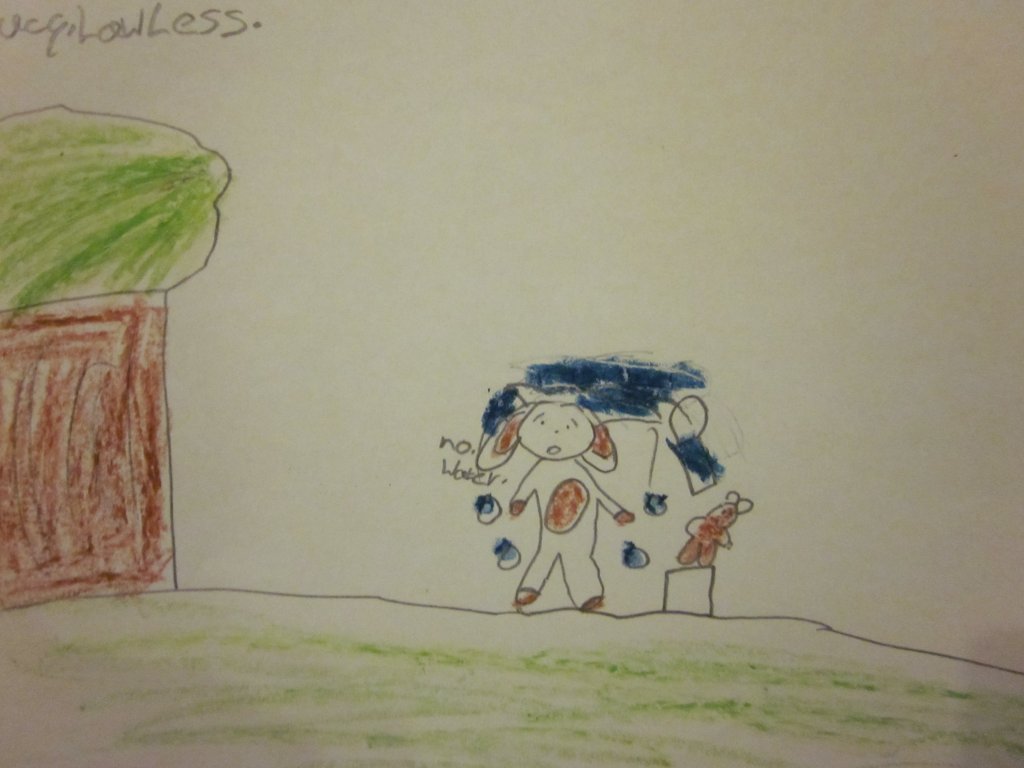
Lucky Duck took the bad Easter Bunny to jail and splashed water all over him and he was a good Easter Bunny again.

In the meantime, take a look at one of my favourite books on the CAST web site: Play Ball with Me! A Joel and Angel Book written and illustrated by Ann Meyer. The book features Anne’s two dogs in a story of the trials of friendship and is beautifully illustrated by her own digital photographs of her two charming dogs, with audio links, and a helpful illustrated glossary of terms. It features a text-to-speech feature but develops more than just listening comprehension.

copyright Ann Meyer

copyright Ann Meyer

One of the strengths of Book Builder is the presence of avatar coaches. These coaches can be customized, by the teacher, to the learning needs of the child where each coach can help the child to develop response; expand vocabulary, build strategy usage (e.g. making predictions, forging connections, asking questions). (Elmo is the sweetest avatar coach of all!) The children can also craft their own responses to answer teacher provided questions. Therefore, in providing a customized reading environment it affirms the uniqueness of the child as a reader, writer and thinker.

Percie, Emo and Can-do coach avatars

Emo a coach avatar

Shrek and Big Bang Theory: Using Popular Culture to Develop Vocabulary

A post from Bridget

I have been on a vocabulary roll lately. Everywhere I go, I find myself intrigued by vocabulary instruction possibilities inherent in our everyday experiences, enmeshed as they are in technology and media.

Idea #1: Driving home listening to an NPR radio show on new words from 2010, I found myself singing “I’m a belieber” to the tune of the Beatles song.  No, that is not a typo —  a belieber is someone who is a fan of Justin Bieber!  It would be fun and productive to have students nominate, advertise, and vote on “new” words or phrases, drawing on popular culture and current events, as well as local words that are part of their school, family, or community scene.

For example, my sisters and I know what it means when we say “donkey”, especially if accompanied by a raised eyebrow and gaze at the person of interest.  We’re referring to the Shrek movie scene where the donkey (voiced by Eddie Murphy), is about to lose it and yells, All right, nobody move! I’ve got a dragon and I’m not afraid to use it! I’m a donkey on the edge! “

image of donkey from the movie Shrek

My sisters and I  know to back off and give the “donkey” some space, or to gently offer help (for memorable Shrek quotes, see  http://www.imdb.com/title/tt0126029/quotes ).

Students could post their written or multimodal nominations for new words to a class or school-wide vocabulary blog and construct a voting poll using a free tool like Survey Monkey (SurveyMonkey.com).  1 minute podcasts for the ‘New word of the Week’ could become a regular feature of your class!

Idea #2. While we often bemoan the low level of vocabulary heard on TV, inspiration can be found in unlikely places.   “The Big Bang Theory”, a sitcom about a group of nerdy academics, makes me laugh out loud at the way language is used. The show presents multiple opportunities to engage students in exploring advanced vocabulary in a humorous social context. Students could watch video excerpts (there are a slew of them on youtube.com ) or read quotes (again, just Google ‘Big Bang Theory’ and you will find lists).  They would work with words in different ways, depending on the quote.

For example, the following Big Bang Theory quote offers a comical contrast of expert and novice:

The guys are playing the Halo video game and Peggy joins in…

Sheldon: This is a complex battle simulation with a steep learning curve. There are a myriad of weapons, vehicles, and strategies to master, and not to mention an extremely intricate back story.
[Explosion on the video screen.]
Penny: Oh, cool! Whose head did I just blow off?
Sheldon: Mine.

Big Bang Theory scene, playing Halo

The youtube scene is 2.49 minutes and includes several great examples of vocabulary and figurative language; http://www.youtube.com/watch?v=fd37YLDWv28.

Students could begin by delving into Sheldon’s vocabulary (e.g., complex, myriad, intricate, back story, steep learning curve) and then discuss why Penny’s response and the outcome are both ironic and funny.  Would it be so humorous if Sheldon had merely said “Halo is an awesome video game that I play all the time”?   What if Penny had failed at the game? To extend the activity, have students create their own conversational exchanges contrasting “expert” and “novice” ways of talking so as to poke fun at the expert (or perhaps the reverse).

Sheldon often has difficulty understanding the social nuances of language. Here’s another quote from the show that invites a discussion of the differences between literal and abstract meanings,  and the fun that can be had when we intentionally (or unintentionally) confuse the two.

Leonard: For God’s sake, Sheldon, do I have to hold up a sarcasm sign every time I open my mouth?
Sheldon (intrigued): You have a sarcasm sign?

And, finally, here is an example of Sheldon’s use of hyperbole (i.e.,  exaggerated language that is “used to evoke strong feelings or to create a strong impression, but is not meant to be taken literally, Wikipedia).

Sheldon:  When I try to deceive, I, myself, have more nervous tics than a Lyme Disease research facility.

In addition to interpreting and critiquing “Big Bang Theory” language use, students could be challenged to find examples in current events, TV, songs, billboards,  and overheard conversations.

Here is one from the Simpsons:

“Ladies and gentlemen, I’ve been to Vietnam, Iraq, and Afghanistan, and I can say without hyperbole that this is a million times worse than all of them put together.”
(Kent Brockman, The Simpsons)

Another way to approach hyperbole is to start with an image as a stimulus. Consider this photo of a fish feeding frenzy.  Figuratively speaking, when do people go after something (other than food) with a voracious appetite – mobbing a celebrity for an autograph? devouring books?

fish feeding frenzy

Check out Worsely Middle School’s website featuring students’ use of hyperbole.  http://www.worsleyschool.net/socialarts/hyperbole/hyperbole.html

All too often, students think learning vocabulary is boring (especially when it involves looking up definitions and writing sentences).  Media and technology offer a fruitful playground for vocabulary learning, appreciation, and expression.  Try it and see!  And, please post a comment to share your insights and experience.  I can say without hyperbole that I would be over the moon!

NOTE. Photo acknowledgement:  Creative Commons license.  fish feeding frenzy by devan.laney.  Shrek movie image of donkey retreived from Google Image.  Image from Big Bang Theory taken from youtube.

Google Customized Search Engine

A Post from Jill

I recently had one of the most powerful learning experience of my professional career.  It came as I was piloting an integrated science/literacy project with a group of sixth graders in inner-city Oakland, CA. This Earth Science unit was designed to help students learn about climate change.

For six weeks, students explored science content using a range of disciplinary literacy strategies such as annotating text, analyzing evidence based arguments, and writing evidence-based explanations.  The first four weeks of the unit was teacher guided and involved students in reading articles, examining trends in graphs, working with animations/simulations, and discussing new understandings in pairs and small groups.

Drawing on the notion that deep, engaged learning occurs when students explore self-selected, open-ended questions about which they are genuinely interested, the last two weeks of the unit involved students in completing an inquiry project.  This project challenged the students to build on what they had learned during the first part of the unit and take it further by designing a tool, technique, or campaign to combat climate change.  Each group chose a focus (from a bank of five choices), conducted online research, and went about inventing a way to lessen the effects of climate change.  The design challenge Google site spells out the project parameters and the assignment guidelines.

To help scaffold students’ inquiry as they gathered information online, I opted to try out the free service Google offers for building a customized search engine (see http://www.google.com/educators/p_cse.html).  The customized search engine limits the Web sites that come up in search results, listing only those that are pre-selected by the designer/teacher.  Given the sheer volume of information on the Internet,creating a customized search  can be highly supportive option for novice Internet users.

Since a teacher can choose the sites she wants students to search, she can guarantee students’ searches will yield limited number of highly relevant search results, making the time learners spend online more efficient and purposeful. The advantages of narrowing searches to a more targeted and manageable size ensures that students gain valuable practice sifting through a limited amount of search results, freeing up time to put the information to use.

Having explored the use of a customized search engine, I can attest to its efficacy as a viable scaffold for online research.  I observed even the most novice Internet users successfully locate relevant, reliable information in a short amount of time.  I was elated to see students spend quality time digging into the resources they found, following the links to related sites, and  making a range of inter-textual connections to content within and beyond the unit.

To set up a customized search engine, simply set up a Google educator account, choose the Web sites and resources you would like students to access, then follow a few simple steps to create the search engine.  An example customized for sixth graders studying ways society can lessen the effects of climate change can be found at Combating Climate Change http://www.google.com/cse/home?cx=014465768746147993326:rncbgcerhjk&hl=en.

Students spent three days gathering online information using the customized search feature, another two days synthesizing ideas, and two more days creating a Glog to share what they had learned. Finally, students made an oral presentation showcasing their ideas. The confidence students’ displayed as they discussed their final products with their peers was truly amazing.  Feel free to browse students’ work at the URLs below:

Using Spanish/English Cognates to Build English Academic Vocabulary

Using Spanish/English Cognates to Build English Academic Vocabulary

What is “Academic Language?”

Academic language is different from ordinary spoken English because it is the abstract language of ideas. Jeff Zwiers has defined it as “the set of words, grammar, and organizational strategies used to describe complex ideas, higher-order thinking processes, and abstract concepts.”  Students begin school with a fund of conversational language from their home culture, but in school they begin to use another language—that of learning in general and specialized fields. Zwiers refers to these as “bricks and mortar.” Bricks are the content specific vocabulary, like plate tectonics, while mortar are the general utility academic words, like analyze, define, summarize. In terms of vocabulary, we might compare this to Beck, McKeown, and Kucan’s (2002) vocabulary Tiers:

Tier 1 spoken, conversational words, like family, home

Tier 2 words and terms useful across contexts—the “mortar” words according to Zwier, like analyze, summarize

Tier 3 words that are bricks or content specific, like photosynthesis

For Spanish-speaking English Learners, academic language can often be a “third” language. Consciousness about cognates can assist these students to learn English.

What are Cognates?

Lubliner and Grisham (in press) define cognates as words that are spelled similarly in Spanish and English and share meaning due to a common Latin root.  Cognates are particularly plentiful in content area texts such as social studies and science books. For example, the word “nation” in English is “nación” in Spanish. Not all words that look and sound alike are cognates. The word “rope” in English has no relationship to the word “ropa” (clothes) in Spanish. Context is an important part of the strategic use of cognates.

Research suggests that up to 15,000 English words are Spanish-English cognates, including more than 70% of the Academic Word List (Nash, 1997; Hiebert & Lubliner, 2008).

Spanish/English cognates have some definite patterns that it is useful for teachers to know about.  For example, Lubliner identified some 21 patterns that occur with regularity in cognates and provided examples as shown in the following table:

Table 1: (Excerpt) Common English/Spanish Cognate Patterns

Pattern Orthographic Shifts from English to Spanish Pattern Examples Other Examples
1.  Same—Miscellaneous English and Spanish words are spelled the same (accents don’t count as differences) area/área no/no, Mexico/ México America/América
2   Same – al, il words ending with al, il are spelled the same in English and Spanish animal/animal total/total, hospital/hospital
3   same – ar, or words end with ar, or are spelled the same in English and Spanish popular/popular,color/color motor/motor, actor/actor
4   same – able, ible words ending with able, ible are spelled the same in English and Spanish visible/visible terrible/terrible, possible/posible
5  Same—able, ible A, o, e may be added to the end of the Spanish work, letters may be dropped or changed fruit/fruta, group/grupo,art/arte grade/grado, American/Americano, class/clase

A great deal has been written about false cognates (amigos falsos) and how they may mislead Spanish-speaking English Learners about the meanings of words. Probably the best known is “embarrasado” which doesn’t mean embarrassed, but actually means pregnant. However, one doesn’t have to look very far back in history to see that being embarrassed about being in “an interesting condition” was the norm for many women. A brief study into etymology can often clear these misconceptions up.

So we know that cognate strategy instruction isn’t 100% effective. There will also be some “Spanglish” words like “caro” that doesn’t mean heart, but instead means an automobile. I firmly believe we still need to teach the cognate strategy and, like all strategies for building vocabulary and world knowledge or comprehension, it pays to tell children to use critical thinking when they use cognate strategy or any other strategy, for that matter.

Shira Lubliner at California State University and I were awarded IRA’s Elva Knight grant in 2007, and we used the funding to conduct a study using Cognate Strategy Instruction (CSI) in fifth grade classes in a very diverse Northern California school. Our pre/post assessments showed that CSI was successful in teaching students to use cognates to comprehend English text. Qualitative data we collected was similarly positive—students actively read for cognates and many Spanish-Speaking ELs were talking in class for the first time.

So watch for the book chapter. If you are interested in cognates and learning more about CSI, please post a response to this Blog. I would love to provide additional information about the cognate patterns in Spanish/English and their relationship to academic English. If you are using cognates in your classroom, please share!

Here are some websites to look over!

  1. http://spanishcognates.org/ (This website is under construction but will be active around mid-April).
  2. http://www.victoria.ac.nz/lals/resources/academicwordlist/sublist01.aspx (This is the most frequently used academic language list from Averil Coxhead’s academic word list—done by families of words.)
  3. http://calla.ws/overview.html (This is the homesite for CALLA or Cognitive Academic Language Learning—an instructional model for English Learners authored by Chamot and O’Malley).
  4. http://www.jeffzwiers.com/acalang.html (This is Jeff Zwiers’ Language and Literacy website, with lots of resources for teachers).

References:

Beck, I.L., McKeown, M.G., & Kucan, L. (2002). Bringing words to life: Robust vocabulary instruction. New York: Guilford.

Coxhead, A. (2000). A new academic word list. TESOL Quarterly, 34, 213-238. http://www.vuw.ac.nz/lals/research/awl/index.html.

Hiebert, E.H., & Lubliner, S. (2008). The nature, learning, and instruction of general academic vocabulary. In A.E. Farstrup & S.J. Samuels (Eds.), What research has to say about vocabulary instruction (pp. 106–129). Newark, DE: International Reading Association.

Lubliner, S. & Grisham, D. L. (in press). Cognate Strategy Instruction: Providing powerful literacy tools to Spanish-speaking students. In J. Fingon and S. Ulanoff (Eds.). New research in literacy: Helping culturally and linguistically diverse students to succeed. New York: Teachers College Press.

Nash, R. (1997).  NTC’s Dictionary of Spanish Cognates.  Chicago, Il: NTC Publishing Group.