Vocabulary Self-Collection Strategy Plus (VSS+)

by Dana L. Grisham (with Thomas DeVere Wolsey and Linda Smetana)

The Need for Vocabulary Learning

The need for breadth and depth of vocabulary accelerates through the grades as students encounter more challenging academic texts in print and on the Internet (CCSS, 2010). Improving students’ vocabulary is critical if students are to develop advanced literacy levels required for success in school and beyond, in the world of higher education and the workplace (Biancarosa & Snow, 2006; Graves & Watts-Taffy, 2008; Lubliner & Grisham, 2012).

Research suggests that students with a well-developed vocabulary learn many more words indirectly through reading than from instruction (Cunningham & Stanovich, 2001). If wide reading promotes vocabulary development, then conversations about their reading with adults and peers also strengthen students’ word learning (Biemiller & Boote, 2006). The goal of effective vocabulary instruction is to promote a lively interest in words through student expression and participation in a learning community that enjoys playing with words, builds on individual interests as well as curriculum needs, and emphasizes self-efficacy in word learning (Beck, McKeown, & Kucan, 2008; Graves & Watts-Taffy, 2008). As we have noted in this blog, the impact of technology on vocabulary development also needs to be considered (Castek, Dalton & Grisham, 2012).  In other contexts, we have suggested that technology integration should be generative in the sense that learners should use technological tools to satisfy their curiosity and to generate creations for learning and for the demonstration of learning (Grisham & Smetana, 2011).

Vocabulary instruction may occur before reading (preteaching important vocabulary), during reading (teaching what emerges as needed), and after reading. Vocabulary Self-collection Strategy or VSS (Haggard, 1982), is an after reading strategy.

The Common Core (2010) requires that technology be integrated into instructional and independent learning sequences.  Research has shown that the use of technology and technology-based instruction enhances student learning. In the post-reading vocabulary assignment we explore here, teachers may use use several forms of technology to increase student interest in vocabulary and a variant of the VSS strategy to engage students in more robust vocabulary learning.

Vocabulary Self-collection Strategy Plus (VSS+) occurs after a selection has been read and is based on the principles of VSS (Haggard, 1982), a researched-based strategy that captures the essence of vocabulary learning:  multiple exposures to a word, multiple readings of a text, collaboration of students and teacher, oral discussions and presentations, selecting words that are important to know, writing a script and recording a podcast, Internet search for illustrations, and building semantic webs. Recently, two colleagues (Thomas DeVere Wolsey and Linda Smetana) and I worked in a fourth-grade classroom in a public school in Northern California, to teach the students how to make an online dictionary (e-dictionary) page using the VSS+ strategy. The three of us spent three hours with Mr. D’s 33 students, first in the classroom, then in the computer lab at their school.

VSS+ is a structure that becomes familiar to students so they can use it with more independence over time. It takes more time in the beginning as teachers and students get used to the technology, the time, and the process.  To teach VSS+ we wanted to use text with interesting or unknown words or text dense with academic language. Mr. D provided us with a passage from the Science textbook in use in his classroom. Mr. D pre-taught some of the vocabulary and students had already read and discussed the package when we arrived.

Collaboration and peer learning are essential to the VSS+ strategy. Mr. D had the students divided into cooperative groups of 4 students. In order to differentiate instruction to meet the learning needs of students, they may be grouped heterogeneously or homogeneously as needed. Mr. D’s students were grouped heterogeneously.

To teach the VSS+ strategy, we began in the classroom with a PowerPoint slide and a demonstration of the strategy.  Using a think aloud protocol, I modeled the strategy by presenting a nominated word to the class, and provided suggested answers to the following questions. In the demonstration, we used an example that we constructed on “continent” (see below). These are the three elements that students must consider as they nominate a word.

a.     Where is the word found in the text?  (Page number; read the sentence aloud)

b.     What do the team members think the word means?

c.     Why did the team think the class should learn the word?  The team must tell the class why the word is important enough to single out for emphasis (a rationale).

During the team presentations of nominated words, we facilitated discussion, listened to students’ projected meanings of the word, and invited class members to contribute additional clarifications of the words. A chosen target word was allocated to each team to prepare an e-dictionary page.

 Then came the fun part!  We adjourned to the computer lab where we asked students in Mr. D’s class to use two formats for their e-dictionary pages:  PowerPoint (like our example below) and a program called Thinglink.

In the lab, under teacher supervision, team members used the Internet to locate images and or definitions for the target word and then collaboratively determined which of the images/definitions best fit their prediction of the word meaning.

We proposed the following formatting for the eDictionary:

Word and Written Definition

Image selection from the Internet, Photos, Illustrations or Student Drawings (if a scanner is available)

Semantic web (we used WordSift)

Student audio recording about the word (critical thinking about own word learning)

Arrangement of the PowerPoint or Website page

Audio recording by students of the main elements of the word exploration

Posting to website (classroom e-Dictionary)

In the following example, the three of us used PowerPoint to make a sample e-dictionary page using the word “continent.” In the PowerPoint page is an audio recording that cannot be loaded into WordPress. To hear this recording, please visit

http://media60.podbean.com/pb/5d2ff0db75b8e90568ffd2295b4362b8/52693971/data1/blogs25/353339/uploads/ThinglinkContinents.mp3

Slide2

Next week in Literacy Beat, Linda, DeVere and I will talk more about the work we did with Mr. D’s students and share examples of their PowerPoint and Thinglink pages with you.

References

Biancarosa, C., & Snow, C. E. (2006). Reading next—A vision for action and research in middle and high school literacy: A report to Carnegie Corporation of New York (2nd ed.). Washington, DC: Alliance for Excellent Education.

Biemiller, A. & Boote, C. (2006). An effective method for building meaning vocabulary in primary grades. Journal of Educational Psychology, 98, 44-62.

Blachowicz, C. L. Z., & Fisher, P. (2000). Vocabulary instruction. In R. Barr, P.

Mosenthal, P. S. Pearson, & M. Kamil (Eds.), Handbook of Reading Research, vol. III, (pp. 503-523). White Plains: Longman.

Castek, J., Dalton, B. & Grisham, D. L. (2012). Using Multimedia to Support Generative Vocabulary Learning. In J. F. Baumann & E. J. Kame’enui (Eds.). Vocabulary Instruction: Research to Practice (2nd Edition). New York: Guilford.

Common Core State Standards Initiative. (2010). Common Core State Standards for English Language Arts & Literacy in History/Social Studies, Science, and Technical Subjects. Washington, DC: CCSSO & National Governors Association.

Cunningham, A.E. & Stanovich, K. E. (2001).  What reading does for the mind. American Educator, 22, 1/2, 8-15.

Graves, M.E. & Watts-Taffy, S. (2008).  For the love of words:  Fostering word consciousness in young readers. Reading Teacher, 62, 99.185-193.

Haggard, M. (1982) The vocabulary self collection strategy: An active approach to word learning.  Journal of Reading, Vol. 26, No. 3 (Dec., 1982), pp. 203-207.

Grisham, D.L. & Smetana, L. (2011) Generative technology for teacher educators. Journal of Reading Education, 36, 3, 12-18.

Lubliner, S. & Grisham, D. L. (2012). Cognate Strategy Instruction: Providing Powerful Literacy Tools to Spanish-Speaking Students. In J. Fingon & S. Ulanov (Eds.), Learning from Culturally and Linguistically Diverse Classrooms: Promoting Success for All Students (pp. 105-123). New York: Teachers College Press.


1

Access to Texts on a Global Scale

Recently, I had the privilege of working with teacher educators, class teachers and children on a development aid project on literacy in Zambia, Africa. In one classroom I visited there were sixty little boys sitting at weather-beaten desks and the teacher was attempting to teach literacy from a single class reader-the one and only available book in the classroom. As literacy educators we know the importance of connecting the right book, to the right child, at the right time. However, access to texts, and more importantly equality of opportunity in access to texts, is a real issue in developing countries (and indeed among marginalised communities worldwide).

The World Internet Usage Statistics (www.internetworldstats.com) indicate that almost 35% of the world population are now online and that growth in access to the Internet in developing countries is advancing at a rapid rate. So perhaps access to books on the Internet may prove a feasible path to fostering literacy, and nurturing a lifelong love of books and reading, among children, both in developing countries and in marginalised communities worldwide. In this blog post I will review a number of organisations who are attempting to do just that.

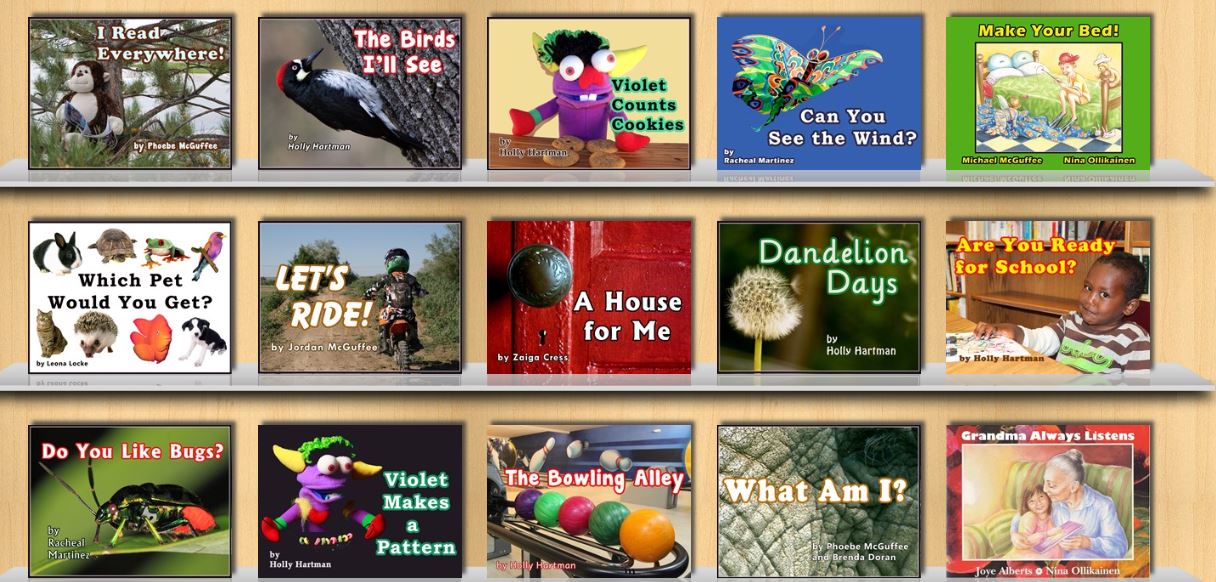
Book abundance is the vision and mission of Unite for Literacy (www.uniteforliteracy.com). Mark Condon began creating libraries of inexpensive, culturally appropriate and linguistically rich picture books for children in marginalised communities in the 1990s. This initiative has grown into a “Wondrously Infinite Global Library” as noted on the Unite for Literacy Website. The site provides access to a growing number of electronic picture books that honour and celebrate the culture and home languages of a diverse range of children. These picture books can be read aloud in English but also, crucially, in a range of about 12 other languages such as, Spanish, Chinese, Arabic, French, Russian and Vietnamese. Examples of the range of texts are shown in the screen saver from the Unite for Literacy website below

MArk condon

“The path to a literate life is a story that must pass through the heart.”  Mark Condon

We Give books (http://www.wegivebooks.org) is a website created by the Penguin Group and Pearson Foundation Group which provides Internet access to a range of  fiction and informational text books suitable for children up to the age of 10. These electronic texts can be read across a range of digital platforms and electronic devices. The site provides access to a range of award winning and recently published texts. For every book read from the digital library We Give Books donate books (almost two and a half million to date!) to charities and worthwhile causes in communities around the world.

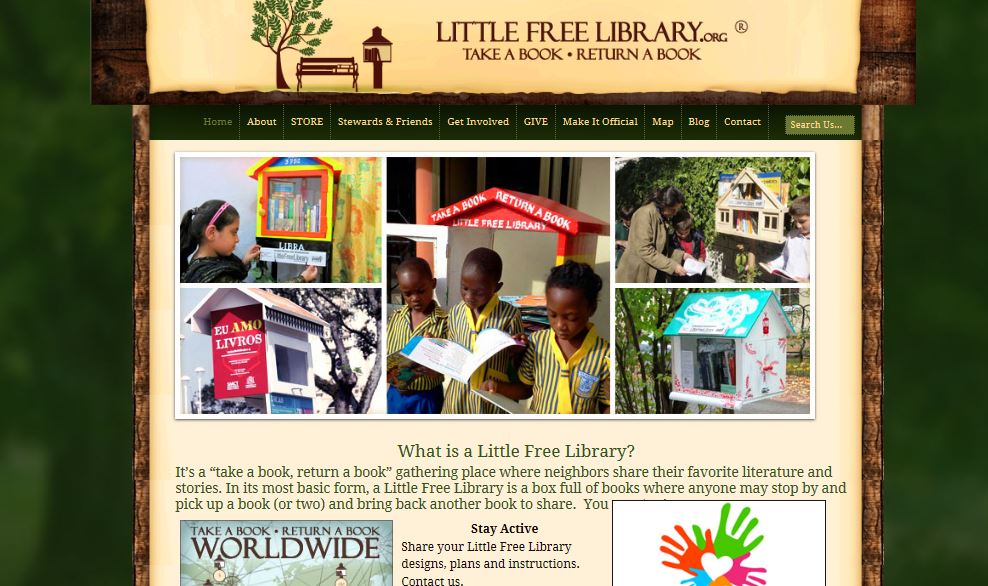
When I was growing up swapping books among friends was one of our favourite pastimes. Little Free Library (http://littlefreelibrary.org) is based on the similar concept of ‘bring a book, take a book’.

little free library 3

This movement started in the US but is now slowly growing across the globe ( as shown in the map below) and may provide community-generated access to books. For examples of the creativity of people in creating mobile Little Free Library book stores visit Pinterest http://www.pinterest.com/ltlfreelibrary/.

little free library 2

Finally, you will find a more extensive list of sites providing free electronic texts for children at http://www.techsupportalert.com/free-books-children

Note: Post updated 1-30-2017, video removed that was no longer available.

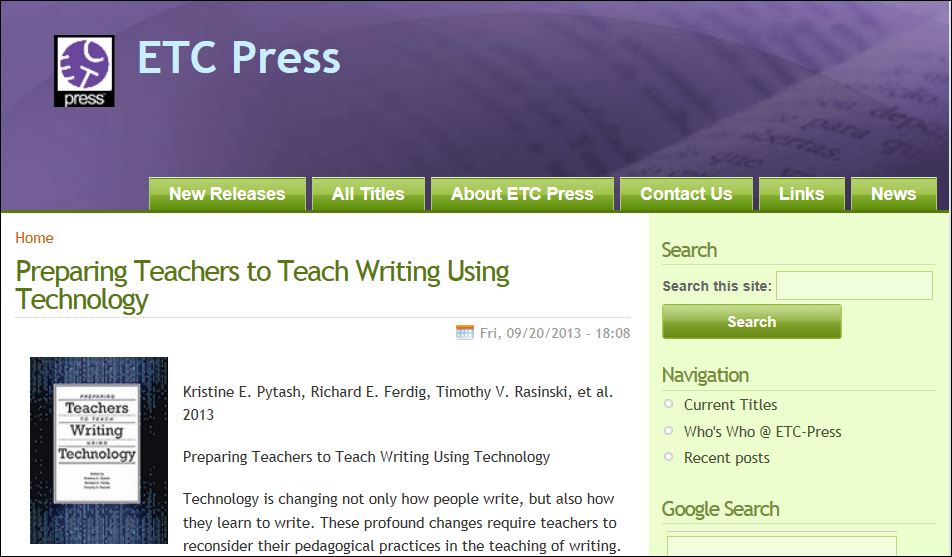
Preparing Teachers to Teach Writing Using Technology by Kristine E. Pytash, Richard E. Ferdig, Timothy V. Rasinski, et al. , 2013, ETC Press

Thanks to ETC Press and editors Kristine Pytash, Richard Ferdig and Timothy Raskinski, we have a valuable new resource to guide our work integrating technology into writing instruction.

The book is available online and can be downloaded freely at: http://www.etc.cmu.edu/etcpress/content/preparing-teaching-teach-writing-using-technology

Image

I have copied below the description of the book, followed by the table of contents.  I encourage you to download the book and then sample chapters of interest.   Note that there is also a link to supplemental materials for Rish’s Chapter 1, Beach and O’Brian’s Chapter 5, Collet’s Chapter 8, and McIntyre’s Chapter 10.

As we all know, it is expensive and time consuming to develop, edit, and publish professional books.  I applaud the editors and ETC Press for freely offering this resource.  The work is licensed under a Creative Commons Attribution-NonCommercial-No Derivative Works 2.5 License.   That is, you are free to share the work, with attribution; you may not use it for commercial purposes (to learn more about this level of use, go to  http://creativecommons.org/licenses/by-nc-nd/2.5/

Book description

Technology is changing not only how people write, but also how they learn to write. These profound changes require teachers to reconsider their pedagogical practices in the teaching of writing. This books shares instructional approaches from experienced teacher educators in the areas of writing, teacher education, and technology. Chapters explore teachers personal experiences with writing and writing instruction, effective pedagogical practices in methods writing courses, and professional development opportunities that effectively integrate technology into the writing classroom and contribute to students’ growth as writers and users of technology. While the chapters in this collection are written to inform practice, they are written from a theoretical and empirical base by research-oriented educators in our field. Each chapter provides a research base for a particular instructional approach, a description of their strategy, and examples from instructional settings that highlight how the pedagogical practice advanced the knowledge of the teachers in the areas of writing instruction and technology.  This collected volume provides as up-to-date understanding of how teachers are prepared to teach writing using technology.

Foreword (David Reinking)

 Preservice Teacher Methods Courses

1.  Exploring Multimodal Composing Processes with Pre-Service Teachers (Ryan M. Rish)

2.  Developing Preservice Teachers for 21st Century Teaching: Inquiry, the Multigenre Research (Carol Wickstrom)

3.  No more index cards! No notebooks! Pulling new paradigms through to practice (Nanci Werner-Burke & Dawna Vanderpool)

4.  Exploring Writing with iPads: Instructional Change for Pre-Service Educators (Joan Rhodes)

In-service Teacher Methods Courses

5.  Fostering Student Writing-to-Learn through App Affordances (Richard Beach & David O’Brien)

6.  Virtual worlds, videogames and writing instruction: Exploring games-based writing practices across content areas (Hannah Gerber & Debra Price)

7.  Engaging Teachers in Digital Products and Processes: Interview Feature Articles (Susan D. Martin & Sherry Dismuke)

Working with Teachers in the K-12 Setting

8.  Helping teachers make the shift: Professional development for renovated writing instruction (Vicki S. Collet)

9.  Teaching Long-Term English Learners to Write in Content Areas: The Application of Dynamic and Supportive Instruction (Nancy Akhavan)

10.  Technology and Writing Instruction: Three Cases in a Title I Elementary School (Beverly McIntyre)

Beyond Professional Development

11.  Write, Respond, Repeat: A Model for Teachers’ Professional Writing Groups in a Digital Age (Troy Hicks, Erin Busch-Grabmeyer, Jeremy Hyler, & Amanda Smoker)

12.  Comic life + writing = motivated student writers: Incorporating visual graphics to teach writing (Lynda Valerie & Farough Abed)

Composition Coursework

13.  Errors and expectations in the electronic era (Jesse Kavadlo)

14.  E-feedback focused on students’ discussion to guide collaborative writing in online learning environments (Teresa Guasch, Anna Espasa & Paul A. Kirschner)

15.  Writing with Wikipedia: Building ethos through collaborative academic research (Frances Di Lauro & Angela M. Shetler)

Conclusion

16.  Assessing the impact of technology on preparing teachers to teach writing using technology (Kristine E. Pytash, Richard E. Ferdig, & Timothy V. Rasinski)

Exploring Multimodal Composition and Digital Writing

In addition to the free ETS Press volume on writing and technology, Ferdig and Pytash have also recently published an edited volume, Exploring Multimodal Composition and Digital Writing.

http://www.igi-global.com/book/exploring-multimodal-composition-digital-writing/75468.

As a contributing author, I just received my hard copy of this handbook and am looking forward to exploring the various chapters in depth (and especially the chapters written by my Literacy Beat colleagues Jill Castek and Dana Grisham!).  The book is quite comprehensive and should be an important resource for the field.  Topics include:

  • Collaborative writing tools
  • Digital Assessment
  • Digital Media
  • Information and Communication Technologies
  • Multimodal Writing
  • Online Writing Communities
  • Technology-Facilitated Revision
  • Writing Processes

There is so much to learn about technology, media, and literacy, that I feel rather overwhelmed at times (actually, more times than I care to admit!).  I appreciate the opportunity to learn from the authors represented in these two books, one of which is freely downloadable, and know I will find support for my quest to become a creative and thoughtful multimodal composer and teacher.  I hope you find these books useful to you on your journey and welcome response and comments about your work.    BD

On the Beat at the 18th European Conference on Reading

A post from Bernadette

The 18th European Conference on Reading was held in in the beautiful town of Jönköping in Sweden from August 6th to the 9th. Over the space of four days delegates, from around the globe including, Europe, US, Canada, Russia, Asia, South Africa and Australia, met, listened, debated and forged collaborative links around issues relating to the conference theme of New Literacies, New Challenges. In this blog post I thought I would give you a flavour the wonderful keynote addresses presented during the conference. Local speakers provided stimulating and interesting keynote addresses to both open and close the conference. Professor Elsie Anderberg, from Jönköping University, addressed the issue of The Function of Language Use in Reading Comprehension in her opening address. Professor Stefan Samuelsson (Linköping University) provided intriguing insights from an international collaborative research project on Behaviour-Genetic Studies of Academic Performance in School Students.

Professor Jackie Marsh from the University of Sheffield provided a wonderful and thought provoking keynote address on Digital Futures: Learning and Literacy in the New Media Age addressing issues including family digital literacy practices and children’s use of virtual worlds. Jackie then provided fascinating insights from the Digital Futures in Teacher Education’ Project on aspects related to pedagogical strategies and design of curriculum. Rather than trying to ‘colonise’ children’s home practices with digital literacies, she urged us to try to build on and extend such literacies links; thereby bridging the dissonance between in-school and out-of-school literacies.

Digital Futures in Teacher Education

Digital Futures in Teacher Education

http://www.digitalfutures.org/

Professor Don Leu (University of Connecticut) delivered an engrossing keynote address entitled, The New Literacies of Online Research and Comprehension: Reading with a Lens to the Past and with a Lens to the Future. Don got to the “Heart of the Matter”, and effectively captured the feeling of most of us working in the area of digital literacies, when he quoted Don Henley from The Eagles, “The more I know, the less I understand.” Don addressed issues related to the ubiquitous nature of the Internet and other digital technologies in society and the deictic nature of literacy in the 21st century. He spoke convincingly on the need to ensure equity in, and equality of, access to digital literacies for all students regardless of SES. You can view the PowerPoint presentation in the link below.

The conference organisers, Ulla-Britt Person, Lena Ivarsson and other colleagues in the Swedish Council of International Reading Association (SCIRA), together with colleagues on the International Development in European Committee of the International Reading Association (IDEC) and the Federation of European Literacy Associations (FELA) are be congratulated for the successful organisation of a wealth of presentations and workshops across the four days of the conference.

Presentations and hand-outs from the conference will be available soon on the IDEC website.

So a truly great conference in a wonderful venue! Mark your calendar for the 19th European Conference on Reading to be held in Klagenfurt in Austria on 14th -17th July 2015.

UDL Studio: Deepening response to literature

UDL Studio, a free digital tool (funded largely by the Carnegie foundation) has recently been released by CAST. UDL studio is underpinned by the principles of Universal Design for Learning . UDL Studio  joins other successful digital tools created by CAST. See for example my blog post on LEA Meets Book Builder. UDL Studio enables anyone to create media-rich resources, to actively engage and motivate students, and to respond flexibly to the needs of each learner; thereby ensuring quality and equality in access to learning for all.

UDL Studio offers templates to scaffold you or your students as you create content using multimodal elements, such as text, image¸ video, audio, and animation. You can explore the project library to view previous projects created by UDL studio users.
For example, Katherine Cooper has created a project around Charles Dickens’ classic tale A Christmas Carol. In the screen shot you can see links to audio recording related to character study. Students can also record their prior knowledge of the story through multiple modalities, such as writing, recording, drawing, or uploading a file attachment.

Katherine Cooper

Katherine Cooper

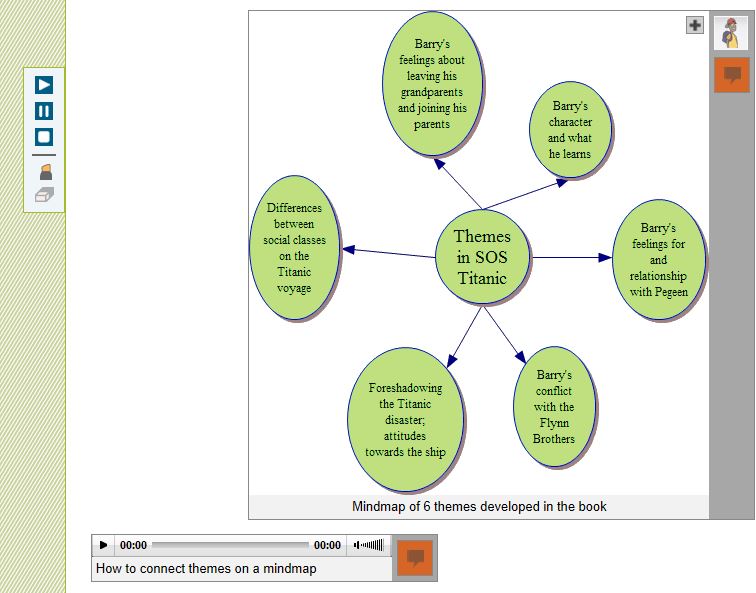
Meanwhile, Matthew Puma has created a resource to support his students while reading SOS Titanic by Eve Bunting. Students can explore historical information relating to the Titanic; inner feelings of the characters; and actions and events within the book. The screen shot below relates to a mind map of themes in the Titanic.

mind map SOS Titanic

My wonderful, final year, elective student teachers have begun to explore the possibilities presented by UDL Studio to encourage immersion in, involvement with, and interpretation of literature (Dwyer & Larson, 2013). We have begun a project around The Boy in the Striped Pyjamas/Pajamas by John Boyne. Our aim is to deepen engagement with the text through close reading to explore the structure of the text; the perspectives of the characters; the use of vocabulary; and historical perspectives relating to the text.

The Boy in the Striped Pyjamas

We really like the tips and resources page which asks you to reflect carefully on how the use of the digital tool enhances children’s understanding of text; enriches the reading experience; and represents information in an engaging manner. The plethora of free digital tools include:

Recording and editing software
Audacity: http://audacity.sourceforge.net/
Free Sound Editor: http://www.free-sound-editor.com/
Audio Pal: http://www.audiopal.com/index.html

Video search engines and editing software
• Blinkx Video Search Engine: http://www.blinkx.com/
• Truveo Video Search: http://www.truveo.com/
• Video editing http://www.stroome.com/

Sources for images
• Pics4Learning: http://pics.tech4learning.com
• Creative Commons image search: http://search.creativecommons.org/
• Free Photos: http://www.freeimages.co.uk

Animation tools
• Gifninja: http://www.gifninja.com/
• Picasion: http://picasion.com/
• GoAnimate: http://goanimate.com/

Reference
Dwyer, B. & Larson, L. (2013). The writer in the reader: Building communities of response in digital environments. In Kristine E. Pytash & Richard E. Ferdig (Eds.). Exploring Technology for Writing and Writing Instruction. US: IGI Global

Delivering Presentations as Learning Opportunities

By Thomas DeVere Wolsey

We all know what a presentation is, right? The teacher presents information, typically thought of as a lecture, to a classroom full of students. A financial officer presents a budget to the board of a corporation. Students, having completed research on a topic present it to their peers. Often visual aids, such as a poster or PowerPoint enhance what the presenter has to say. Multimedia software, along with media hosting sites (e.g., YouTube) gives teachers and their students so many more options than a person with a laser pointer at the front of a room with a captive student audience. Equally important, those same multimedia tools offer the possibility of improving the learning they are intended to promote.

Presentations involve multiple steps; we can think of them as compositions. They require selection of a topic, identification of appropriate sources of information, characterizing that information for the audience, organizing it, choosing the presentation tools, designing the components of the presentation, rehearsing, and finally delivering it to the audience. Delivery is our focus for this blog post. Students are very familiar with traditional presentations using presentation software (e.g., PowerPoint, Keynote). In this format, the student (or a small group of students) prepare a presentation then deliver it to the class as a kind of lecture. Students do need to learn effective presentation skills in a face-to-face environment.

An effective alternative is to ask students to put their presentations online. Some presentation tools live online naturally. Prezi is one such tool, and Glogs make excellent e-posters. Newer versions of PowerPoint easily support audio files and can be converted to videos that may be uploaded to YouTube, Vimeo, and similar services. The big advantage is that students need not sit through all the presentations of their classmates. If the teacher embeds the presentation on a class blog or provides a link in a threaded discussion group, students may then select three or four presentations from their classmates to view. Other social media may also be used–Facebook, Edmodo, Twitter, etc. Using the comment feature of the blog or the threaded discussion forum, they comment on the presentations, adding to the information, questioning it, or suggesting strengths or possible alternatives to the ideas presented.


This format also works well for “dress rehearsal.” A student-created presentation might be shared via a private link to a small group for comment with an eye toward improvement of the product. Andrea Shea (Lapp, Wolsey, & Shea, 2012) taught her second graders to offer “praises” and “pushes” on student writing, and the idea can be used to help students improve their presentations, as well. A push is just gentle feedback designed to offer suggestions, alternatives, and the perspective of a member of the audience. As with written work, students often think of their presentation tools in a once and done way. They may not rehearse what they will say (either recorded or for live presentation) and design elements often benefit from feedback from an audience. Consider PowerPoint presentations with so much text crowded on the slide that the small text is almost impossible to read, or the slide with fonts so fancy they require much work of the audience just to get past all the curlicues and serifs (cf., Reynolds, 2010). Such presentation aids could benefit from some peer response during drafting.
High school teacher Jason Kintner promotes peer feedback on presentations through an Oscar or People’s Choice award format. He writes,

“Something I like to do in my classes to allow students to recognize and reward outstanding performance of the peers in delivering presentation is to designate specific awards. Students pick the top three presentations in the following categories (They are not allowed to pick the same student for each category):
• Einstein Award—Outstanding originality and depth of understanding.
• Rembrandt Award—Outstanding creativity and artistic ability.
• Gestalt Award—Presentation creates an “aha” moment, sudden burst of understanding, enlightenment, or enrichment.

References

Lapp, D., Wolsey, T. D., & Shea, A. (2012). “Blogging helps your ideas come out”—Remixing writing instruction + digital literacy=audience awareness. The California Reader, 46(1), 14-20.

Reynolds, G. (2010). Presentation zen design. Berkeley, CA: New Riders.

Webinars: Professional Development Across a Global Community of Learners

A post from Bernadette

Webinars and online interactive podcasts provide opportunities for professional development that is convenient and participatory. A key feature of webinars is the ability to cross time and space and to interact synchronously with key researchers and scholars in literacy in real time seminars. Participants can ask questions, make comments, and interact with colleagues in a global community of learners. In this blog post I want to draw attention to some of my favourite webinars and online podcasts.

I have been following the interpretation and implementation of the Common Core State Standards (CCSS) in the U.S. with great interest. Text Project, under the expert guidance of Elfrieda (Freddy) Hiebert, has been running a series of really useful and informative webinars on the core goals of the CCSS featuring speakers who served in an advisory capacity for drawing up the CCSS. For example, Professor P. David Pearson provided a very enlightening webinar entitled Research and the Common Core: Can the Romance Survive? where he discussed the research underpinning the CCSS with particular reference to comprehension. He provided a very illuminating critique of the interpretation and implementation of the CCSS. You can also view the archived webinars asynchronously on the Text Project You Tube channel . Other archived webinars include Dr. Timothy Shanahan on CCSS and Education. Upcoming events on the webinar series include eminent scholars and researchers such as, Dr. Karen Wixson, University of Michigan on Key Shifts in Assessment and Instruction Related to CCSS-ELA (24th of April, 2013); and Dr. Nell Duke on Informational Text and the CCSS: Pitfalls and Potential (30th of May, 2013). You can register for these webinars on the Text Project website.

The International Reading Association (IRA) has also conducted a series of webinars on Staying Ahead of the CCSS. Members can access the archive of these seminars for a modest rate on the IRA website.

Another series of webinars which I follow are the Global Conversations in Literacy Research (GCLR). Past webinars have included eminent scholars, from across the globe, on a diverse range of issues pertaining to literacy and have included Dr. James Paul Gee, Dr. Allen Luke, and Dr. Julia Davies. An upcoming webinar features Dr. Patrick Shannon (April 14th, 2013) on A Closer Reading of the Common Core: Reading Wide Awake looks particularly interesting. The GCLR team hope to begin archiving these webinars in the coming months.

Finally, I really enjoy the biweekly podcasts on the Voice of Literacy where Dr. Betsy Baker interviews researchers about recently published research in Tier 1 journals such as, Reading Research Quarterly (RRQ) or Journal of Literacy Research (JLR). These podcasts provide an opportunity to listen to a researcher flesh out their research findings in discussion with Betsy. The Voice of Literacy site provides a comments section where listeners/ readers can pose questions or provide commentary on the podcast. Our very own Literacy Beat Blogger Bridget Dalton has been featured discussing her research related to utilising digital technologies to support the development of reading comprehension and vocabulary with 5th grade monolingual and bilingual students. I have embedded the link below.

Designing technology to support comprehension among monolingual and bilingual students with Dr. Bridget Dalton

Generative Technology for Teacher Candidates: The Assignment

Generative Technology for Teacher Candidates:  The Assignment

Dana L. Grisham

My friend and colleague, Linda Smetana, and I have been working together since about 2004. She’s a full professor at CSU East Bay (Hayward, CA), from which I retired in 2010. Linda is one of those extraordinary scholars and teacher educators who stays close to her field—she teaches one day per week in a Resource classroom in the West Contra Costa Unified School District—and also works full time at the university, where she specializes in literacy teacher education in both special and general education. Recently, Linda and I have been investigating the intersections of literacy and technology in teacher preparation together and I’d like to share with you a project we just completed and the results of which are going to be published in a book edited by Rich Ferdig and Kristine Pytash, due out later in 2013.

Our belief is that “generative” technology needs to be infused into teacher preparation. Technology in teacher preparation tends to be “silo-ed” in the programs where we teach. Currently, candidates at our university have one technology course, based on the ISTE standards, but bearing relatively little on pedagogy for teaching. By generative technology, we mean that the technology is embedded in the content of the course in teaching methods, rather than something “added on.”

The basic framework that we used for the assignment was the TPACK model (Mishra & Koehler, 2006) that has appeared in this blog before:

TPACK

The TPACK model asks the teacher to look at the content of the lesson, or what we want students to learn, as well as the pedagogy (how best to teach this content), and then at the technological knowledge that might be advanced in the lesson. Where the three elements intersect is known as TPACK or the theoretical foundation and link between technology and praxis. In our courses, we have presented TPACK as the goal for integrating meaningful technology into lesson planning and teaching.

The participants in our recent study consisted of 21 teacher candidates in the fifth quarter of a seven-quarter post-baccalaureate teacher preparation program; 17 of these candidates were simultaneously completing their masters degree in education while 18 of the 21 participants were earning their education specialist and multiple subject (elementary) credentials.

In creating the assignment, we carefully considered the context for teaching of the candidates in the course, structuring the assignment so that all candidates could successfully complete it. Candidates had different levels of access to student populations. Accessibility ranged from 30 minutes a day three days a week, to the full instructional day five days a week.  Teacher candidates also taught different subjects among them: English, History, Writing, Reading, Language Arts, Study Skills, and Social Skills. To insure that teacher candidates considered all aspects of their assignment in their write-ups of the project, Linda provided guidelines for the reflection. Students were responsible for learning to use the tools they chose. Linda collected and we jointly analyzed the data. Findings from the research were uniformly positive. In fact, right now Linda is doing post-research interviews with a couple of the candidates who have really taken to the integration of technology into their teaching.

For the purposes of this post, I would like to share the assignment with you. In my next post I plan to share a couple of the projects. Teacher candidates were provided with guidelines for the technology assignment and provided with a list of potential tools that they might use for the assignment. They learned the TPACK model for planning. Below is the technology assignment from Linda’s syllabus and the list of technology tools (free or very inexpensive) provided for students to investigate. We offer this with complete permission for other teacher educators to use or modify for use in their courses.

The Generative Technology Assignment

The Common Core Standards mandate the use of technology for instruction, student work, and student response.  Students with special needs, especially those with mild moderate disabilities may not have access to technology or their access may be limited to hardware and software that may not be useful to support the learning process.

During the second month of the class, we will have three independent learning sessions.  These sessions are intended to enable you to complete the technology assignment.  This assignment focuses on integrating technology with academic skill development, core content with teacher and student creativity. The focus should be on an aspect of literacy or multiple literacies.

In this assignment you will use technology to develop a set of learning sequences for use with your students.  You may complete this assignment in groups of no more than two individuals one of the technology tools in the syllabus or one that you locate on your own.  If completed in pairs, the finished product must demonstrate increased complexity and include the work of students in both individuals’ classrooms.

Your technology assignment should enhance the learning of your students.  Prepare an introduction to the presentation to educate your viewer.  Think about the content of the presentation, reason for the your selection this medium and/or process.  Share how your presentation meets the needs of your students and reflects their knowledge. The assignment must incorporate student work.  Identify how the students participated in the development and creation of the assignment. 

Prepare a thoughtful reflection of your thoughts on the process and the final product including the preparation, implementation and evaluation of the product and the management of students and content. This reflection should be descriptive and include specific examples. It may be submitted as a word document.

Place your project on a flash drive that may be placed into the classroom computer for projection.  Use your student work of materials from the web, interviews, u-tube and anything else that will capture students’ attention. 

Technology Web Resources Provided to Teacher Candidates

VoiceThread http://www.voicethread.com.

Animoto http://www.animoto.com/education

ComicCreator http://www.readwritethink.org/files/resources/interactives/comic/index.html

Edmodo http://www.edmodo.com

Glogster http://www.glogster.com

Prezi http://www.prezi.com

Popplet http://popplet.com

Slidepoint http://www.slidepoint.net

Storybird http://storybird.com

Strip Designer http://itunes.apple.com/gb/app/strip-designer/id314780738?mt=8

(iPad app)

Stripcreator http://stripcreator.com

Screencast http://screencast.com

Screencast-o-matic  http://screencast-o-matic.com

Cool Tools for Schools http://wwwcooltoolsforschools.wikispaces.com/Presentations+Tools

Toontastic http://launchpadtoys.com/toontastic/

In addition to the assignment, teacher candidates were provided with guidelines for reflection, seen below.

Questions to Guide Reflection

What and how did students learn? Include both intentional and unintentional lessons.
What did you learn?
What would you do differently if you were to do this project again?
What were the greatest successes of this project?
How would you improve this project?
What advice would you give a teacher contemplating a similar project?
What kinds of questions did students ask?
Where were students most often confused?
How did you address the needs of different learners in this project?
What resources were most helpful as you planned and implemented this project?

To scaffold teacher candidates application of technology to lesson planning for the project, each one provided Linda with a proposal to which she gave feedback. Each proposal contained the following components: Context, Students, Standards (literacy and NETS•S standards), Technology, Process, and Product.

Every student completed the assignment successfully and their reflections are highly interesting….more to come! In my next post, I will share with you some of the amazing projects that Linda’s teacher candidates produced.

References

Grisham, D. L. & Smetana, L. (in press). Multimodal composition for teacher candidates: Models for K-12 writing instruction. In R. Ferdig & K. Pytash (Eds.). Exploring Multimodal Composition and Digital Writing. Hershey, PA: I-G-I Global.

Mishra, P. & Koehler, M. J. (2006). Technologiical Pedagogical Centent Knowledge: A new framework for teacher knowledge. Teachers College Record, 108, 6, 1017-1054.

Four Online Reading Tasks

By Thomas DeVere Wolsey

Researchers are delving deeper into the nature of online reading tasks for PK-12 students; however, four common tasks emerge that readers encounter often. The MNOP teaching strategies (model, name, overcome obstacles, and probe) for digital and online texts are bolded throughout. Tasks readers might encounter in digital environments include:

  • Finding and reading appropriate material
  • Determining the best approach for reading digital materials
  • Synthesizing multiple sources
  • Integrating multimodal resources

Finding and Reading Appropriate Material

Confronted by search results from Google or other providers, readers must make a number of decisions. As important, they must do so quickly if they are to succeed in reading anything meaningful in a reasonable time frame.  Identifying appropriate online material is not as easy as it sounds; it involves much more than simply choosing some search terms.  Effective readers of online content try search terms, survey the results, refine search terms as necessary, skim some pages, and read other pages in depth.  Equally important: This process continues as readers encounter ideas and links to other sources; in short, the process does not proceed step-by-step.

Effective practice: Teachers assist readers to set a purpose for reading online sources, evaluate the sources they find, and challenge themselves to read increasingly complex materials online. They model these behaviors, often using a data projector or interactive whiteboard.

Example: Stephanie, a fourth-grade student, looked for information about “California missions,” but most of what she found using just those two words in her search was very broad, and repeated the same information.  She had visited the mission at San Luis Rey, and she knew it was not far from the famous San Juan Capistrano mission. Many of the sites in her search results included information about nearby hotels and restaurants which she knew would not help her learn more about the network of missions along the California coastline.  She knew she needed a web source that went into more detail than what she was finding, and she was sure the information was online somewhere. But, where was it?

CapistranoMrs. Wilkinson, the fourth-grade teacher, had seen students struggle with finding just the right search terms. She had learned that students often got stuck and couldn’t get out  of the mire of many search results but little useful information.  On her class webpage, she had linked some fourth-grade friendly resources.  When she saw Stephanie’s face scrunch up after another click to another website that wasn’t helpful, she walked over and watched for a minute.
“It looks like you have found several sites about the missions, and a couple of them about San Luis Rey that we visited last week on our field trip. But, you seem puzzled, too. What’s going on?”

Stephanie took her finger off the touchscreen, relieved somewhat for a chance to tell Mrs. Wilkinson about her search, “I found a ton of sites, but most don’t tell me anything new. I’m not sure what to do to find out more.”

“Ah, it’s no fun to search and search and come up with so little. That happens to me, too. I remember when we were at the mission, you wondered why San Luis Rey was built so close to the ones in San Diego and Capistrano. Is that what you’re trying to find out?” Mrs. Wilkinson probed.

“Uh huh. I thought it wouldn’t take long to find out. What do I do?”

Do you remember the class webpage we created with ideas to use when we get stuck? Why don’t you open a new browser window, so you don’t lose your place, and take a look at that link? It might have a model you can use.

Young readers of paper-based texts are frequently taught for finding texts that are not too hard to read, called the five finger rule, [learn more about the five-finger rule]. The five-finger rule is used to roughly determine how difficult a text will be; however, online, the five finger rule may not be very effective because page lengths are indeterminate, the amount of text on a page may be lengthy or very brief, and multimodal sources may also constitute portions of the information the reader is asked to process.  Instead, young readers can be taught to challenge themselves by asking themselves a few simple questions when they arrive at a website or other digital text:

  1. How well does it seem this information match my purpose for reading?
  2. How much do I already know about what I am seeing on the page?
  3. Do most of the words look familiar? If not, are there links to definitions or examples that can help me?
  4. Are there tools, such as Twurdy [learn more about Twurdy on this blog here and here], that can assist me in knowing how difficult this page will be to read?
  5. When I read this page, do I feel like I am challenged to learn new information as I read, or do I just feel overwhelmed?

Determining the Best Approach for Reading Digital Materials

Reading for specific purposes that promote content learning as well as increasing proficiency with text means that readers in digital environments must attend to features that differ from traditional paper-based texts. Readers must understand the fundamental differences of reading electronic texts from those in the paper-based environment, and they must be able to regulate comprehension processes in ways that recognize these differences.

Some differences are evident in the layouts designed to work well on a computer monitor or screen versus those that are designed for paper-based environments. A quick experiment will highlight the differences between what our eyes do as we read, what we must do with our hands and fingers, and what are brains are doing when we read complex texts.  Compare this blog post designed with the computer screen in mind with this PDF file that was originally designed mainly for paper (click the link for an example of such a text). As you read, what do you have to do when you read the bottom of page 23 with your eyes, your hands and fingers, and your thinking processes? What if you want to review something from earlier in the article? How do you locate it? Does that process interrupt the flow of your thoughts?

Reading many online materials means that young readers will bring to bear their knowledge of the topic, but it also means they must adapt to online text structures. Online text often differs markedly from paper-based text.  There may be fewer meaning cues to guide inferences because the author believes that the reader will click those links that are relevant to the reader.  The reading may proceed in a non-linear way that is quite unlike reading a book or article in a paper-based magazine.  It is up to the reader in exponentially different ways to construct meaning because the texts are interlinked. Readers literally go to additional sources rather than taking the author at face value, and the quality of inferences drawn may be much more complex. For readers, the potential of consulting a great variety of sources may result in richer thinking. The reader might, for example, consult the links provided by the author, or the reader may search for more information by initiating an original search.

Self-regulation of reading is foregrounded in most online reading environments.  In most reading situations, readers must ask themselves questions as they read and apply fix-up strategies when they realize that the words they read are not matching closely with the background knowledge they bring to the reading task (Hacker, 2004).

Moreover, online readers may be apt to distractions caused by advertisements, instant messaging, a great many sources in a search result and so on.  Teachers can assist students to avoid information overload by attending to the purpose for reading established early on and knowing when to switch from one reading approach to another.

The f-shaped pattern described earlier on this blog can be an efficient approach to locating appropriate sources online; however, as online readers find internet sources that are most helpful to them (focusing on the purpose for reading!), they should be taught to switch from scanning material to reading closely.

Close reading is a term readers will hear more often as the Common Core State Standards (2010) are implemented in most of the United States in the coming months and years.  A useful definition of what close reading is can help here:

Close reading: Close reading is characterized by the use of evidence from the text to support, analysis, conclusions, or views of texts. For example, responses to the definition of text complexity would begin with a reference to the place in the text where the term is defined (Wolsey, Grisham, & Hiebert, 2012, p. 2).

Effective practice: Readers of online materials may apply the same scanning approach to most, if not all, of the web sources they encounter, but sometimes they must slow down and read more carefully.  Teachers can help readers overcome obstacles when they encounter web sources that seem to require close reading. Web sources demand that readers determine when to scan search results and the webpages they find and slow down, applying more thorough approaches as they narrow their search to the information needed to meet reading purposes.

Example: Joe worked on his California missions project, and he was really excited to find out that the hero Zorro, had visited the mission at San Juan Capistrano.  When Mrs.  Wilkinson noticed his finding, she probed for more information. “That’s an interesting bit of information, Joe. Where did you learn this?”

Joe quickly pulled up the webpage, and pointed out that there was a neat picture of Zorro on the Capistrano mission’s website, and the  opening line talked about Zorro at the mission.  Mrs. Wilkinson knew right away that Joe needed help overcoming an obstacle—he had read too fast and not enough.  She probed some more, “Very interesting site, Joe. Zorro is one of my favorite characters, too. What else do you think you might learn if you read some more on this page?” (Note to Literacy Beat readers: There was an exhibit at the Capistrano mission about Zorro, a fictional character, and that is the webpage Joe had mistaken as fact about Zorro visiting the historic mission).

Synthesizing Multiple Sources

Our research, built on the theoretical work of Rand Spiro and his colleagues (e.g., 1992, 1996, 2004), leads us to believe that learners who must reconcile a variety of sources and support their own conclusions with evidence are more likely to think deeply and engage thoroughly with content at every level. Reading online, when properly scaffolded, can lead student readers to develop thinking by carefully evaluating the content they find online, choosing the sources most appropriate to their purposes for reading, and challenging themselves to approach complex material.

Effective practice: Teachers can assist students to approach many sources, evaluate those sources, note differences between them, and reconcile those differences by noting them and deriving their own conclusions. Probing students’ choices of sources and the manner in which they approach the reading task provides the teacher with the opportunity simultaneously name the process (skimming, close reading, and so) and model alternative practices based on the prior knowledge the teacher brings to the interchange as well as the prior knowledge the student has about the topic and the processes necessary for successful online reading.

Example: When Mrs. Wilkinson’s fourth-grade students began to explore the legacy of the California missions, they often encountered information that was new to them. For every new idea they included in their final multimedia projects, she asked students to do two things: 1. Determine the reliability of the source, and 2. Find at least two sources of information (three is better) that supported the new information.  She found that as students read to verify what they included in their projects, they also drew connections between the sources, noticed new ideas and information to explore, and found disparities between the sources for which they had to account.  As a result, they had a richer understanding of the role of the missions in California and that not all views of the mission were positive.

Integrating Multimodal Resources

Though textbooks and other sources have long included photographs, graphs, and artwork, online reading more thoroughly integrates media into the online reading experience.  Graphics are easier for authors to create in the 21st century and include as are video and audio elements.  Icons require readers of online content to understand the icon and the process clicking it may initiate. Often, icons provide support, such as pronouncing a word or reading a passage aloud, that a paper-based text cannot.  Increasingly, multimodal sources invite the reader to interact with concepts about which they have been reading (learn more on this blog about multimodal learning).

Effective practice: Students are often innately aware that multimodal elements found in online reading are worthy of their attention or may be a distraction depending on the purpose for reading the online text, the arrangement of elements on the page, and the relevance of those multimedia elements to the text (and the other way around).  However, novice readers may be distracted by these or lack a process for reading text and viewing multimodal elements.

Example: Often, as Mrs. Wilkinson’s fourth graders worked with online sources, they found video clips, photographs, and primary source documents from the era linked or embedded within the text.  She taught them to decide what elements seemed to be more useful by watching short bits of video to determine whether to watch the entire piece.  Students learned to quickly scroll through a webpage noting the types of information in addition to the words, and whether any of those were ads and other visual information that might not be relevant at all.

Reading Online Text

What difficulties and successes have you and your students encountered when reading digital texts? What made the reading a friendly experience? How have you and your students challenged yourselves to read increasingly complex texts, perhaps a little beyond your comfort zones?

References

Common Core State Standards. (2010). Common core state standards for English/language arts and literacy in history/social studies, science, and technical subjects. Retrieved from http://www.corestandards.org/assets/CCSSI_ELA%20Standards.pdf

Coiro, J., & Dobler, E. (2007). Exploring the online reading comprehension strategies used by sixth-grade skilled readers to search for and locate information on the Internet. Reading Research Quarterly, 42(2), 214-257.

Hacker, D. (2004) .Self-regulated comprehension during normal reading. In R.B. Ruddell, & N. Unrau (Eds.), Theoretical models and processes of reading (5th ed., pp. 755-779). Newark, DE: International Reading Association

Spiro, R. (2004). Principled pluralism for adaptive flexibility in teaching and learning to read. In R. B. Ruddell & N. Unrau (Eds.), Theoretical models and processes of reading (5th ed., pp. 654-659). Newark, DE: International Reading Association.

Spiro, R. J., Feltovich, P. J., & Coulson, R. L. (1996). Two epistemic world-views: Prefigurative schemas and learning in complex domains. Applied Cognitive Psychology, 10, 51-61.

Spiro, R.J., Feltovich, P.J., Jacobson, M.J., & Coulson, R.L. (1992). Cognitive flexibility, constructivism and hypertext: Random access instruction for advanced knowledge acquisition in ill-structured domains. In T. Duffy & D. Jonassen (Eds.), Constructivism and the technology of instruction (pp. 5-75). Hillsdale, NJ: Erlbaum.

Wolsey, T. D., Grisham, D. L., & Hiebert, E. H. (2012). Module 1: Participant edition – What is text complexity? TextProject Teacher Development Series. Retrieved from http://textproject.org/teachers/teacher-development-series/

Multimodal Shoe Poems and Digital Writers Workshop

by Bridget Dalton

The next issue of the International Reading Association’s The Reading Teacher includes a column that I wrote on ” Multimodal Composing and the Common Core Standards”.  In the column I describe a multimodal shoe poem project . To complement the article, I’ve pasted below the PowerPoint slide presentation that Blaine Smith and I created to introduce the activity and scaffold the process. Feel free to use and remix this for your students.  If you try it out, it would be great to hear from you via a post to the blog or an email (bridget.dalton@colorado.edu).

Multimodal Shoe Poem


Why start with Shoe Poems?

1. Kids know shoes – they are part of popular culture. They begin with expert knowledge and can focus on creating the poem
2. Shoe poems offer multiple entry points – they can be concrete or abstract.
Why Power Point?
1. It’s an easy to use composing tool that allows you to build with image, sound and text.
2. You can build on students’ prior experience with the tool.


Blaine Smith and I have been developing a Digital Writers’ Workshop instructional approach (Dalton & Smith, under review). For this project, we used a Demo, Create, and Share, Reflect, Respond structure, but there are lots of different ways to be successful. Think about how you teach writing and adapt your approach so that it reflects multimodal design.

Here we go! To begin, awaken students’ excitement by ‘showing and telling’.  What is a shoe poem? Why would you want to create one?
How does it work?


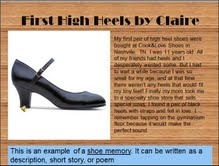
I try to use at least 2 examples and encourage students to come up with their own creative approaches. These 3 examples show different types of shoe poems: question-answer; shoe memory; and shoe conversation They offer choices and also show different styles of multimodal design. Tell students the blue box is information to help them – it is not part of the poem!


For this shoe memory, Claire selected a wooden floor background and a tap dancing sound effect to complement her written memory of the thrill of wearing her first pair of high heels when she was 11 years old.


This last example is likely to appeal to kid interested in sports. It illustrates a different visual style and how to use the audio-record tool to make the shoe conversation can come alive with dramatic dialogue.


Now for the fun part – create your own shoe poem. I often have students work with a partner so they can benefit from the talents, knowledge and skills that each brings to the task. Working with a partner also requires that they talk about design decisions and negotiate their collaboration.


I use PowerPoint to provide the directions for the activity. I project it on the screen while students are working, and put it in a folder on their computers so that they can consult it as needed. I do this to avoid repeating directions!


Since this was an introduction to multimodal composition for these students, I scaffolded it by putting a folder of shoe images on their desktops. Of course, if they had a special shoe in mind that wasn’t in the folder, they searched on the Internet.  While there are steps involved in creating and producing multimodal pieces, students can change the order as needed. This outlines the overall process; schedule intermittent sharing sessions so that students can present and get feedback as they go along.

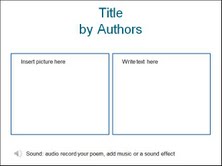
Again, since these students were new to both shoe poems and this type of multimodal composition, I scaffolded it with a template they could use, if they wanted. I remind students that it is one way, and they may have a different way that will work better for them.


The Share, Reflect, Respond stage happens during the process to get feedback, and at the end, to celebrate. Students are more influenced by each other’s work than they are by teacher examples!
I combine students’ class presentations with some kind of publishing. Audience is important; the Internet offers multiple options for publishing student work. I also make color-printed hard copies when I can.

And that is a wrap, my friends! Hope to hear about the creative work you are doing with your students to transform them into designers and multimodal composers!