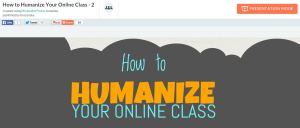
Many posts on Literacy Beat relate to visual literacies in digital environments, and this week I wanted to share with you an infographic (thanks to our LiteracyBeat friend, Peggy Semingson) that describes ways to humanize the online class or course. Email and threaded discussion communications can seem cold and dry at times. But teaching is an art of the heart and soul as much as it is about the stuff of any content. I think you are going to like this infographic! Also, be sure to check out the presentation mode to break down the elements of the infographic. The presentation mode can be activated in the top, right of your browser.
PiktoChart – Click to open the infographic.
Peggy Semingson added: “Infographic was created by Michelle Pacanksy-Brock at Cal State Univ., Channel Islands (Instructional Designer). Her blog/website is here: http://www.teachingwithoutwalls.com/. I actually also came across her interactive syllabus example in the Online Learning Consortium class on The Interactive Syllabus.” Read more from teachingwithoutwalls here.
You might be like me if you scroll through your Facebook news feed clicking “like” but come to a screeching halt when you find a social media quiz like this one, Which Social Networking Site Are You? on Cha Cha. It turns out that I am Google+. Want to know which Avenger you are from the Marvel series? Take this quiz on The Escapist. According to this quiz, I’m Hawkeye.
These quizzes that focus on the quiz taker and often combine popular culture are a little addictive. But what if they were educational tools, too? I set up a free account on Qzzr to find out.
8.12 Students analyze the transformation of the American economy and the changing social and political conditions in the United States in response to the Industrial Revolution.
(4) Discuss entrepreneurs, industrialists, and bankers in politics, commerce, and industry (e.g., Andrew Carnegie, John D. Rockefeller, Leland Stanford) (1998, p. 38).
Common Core State Standard for writing and related substandards.
I created a social media quiz that asks students, “Which Robber Baron are you?” Based on their responses, they are given a prompt for writing based on the popular RAFT technique [click here]. In this example, I gave students the option to choose the topic based on their responses. I controlled or assigned the role, audience, and format. When I learn more about social media quizzes, I will add the R, A, and F into the quiz, as well. Try out the quiz, below—you know you want to!
Click the image to take the quiz (opens in a new window)
To set this up, I designed an Excel template with two sheets (see below). One sheet is for the overall profile for each choice; in this case, Leland Stanford, John D. Rockefeller, Andrew Carnegie, and J. P. Morgan. For each, I wrote a profile in second person (you are….) which I post as an outcome. If you would like to see the Excel spreadsheet I used, please click here. Each profile is set up according to criteria I determined in advance: Early life, interests, business focus, and so on. The Qzzr tool allows me to choose an outcome (in this case, one of the Robber Baron profiles along with a format type), and I enter the questions from the Excel sheet into Qzzr. Just copy and paste from Excel into Qzzr and voilà!
Tabs for each sheet are on the bottom left.
Next, I create a link to a writing prompt based on the students’ responses in Qzzr and place that in the final outcome description (for example, “ You are John D. Rockefeller”). I linked the prompt to this blog, but you may use a variety of platforms to deliver the prompt to students (e.g., Google Drive, your course management system). The great thing about Qzzr is that if the students don’t like the assigned topic, they can go again.
In this example, I wanted students to compare the assigned Robber Baron with another in the same industry. The prompt, which you may download here, is based on the format of the prompts provided at Achievethecore.org for informative writing.
Good luck, and have fun, too. Learn more about differentiation on LiteracyBeat here. Also, check out other educational uses of social media quizzes here.
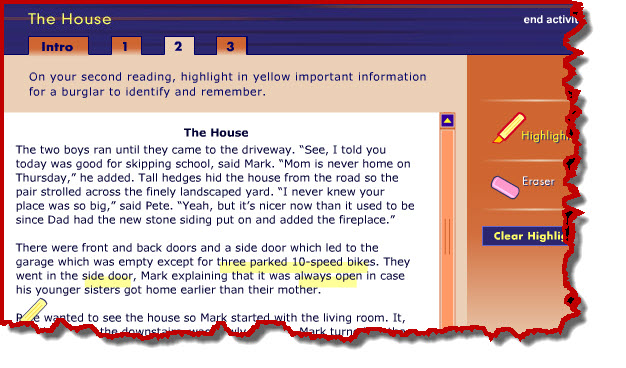
Students sometimes have difficulty understanding why they might want to reread a text. A simulation, part of an online professional development program from Annenberg Learner, clearly demonstrates how different purposes for reading result in attending to different words in the text. This simulation, titled “The House,” allows readers to interact with a short text by reading for three different purposes.
Source: Annenberg Learner, Teaching Reading 3-5
Teachers may want to project this on a digital display for the whole class or allow students to work in pairs on a computer then discuss their how their highlighted text changes depending on the purpose for reading. Students come to see how highlighting a text can help them pay greater attention to what it says, as well. The digital highlighter and eraser tools are easy and fun to use. To try it, click here then choose “The House Interactive” link.
In July 2014, I was so inspired by the presenters and participants who attended the Summer Institute in Digital Literacy (also see the Institute Wikispace at https://dliuri2014.wikispaces.com/). This six-day institute held at the University of Rhode Island focused on how literacy is changing as a result of emerging media and technologies. It offered participants an exciting and hands-on experience in which to discuss and explore new approaches to teaching literacy in today’s digital age. Presenters introduced a wide array of technology tools that can be used to create digital products, critique media, and curate online resources in engaging and efficient ways. I’ve spent the last several months since the institute exploring all the tools, techniques, and possibilities. This post focuses on just a few of these resources:
Vialogues:https://vialogues.com/ is a tool that can be used to spark meaningful conversations with students around videos you post to the platform. The discussions allow for a time-stamped, annotation-like discussion. Online interactions can refer specifically to exact parts of the video using time stamps. To scaffold the discussion, you can add comments, surveys and open-ended questions for your students that encourage students to critically analyze video texts.
Mozilla Popcorn Maker https://popcorn.webmaker.org/en-US/editor/ is another tool for analyzing video (its surprisingly easy to use). Just take a video from YouTube and students can add their own commentary using pop-up boxes. Students can use it to critique the messages in commercials, music videos, or public service announcements. Use it in conjunction with, or in preparation for, a face-to-face dialogue to provide an avenue for students to share multiple points of view.
Blendspace https://www.blendspace.com/ creates easy to use and beautiful to look at collections of inline resources (including images, videos, websites). Just drag and drop items into your Blendspace to curate an entire educational experience for your students. Optional features allow you to see which students have viewed the resources you posted. Quiz questions can be embedded throughout to help students track their progress through the content. Visit the Blendspace site and explore the different ways teachers are using this innovative resource to enhance educational experiences for students.
Symbaloo http://www.symbaloo.com/ is a curation tool that is organized like a grid. Each square contains an image and a link to a website. Many educators have used Symbaloo to organize sites that students regularly visit so they are accessible all in one place. Others have used it to collect resources for students to explore on a given topic. Collections are easy to share and are engaging to look at. Your students will make connections easily to the visual format. This video will introduce the benefits of its use in the classroom.
2015 Summer Institute in Digital Literacy Sign-Ups
If you have used any of these resources in your classroom, leave us a comment. We’d love to hear from you (and we’ll benefit from your experiences, too).
This posts describes how students can explore complex texts through a hypertext literary analysis. By using PowerPoint—a common program that is readily accessible on most computers—students are able examine the multiple layers of meaning in a passage through hyperlinking words and phrases to written explanations and related media. Multiple modes are employed—including text, music, images, animation, and videos—to help students dig deep into the textual features, intertextual connections, and personal responses that produce meaning in fiction and poetry.
Creating a Hypertext Literary Analysis in PowerPoint
This strategy uses PowerPoint to create a multimodal hypertext with interconnected slides. The composing process begins by inserting the text to be analyzed on a blank PowerPoint slide, which functions as the anchor of the hypertext. Next, students can create a deck of blank slides that can easily be linked from the analyzed text. Words or sections of the text can now be hyperlinked to other slides by using the ‘Insert’ menu and designating the desired destination for the link. The majority of links will lead to other slides within the document, but hyperlinks can also be used to connect to other documents or to websites (video tutorial on hyperlinking in PowerPoint).
Once a clear and fluid structure has been established in PowerPoint, it’s time to begin incorporating multiple modes for analysis. Analysis slides will, of course, include written explanations of the textual features being explicated, but this strategy also asks students to use media to deepen and support the analysis. PowerPoint allows users to embed images, audio, and video and offers tools for editing and layering these media. Students can manipulate their chosen media to reflect themes in the text or to illustrate their personal response (see Smith & Renner, in press for more information about integrating a hypertext literary analysis in your classroom).
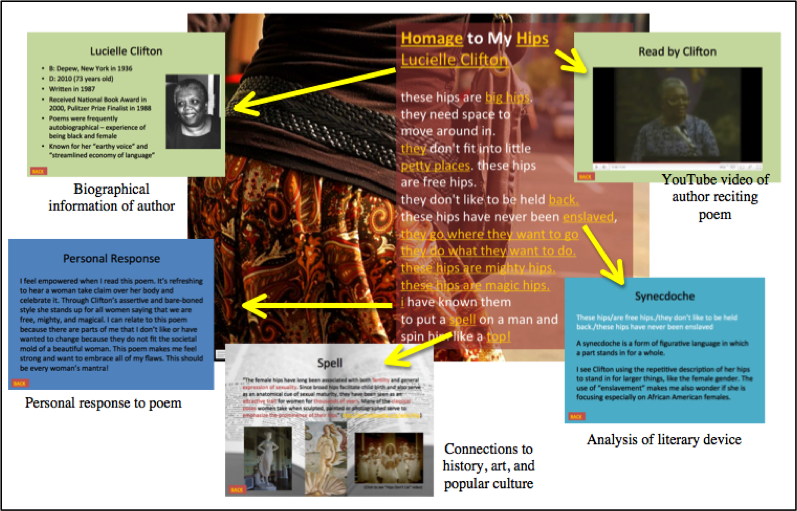
For example, in a hypertext literary analysis of Lucille Clifton’s poem “Homage to my Hips,” the composer hyperlinks from a PowerPoint slide that contains the original poem to other slides that include Clifton’s biographical information, intertextual and pop culture connections, a YouTube video of Clifton reciting the poem, analysis of literary devices, and personal response. Images, color, videos, and music are also used purposefully to organize, supplement, and extend the written analysis.
Example hypertext literary analysis for the poem “Homage to My Hips” by Lucille Clifton
There are a variety of ways a hypertext literary analysis can be adapted. Melanie Hundley at Vanderbilt University asks pre-service English teachers to explicate poems through hyperlinks and multiple modes (Hundley & Holbrook, 2013). Nicole Renner and I used this assignment in a 12th grade AP Literature and Composition class for students to analyze important passages from Tim O’Brien’s The Things They Carried. Through hyperlinks, students examined literary elements, such as metaphors, irony, and theme. They also hyperlinked to intertextual connections, including other literary works, films, and popular culture references, as well as key words and phrases, questions, and personal reactions (Smith, 2013; Smith & Renner, in press).
This type of nonlinear and multimodal analysis supports students to develop important literacy skills, including reading and comprehending a complex literary text, interpreting words and phrases with connotative and figurative meanings, and examining themes, structures, and points of view.
References
Hundley, M. & Holbrook, T. (2013). Set in stone or set in motion?: Multimodal and digital writing with preservice English teachers. Journal of Adolescent and Adult Literacy, 56(6), 500-509.
Smith, B. E. (2013). Composing across modes: Urban adolescents’ processes responding toand analyzing literature. Unpublished doctoral dissertation, Vanderbilt University, Nashville, TN.
Smith, B. E. & Renner, N. B. (in press). Linking through literature: Exploring complex texts through hypertext literary analysis. In T. Rasinski, K. E. Pytash, & R. E. Ferdig (Eds.). Using technology to enhance reading: Innovative approaches to literacy instruction. Bloomington, IN: Solution Tree.
During the last year, Dr. Diane Lapp and I had the opportunity to work with several prominent thought-leaders to explore how multiple literacies and multicultural education intersect and promote greater learning and understanding amongst our students. The result, under the guidance of Dana Grisham, was a themed issue of Reading and Writing Quarterly that was just released online. In the introduction, Diane and I wrote, “Digital technology, whose users comprise ever-changing communities, permits previously disconnected worlds to find commonalities and explore differences. Technology has the potential to connect students and educators across cultures, and, at the same time, make it possible for students to participate more fully in their own cultures” (Wolsey & Lapp, 2015, p. 97).
The six articles in the current special issue of Reading and Writing Quarterly each address topics that demonstrate how technology can facilitate learning, build students’ understanding of their culture, and construct bridges across and to other cultures. The table of contents may be found below. Please take a few minutes to visit the special issue on the Taylor and Francis website (preview and abstracts) or through your university electronic library resources.
• Imagining Writing Futures: Photography, Writing, and Technology by Cheryl A. McLean & Jennifer Rowsell
• Fostering Students’ Science Inquiry Through App Affordances of Multimodality, Collaboration, Interactivity, and Connectivity by Richard Beach & David O’Brien
• iPad Deployment in a Diverse Urban High School: A Formative Experiment by Nancy Frey, Douglas Fisher & Diane Lapp
• The Council of Youth Research: Critical Literacy and Civic Agency in the Digital Age by Antero Garcia, Nicole Mirra, Ernest Morrell, Antonio Martinez & D’Artagnan Scorza
• Multicultural Education and Multiliteracies: Exploration and Exposure of Literacy Practices With Preservice Teachers by W. Ian O’Byrne & Shane A. Smith
• A Digital Tool Grows (and Keeps Growing) From the Work of a Community of Writers by Nancy L. Roser, Melissa Mosley Wetzel, Ramón Antonio Martínez & Detra Price-Dennis
Reference:
Wolsey, T.D. & Lapp, D. (2015). Introduction to teachers and students as creators in blended learning environments. Reading and Writing Quarterly, 31(2), 97-101. doi: 10.1080/10573569.2014.963906
Recently, some folks asked for a copy of the Vocabulary Video word webs I use to guide students in researching the meaning of their word and developing ideas for their Vocabulary Video skit. I’ve posted two word web maps below, one that can be used with any word and one that is customized for working on character attributes. I’ve also provided an Assessment Rubric and a Guide Sheet that you can adapt to fit your context. To learn more about Vocabulary Videos and view some examples, see my Literacy Beat post on VocabVid Stories. Have fun exploring word meanings through student-created videos!
Sometimes, searching for and selecting the best content online can take as much time as actually watching, reading, or engaging with the content itself. This is especially true for parents and teachers who often make the selections for children. This is so for text and image-based digital content but also for video. Youtube EDU provides some guidance for teachers and parents. In this LiteracyBeat post, I will tell you a little bit about a new service that curates video content from a variety of sources and for specific audiences: Pluto TV
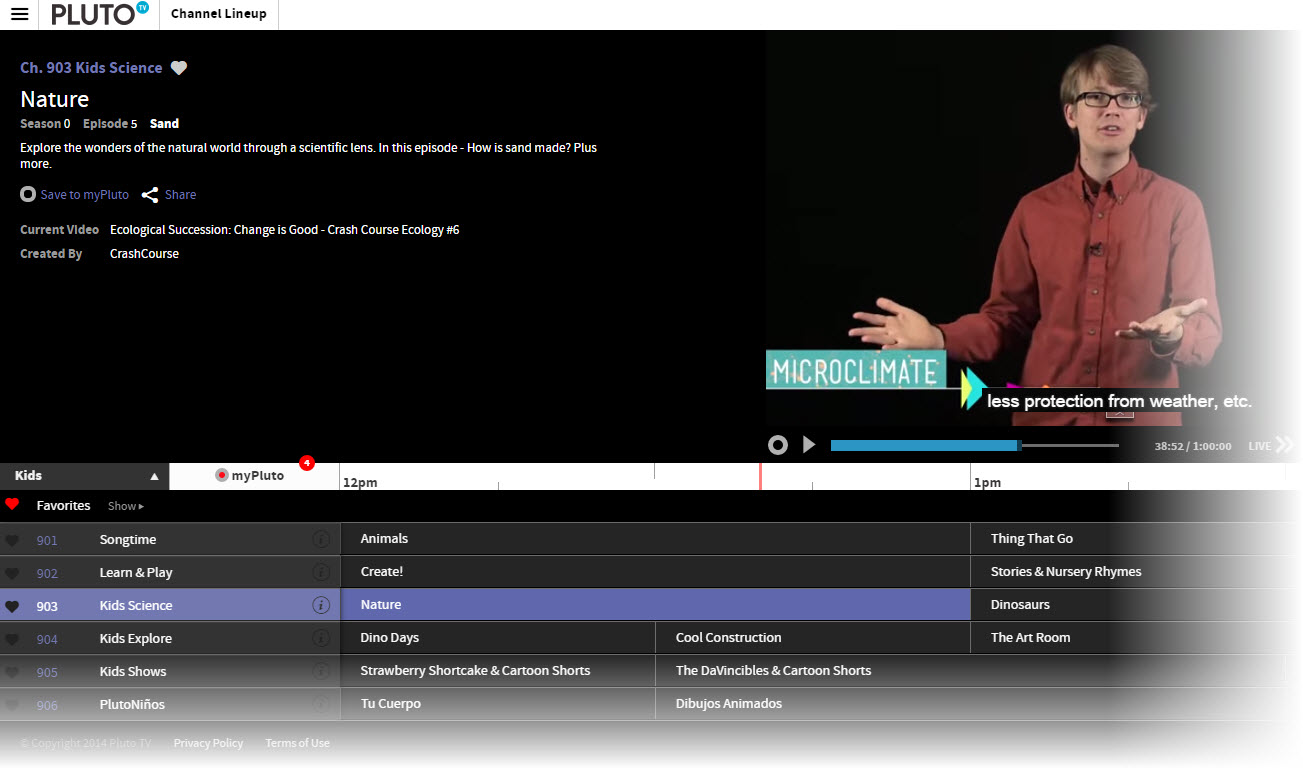
Where YouTube EDU uses an electronic discovery system to identify content, Pluto TV employs about 15 human beings who search for and curate videos. For parents, teachers, and children, the curation process is particularly important because each of the children’s channels (currently channels 901-906, click the “Channel Lineup” button on the top left) on Pluto are aimed at a different demographic, a very important feature that differs from television channels that may air content for preschool children in the morning and elementary-age children in the afternoon. Moreover, the curated content filters out shows on popular channels that don’t always deliver the educational or useful content parents expect. There is also a Kid’s Mode with a parent lock feature. Shows can be saved for future viewing or a reminder sent that a show is about to air.
Pluto TV screenshot – Kid’s Channel Lineup
The interface is a familiar one that looks like the channel line-up on your television service provider. Each show plays at a specific time and it is possible to save a show or set up a reminder to watch it later. Of course, Pluto is well-designed to work on multiple devices and there is an app to improve the experience, as well. Learn more about Pluto here.
A rule of thumb we have come to find helpful in any language learning environment is that the more one uses a language, the more likely it will be that proficiency develops in that language. Of course, effective instruction, useful models, and other resources are all important, as well. A resource from the Common Core State Standards website suggests that English language learners, among other things, should have:
Opportunities for classroom discourse and interaction that are well-designed to enable ELLs to develop communicative strengths in language arts;
Ongoing assessment and feedback to guide learning (p. 2).
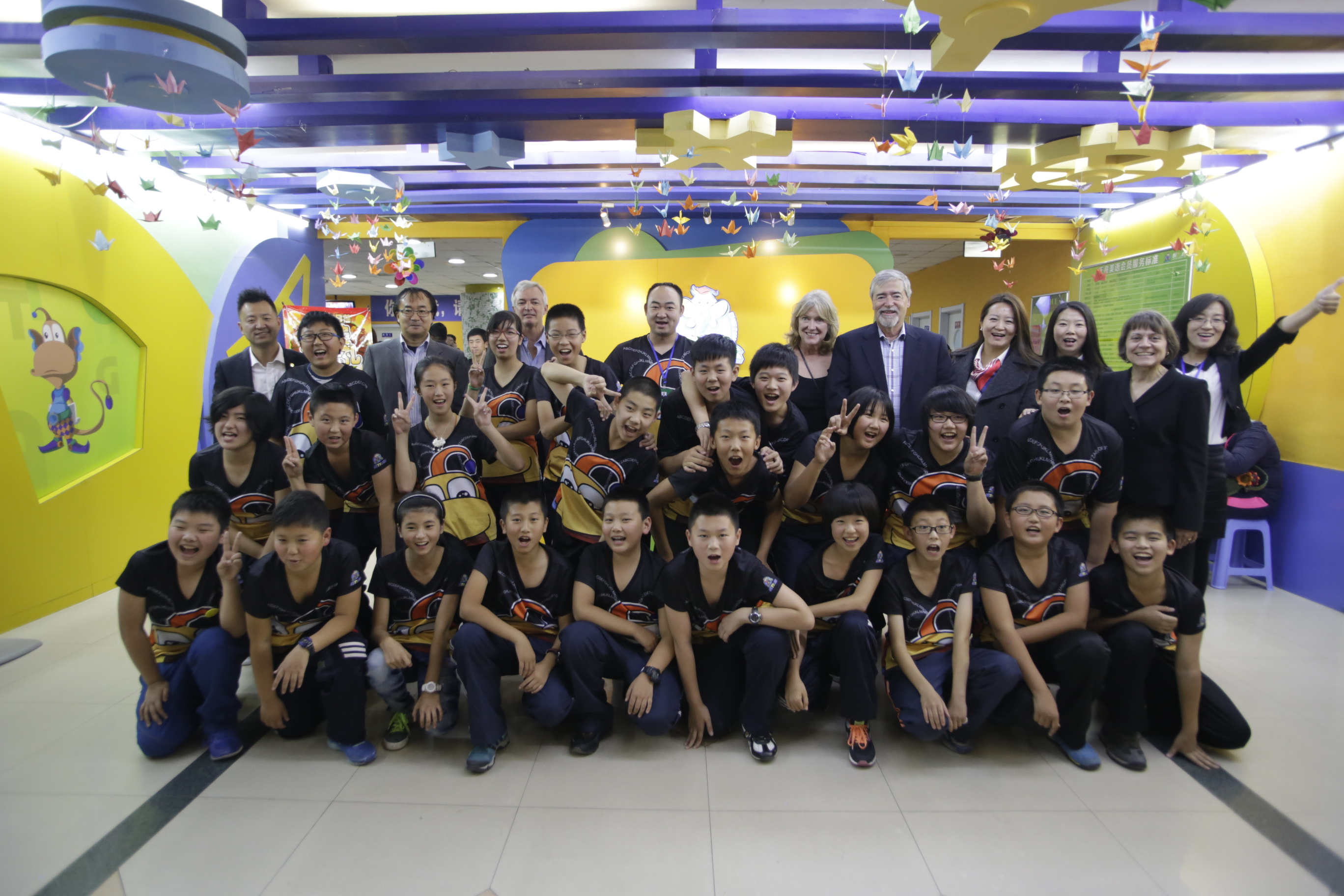
Recently, we had the opportunity, as part of a delegation to meet with education leaders in China, to observe a class of middle school age students debate a topic as a way of integrating speaking, listening, and presentation tasks at Tiantong Education Group’s teaching center in Shenyang, China All of the students are English language learners.. The teacher called the process “debate” but we have modified this title a bit to differentiate it from other debate protocols to “Whole-class Great Debate.”
The students had just returned to class after a national holiday, and, as you may be aware, China is grappling with pollution that causes health problems for many citizens (for example, read this news article about pollution in Beijing). Students were asked to “state up their opinion” as to whether it was a good idea to stay home during the holiday or to go somewhere, such as the beach.
Students sat in rows, two on each side, facing each other. Initially, a student on each side states an opinion that staying home or going out for the holiday is their preferred option. Each side then adopted one of the two stated positions. They met in small groups to come up reasons in support of staying home or going away. Next, a student stated the opinion to which the other side responded. Students they returned to their group to determine counterarguments to those they heard. The process began again. A selected student (a volunteer in the class), then summarized the group’s position.
So far, this seems much like a typical classroom debate. However, to keep the students engaged in the discussions and to encourage them to listen to one another, the teacher developed protocols for speaking to the class. Students were encouraged to stand up and speak up taking turns from one side or the other. The spontaneous nature of standing and speaking motivated students to listen so they might speak. However, at times, more than one student from a side might want to speak. They learned to call “I’m, first” but sometimes it was hard to tell who was actually first. To keep everything moving and in control, students could use a version of “rock paper scissors” to decide who would actually speak first. Finally, each side met again to review their opinions and the counterarguments to their opinions, and a final summary speaker was elected.
The teacher did choose a colleague to come in and evaluate the debate and select a winner based on a rubric for developing and stating an opinion, but it was clear that the debate’s main goal was interaction in English requiring students to listen carefully to each side, discuss their opinions and those of the other side, then speak publicly about it. The teacher recognized the strengths of each team’s presentation. We hope you enjoy watching this video of the Whole-class Great Debate.
Representatives from IAIE include Jin Zhang, Dana Grisham, Thomas DeVere Wolsey, Marc Grisham.


 Bridget Dalton
 berdwyer
 Blaine Smith
 danagrisham
 jillcastek
 TDWolsey