By Thomas DeVere Wolsey
One of my goals as a teacher and professor is to guide my students to think of themselves as readers, authors, and creators. To help students realize just how much reading and writing have played a part in their lives, I use an assignment I call My Life as a Reader and Author. The assignment involves the creation of a mandala with symbols representing different aspects of literacy in the students’ lives. The directions, paired with examples in the PowerPoint are fairly simple:
The texts we read and the texts we compose can have a powerful influence on our identities. In this assignment, you will create a visual representation of your life as a reader and author using the mandala to organize and capture your ideas. Briefly explain each symbol.
Zahraa created this mandala, below, using digital tools.
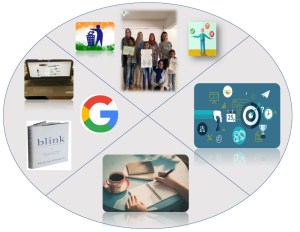
Zahraa’s Mandala
She then described the significance of the images.
I divided my mandala into four sections:
I added a photo of my laptop as usually I use it to read online and also to download softcopies of the books that I want to read. I like to read on my laptop as I have different folders to save whatever I want to read and highlight on it.
I added the photo of the book the power of thinking without thinking. It is the most recent book that I have read. I found this book so interesting and I learnt a lot from it. In addition, I recommended this book to my friends who do not like to read very much as I found the author’s way of delivering information is so good.
I added google logo as it is my close friend when I need to know or read about anything.
- Junior development section
In this section I added a photo of my weekly visit to children orphanages. I am a part of Volunteers In Action (VIA) club at AUC. Every week end we visit an orphanage and we give sessions to children about different things like peace, cleanness, attitude and manners. I added this photo because these children motivate me to read more about the topic before delivering it to them in order to teach them in a correct good way.
I added photos of cleanness and right & wrong photo to highlight some of the things I teach them during the sessions
While reading I experience new things and know a lot of new information. This photo describes things that one can achieve while reading like how to manage your time, select your goals and how to learn from others mistakes, especially if you are reading about someone’s bibliography.
In the writing section I added a photo to describe my favorite time of writing which is in the early morning with a cup of coffee.
Malika chose to combine shapes from the Internet and then draw her symbols.
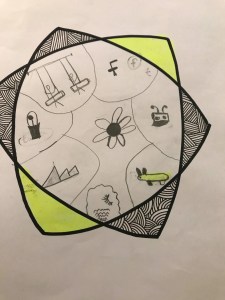
Malika’s Mandala
Resources
Mandala Generators Online:
Staedtler:
MandalaCreator:
MandalaMaker:
ColorMandala:
DrawMandala:
Mandala Creator:
Mandala Creation Software:
MandalaMakerTM :
Mandala Maker from Tucows:
Adobe products and plugins (e.g., Illustrator, Photoshop) that can be used to create mandalas).
Illustrator:
MirrorMe plugin for Illustrator:
PhotoShop:
Inspiration:
Mandala Project:
Filed under: avatar, digital content creation, multimodal | Tagged: Author, My Life as a Reader, reading, Wolsey, writing | Leave a comment »


 Bridget Dalton
 berdwyer
 Blaine Smith
 danagrisham
 jillcastek
 TDWolsey


 Literacy Beat