by Lindsay Merritt with Karen Wood and Thomas DeVere Wolsey
This is the second in a three-part series exploring conversation and collaboration opportunities. Lindsay Merritt describes, in the post below, how she uses jigsaw and a graffiti wall to promote academic discussions in her classes.
Lindsay writes:
In my classroom, I use the jigsaw strategy to help my students “own” their work and their learning. I started to use jigsaw (e.g., Aronson, 2000) because I found that often when I presented a lesson students looked at me blankly because they were overwhelmed by too much teacher talk, or my directions were not clear. When I began using the jigsaw process, students become the “experts” in their topics, and had the opportunity to share, discuss, and collaborate with their classmates. My role became one of planning, monitoring, guiding instruction, and having the pleasure of seeing first-hand the “ah ha” moments of my students’ learning.
My class has been studying Africa through our social studies curriculum. We are learning that Africa is not a country, but a continent made up of many different countries and cultures. I could not think of a better way to share this information than through the jigsaw strategy. Students worked in five groups, one for each of the regions of Africa (east, south, north, west, and central). Their job was to look through the informational text, Hands on Africa (Merrill, 2000) and become experts on their region’s culture, location, geography, and countries within. As they worked I was able to hear them reading together, discussing, and then writing in-depth sentences focusing on these key areas. Every student was engaged and participating. This process afforded me a perfect opportunity to continually assess their learning.
I then selected one student from each region to form a larger group to share their information. Students made sure to present their information clearly so that their classmates could understand. The students took their “expert” roles seriously and even started making connections among the regions. Once they finished sharing they went back to their home groups to create a visual display of their readings to put on the Africa graffiti wall. When they wall display was ready, the students had five minutes to view the wall and write down any new information or connections they could make to the information we were learning in the unit. I was thrilled to see my students so excited about the learning process and truly taking ownership for their learning.
In this video, Lindsay describes the jigsaw and graffiti wall approach:
Digital tools we have used to build on jigsaw and graffiti wall approaches include:
Aronson, E. (2000, May/June). Nobody left to hate. The Humanist, 60(3), 17-21.
Merrill, Y. Y. (2000). Hands on Africa: Art activities for all ages. Salt Lake City, UT: Kits Publishing.
Wolsey, T.D., Wood, K., & Lapp, D. (in press). Conversation, collaboration, and the Common Core: Strategies for learning together. IRA e-ssentials series: What’s New?Newark, DE :International Reading Association.
About the contributors:
Lindsay Merritt teaches 3rd-grade at Hope Academy in Cabarrus County, North Carolina
Karen Wood is a professor at the University of North Carolina at Charlotte.
By Jolene Graham with Karen Wood and Thomas DeVere Wolsey
The next three posts on LiteracyBeat explore possibilities for promoting discussion, often with technology embedded. Teachers have long known of the value of discussion in the classroom, but the Common Core State Standards also emphasize these skills in the anchor standards for collaboration and presentation. Please open the Common Core Standards that Address Conversation and Collaboration PDF to see these arrayed on a chart.
This week’s post was written by Jolene Graham describing the Exchange Compare Writing instructional approach which encourages students to have meaningful discussions. In the video, below, she describes how she uses digital technologies to enhance the activity. The strategy occurs in four steps.
Preparation Phase
Determine 6-8 significant terms to emphasize
Pre-assign students to heterogeneous groups of four or five.
Pre-reading Stage
Display, pronounce terms.
Groups use terms to compose a paragraph representing their predictions of the story they are about to read. All terms must be used.
Teacher assists, circulates, and monitors participation.
Students polish compositions in peer-editing groups (Optional)
Groups share completed compositions orally.
Reading Stage
Students read passage focusing on significant terms.
Post-reading Stage
Students discuss terms as used in the selection.
Groups/class compose second passage reflecting selection content
Jolene describes a lesson that uses exchange compare writing:
I recently used exchange compare writing in my fourth-grade classroom as we read the book So Far from the Sea by Eve Bunting (1998). To prepare for my lesson I first read the book and chose key vocabulary that would help the children write a communal, predictive passage. These preselected terms were reviewed as a class to solidify the meaning of each term. Terms were defined by providing a picture or by using the word in a sentence. As a class we reviewed what was meant by working collaboratively, and we discussed the importance of both listening and speaking to other group members. The students were divided into heterogeneous groups and invited to collaboratively write a paragraph that predicted what the story was going to be about. I used this communal writing time to walk around the room and listen to suggestions, ask questions, and promote collaboration. It was a perfect way to assess the learning that was occurring.
After the groups wrote their collaborative predictions, we read the story, listening carefully for each of the key vocabulary words. To make sure my students were actively listening I asked them to raise their hands when they heard one of the words we used in our predictive passage. After the reading we discussed how our predictions compared with what actually happened in the story. The students then were asked to go back into their same groups and collaboratively write a summary of the story, using the key terms correctly.
Below, you will see a list of vocabulary terms, one predicted response and one response after reading that student groups might create.
Key Concepts/Phrases:
So Far from the Sea by Eve Bunting
Grave
Manzanar War Relocation Center
Japan
Guard towers
Monument
Boat
Neckerchief
Silk flowers
Attack
Barracks
Cub Scout uniform
Origami birds
Predicted passage (A passage the teacher wrote as a model for students using the terms selected, above).
Japan attacked America so we sent the Japanese-American people to the Manzanar War Relocation Center. There were guard towers to make sure the people couldn’t leave and barracks for the people to sleep in. The relocation center was far from the sea and if you looked really hard you could see boats. People didn’t have a lot to do so they spent time making origami birds and silk flowers. Some people died and a graveyard was made. When the war was over I was so excited I decided to wear my scout uniform and neckerchief. Today there is a monument there for all of the people who were sent to that camp.
Student response after reading the passage
Laura and her family were traveling to Manzanar War Relocation Center to visit the grave of her grandfather. This will be the last time they are visiting since they will be moving from California to Massachusetts. Laura’s father tells what the camp used to look like with guard towers, barbed wire fences, barracks, a hospital, churches and a school. All Japanese-Americans were sent to live there because Japan attacked the United States.
Laura’s grandfather was a tuna fisherman. He owned his own boat and loved the sea. When the Americans came to take them to the relocation camp, Laura’s father wore his Cub Scout uniform so the guards would know he was a true American.
Laura’s family brought silk flowers to place at her grandfather’s grave. There is a memorial to mark the graves of those who died in the camp. People have left offerings such as rice cakes, origami birds, and bits of colored glass. Laura brought her own neckerchief from her scout uniform to place as an offering because her grandfather was a “true American”.
As the groups shared it is again so obvious who has really comprehended and gained understanding of the initially identified terms. Like many collaborative strategies, communal writing provides wonderful opportunities to formatively assess your students.
Listen to Jolene describe how she uses Exchange Compare Writing using Google Docs:
Bibliography:
Bunting, E. (1998). So far from the sea. New York, NY: Clarion Books.
Wood, K. D., Stover, K. & Taylor, D.B. (in press) Smuggling writing across grades K-5: Standards-based instruction for the 21st Century Classroom. Thousand Oaks, CA: Corwin.
Wolsey, T.D., Wood, K., & Lapp, D. (in press). Conversation, collaboration, and the Common Core: Strategies for learning together. IRA e-ssentials series: What’s New? Newark, DE :International Reading Association.
About the contributors:
Jolene Graham teaches 4th-grade for Charlotte Mecklenburg Schools, North Carolina
Karen Wood is a professor at the University of North Carolina at Charlotte.
This month, I feature some music you may have heard and a website you might like. The two go together, but you will need to make this a multimedia moment. First, start the YouTube video, below, so you can hear the music from The Alternate Routes.
If you would like to read the lyrics, point your browser to The Alternate Routes website.
Next, click this link http://www.newtownkindness.org/ and visit Newtown Kindness. The link will open in a new window so you can listen to the music as you explore the site. Newtown Kindness is an organization dedicated to teaching students to be kind and recognizing those who are kind in any of many ways. The site honors Charlotte Bacon, who died at Sandy Hook Elementary School, by turning tragedy into hope. Maybe you and your students will want to become involved by supporting therapy and comfort dogs, taking a kindness pledge, or engaging in a lesson about responding with kindness. Watch the video below to learn about some of the recipients of the Charlotte Bacon Acts of Kindness Awards.
Heroes don’t look like they used to, they look like you do. -The Alternate Routes
At a roundtable in the Research Into Practice Series on Monday, Karen Wood, Diane Lapp, and DeVere presented some ideas about conversation, collaboration, and the Common Core State Standards. Find out more about the IRA e-ssentials series by pointing your browser here: http://www.reading.org/general/Publications/e-ssentials.aspx
Last year at IRA, Dana was awarded the TILE-SIG Research Award. This year, she is the keynote speaker. The title of her keynote is “Changing the Landscape of Literacy Teacher Education: Innovations with Generative Technology.” Congratulations go, also, to our friend and colleague, Denise Johnson at the College of William and Mary, who is the TILE-SIG Research Award recipient this year and next year’s keynote speaker.
Bloggers Dana and DeVere with colleague Linda Smetana discussed their work with Vocabulary Self-collection Strategy Plus (VSS+) at the Meet the Researchers Poster Session on Sunday. Their poster (via Slideshare) you can view here:
Dana and Linda Smetana presented research on the manner in which preservice teachers approached and used ebook formats.
And great news! Bloggers Jill and Bernadette with colleague Colin Harrison wrote a new book that debuted today.
Colin, Bernadette, and Jill presented shared resources and ideas excerpted from their new book published by Shell Education. The IRA session entitled Transform Your Literacy Practice Using Internet Tools and Resources: Meeting Students’ Instructional Needs while Addressing the Common Core State Standards. Click here to access the presentation materials andwebsite for the session.
In the book, readers will discover how to effectively use technology to support students’ literacy development. New classroom uses for technology are introduced in this easy-to-use resource that help educators enhance students’ attention, engagement, creativity, and collaboration in reading and learning. Great for struggling readers, this book provides strategies for making content-area connections and using digital tools to develop reading comprehension.For more information about the book, click here.
Most of the Literacy Beat Team will be in New Orleans at the International Reading Association (IRA) this weekend. We have created a series of short posts with links to online resources about our activities there. Each day of the conference, you will find our content shared here for you.
On Friday, Jill and DeVere will be at the Writing Moments Institute organized by Kathy Ganske.
Jill presented on the topic: Using Reading, Talking, Writing, and Digital Tools to Understand Disciplinary Texts in the Middle Grades
This session showed teachers ways to structure evidence-based discussions that draw upon both text and experience to aid students in developing academic language, writing proficiency, and content-area learning. Participants took part in informational text reading and evidence based discussions that serve as preparation for writing an argument. Ways to use digital tools to support writing and thinking were highlighted and demonstrated. Workshop materials, include the PPT and all activities can be accessed from the workshop’s Google Site.
DeVere addressed: Writing from Sources in the Disciplines: Tips for Engagement and Digital Tools, Too
How many sources do we need? Teachers hear this question all the time, and it is really a tough one, not as easy as it sounds. Writing from and with sources means students must often consult a wide variety of sources, use some, discard others, and make sure the sources they do use are appropriate and relevant. The task is not as easy as it sounds; then add to that the complexity (cf. Spiro, et al., 2004) of the topics students encounter in middle and high school, and an arbitrary number of sources suddenly seems to impose limits on student exploration, not a door to further exploration (Wolsey, 2010; Wolsey, Lapp, & Fisher, 2012). In this session, participants learned how to construct a prompt or direction for writing (e.g., Hillocks, 1986) that engages student-scholars, teach students to use solid argumentation approaches (cf. Toulmin, 2003, Walton, Reed, & Macagno, 2008) in the disciplines, promote inquiry through composing processes in content areas, and use digital tools.
Given the importance of good picture books to beginning readers, the goal of establishing picture book “abundance” is one that everyone can endorse. Supporting it as a cause and making it happen, however, are two very different things. Do the math. There are over 7 billion people in the world. Perhaps 10% of those people are birth to age 8, the ages for which picture books tend to be most important. That’s 700 million children. Now, many of those have plenty of picture books, but more of them do not.
However, for the sake of conversation let’s say 350 million children who need access to abundant picture books don’t have it.
So, how many picture books qualify as “abundant” enough to support each of those kids in learning even basic reading ability? A convenient and defensible number is 100. That comes from Evans and colleagues(2010) who discuss what they call “family scholarly culture” a terrific concept that describes families that read and discuss books together. In their longitudinal study of 27 countries with data covering 20 years, Evans et al display graphics indicating that almost regardless of parent education or income, the number of books in the home is the best predictor of school success, and each book added to the home, up to just about 100 seems to increase that prospect of academic advancement. So, 100 books is certainly abundant enough.
So let’s see, 350,000,000 kids x 100 books, that’s 35 billion books needed. Oh, and that number increases each year with the addition of another 4 million or so new children added to the world’s population. Sadly, the Bill and Melinda Gates Foundation doesn’t have enough money to make even a small dent in that, even if they could get books (written, edited, printed, bound, stored, and transported) at a cost of $1 apiece, they then have to get the books into those children’s homes.
So, let’s face facts, book abundance – 100 books for every child in the world – will never happen… WAIT!…or will it?
The Digital Solution
The alternative solution to the one I posed above of course is digital books. By leveraging the rapidly expanding digital network system around the world and then populating a library with 100+ creative-commons copyrighted, mostly non-fiction (the intention being to create generally universally interesting content) picture books and then translating and narrating those books in nearly 7000 languages (I know, I know, but stay with me), it could work.
Look at the Global Book Publication Matrix, below.
Global Publishing Matrix
Digital books can be created that are offered as a Global Public Good, i.e., A resource that is free for all (no login) and inexhaustible (digital). That’s the goal of Unite for Literacy, a small “social enterprise” company in Colorado that has a free library that went online in August 2013.
Digital Book Readers
Digital Book Reader
Digital Book Reader
Unite for Literacy to date actually has more than 100 books available in a free online library (www.UniteforLiteracy.com) and each one offers English text and is narrated in up to 18 world and indigenous languages. With the current languages, nearly half the families around the world can access the library and read the English book, listen to the English narration and/or listen to a book narration by a fluent native speaker of their home languages.
Plans include adding books created in collaboration with the content experts at local cultural institutions (museums, galleries, performance groups, sports teams, etc.) and of course adding more languages. Japanese was just added, Turkish and Slovak are on the way and Navajo and Cherokee are in the works. Also, when time and budget permit the books will be readable in the all of the world’s languages of instruction (about 200 by our count) as well.
Unite for Literacy is supported by generous corporate and organizational sponsors, all committed to world literacy and actively advocating for literacy in their communities. It is further being promoted by a growing number of educators, librarians and advocacy groups that take the online library link out to the communities that they serve. Sponsors are publicly recognized in the communities that they serve and on the companies’ websites, as well as in the library. Sponsorships are available for providing existing books for new language communities, for underwriting book authors to create new titles or to advocate for particular books with which they wish to be associated. Community literacy advocates take advantage of additional web resources to promote family readership and the accessing of books at home and school.
Digital Books from Unite for Literacy
Free, digital, narrated, picture books are the game changer. There are efforts well under way as this is written that seek to create inexpensive smartphones and free or nominally priced mobile Internet access around the world. Those efforts, backed by the titans of digital communication, will in a very few years put the riches of the Internet within reach of even those living in poverty. When these digital books become eventually available in all 200+ world languages of instruction and those texts are accompanied by on-demand narrations in the almost 7000 indigenous and immigrant mother tongue languages found in homes that send their children to those instructional settings, then in fact worldwide picture book abundance will be a reality.
Unite for Literacy is working to make a contribution to that effort.
Reference:
Evans, M., Kelley, J., Sikorac, J., & Treimand, D. (2010). Family scholarly culture and educational success: Books and schooling in 27 nations. Research in Social Stratification and Mobility, 28, pp. 171–197.
All images in this post courtesy of Unite for Literacy.
Digital Project Management Tools bring College and Career Skills Right into the Classroom
This weekend, one of my projects is to renovate the garden and put in spring vegetables. It’s up to me and my favorite nursery. All I have to do is motor on down to the garden center, buy what I need, and plant the seeds and seedlings. Other projects take a bit more planning, and digital tools can be a big help. Students often have a great number of projects in progress, and many of those involve collaborative work. Students work with students, with their parents, and sometimes members of the community. Teachers orchestrate much of the project management aspects, quite often. But, what if students could take on some of the College and Career Readiness Standards and learn how to manage their own projects?
Here are some of the College and Career Readiness Anchor Standards that require collaboration.
CCSS.ELA-Literacy.CCRA.SL.1 Prepare for and participate effectively in a range of conversations and collaborations with diverse partners, building on others’ ideas and expressing their own clearly and persuasively.
CCSS.ELA-Literacy.CCRA.SL.6 Adapt speech to a variety of contexts and communicative tasks, demonstrating command of formal English when indicated or appropriate.
The Common Core State Standards in English-language arts/literacy emphasize the need, for the first time, for students to work together in a variety of settings and contexts and to use their literacy skills to get the job done. Assigning, selecting, or choosing a project is the first step. Managing the project so that work that is planned is actually carried out is where technology comes into play. Class projects last from a day to several weeks, and they range from preparing presentations to the class, making a digital demonstration of knowledge, or engaging in various service-oriented activities.
A project management tool that has been around for more than a century is named after the man who created it, Henry Gantt (cf. Clark, 1923). The Gantt chart has been used in the military, in manufacturing industries, live sports events (think Final Four) and in long range planning just about everywhere—including schools. Gantt charts are useful because they graphically show, “Work planned and work done are shown in the same space in relation to each other and in their relation to time” (p. v). Their visual nature encourages student project participants to develop a plan, stick to it, and note their progress over time. Digital tools improve Gantt charts by automating some tasks, making them easily available to project participants at any time, and being infinitely expandable. The use of color further improves the appeal and utility of the organizer.
Gantt project management organizers can be created with sticky notes on a white board or wall (Click here to see one example), on butcher paper, or with an 11 X 17 piece of construction paper. However, technology can greatly simplify the task. Typically, they show the tasks to be accomplished, who is responsible for each task, and a timeline showing planned and completed tasks. Excel® spreadsheets offer one digital solution to the Gantt chart that makes updating simple, and you’ll see that data entered in one part of the chart is translated visually. Gantt charts can easily be created in a shared spreadsheet file such as those found in Google Docs, or with online apps specifically designed for this purpose (see figure 1), such as Smartsheet.
Figure 1: Image courtesy of Smartsheet.
Online apps, such as Smartsheet, make it easy to share the chart on a class webpage, blog, or course management system. Parents can see it, students can edit and change it, and everyone will know who has to do what in order to get the job done and done well. Read more about project management tools for the classroom in this interview with Jodi Sorensen of Smartsheet. The company provides a free student project sheet for teachers to get started–log in and play around; it’s fun. There’s also a free teacher syllabus sheet. All those binders of curricular materials may be a thing of the past. One feature of Smartsheet I liked is the capability of linking other files (pictures, documents, and so on) right to the project organizer. See how this is done in this video on YouTube starting at time 0.36.
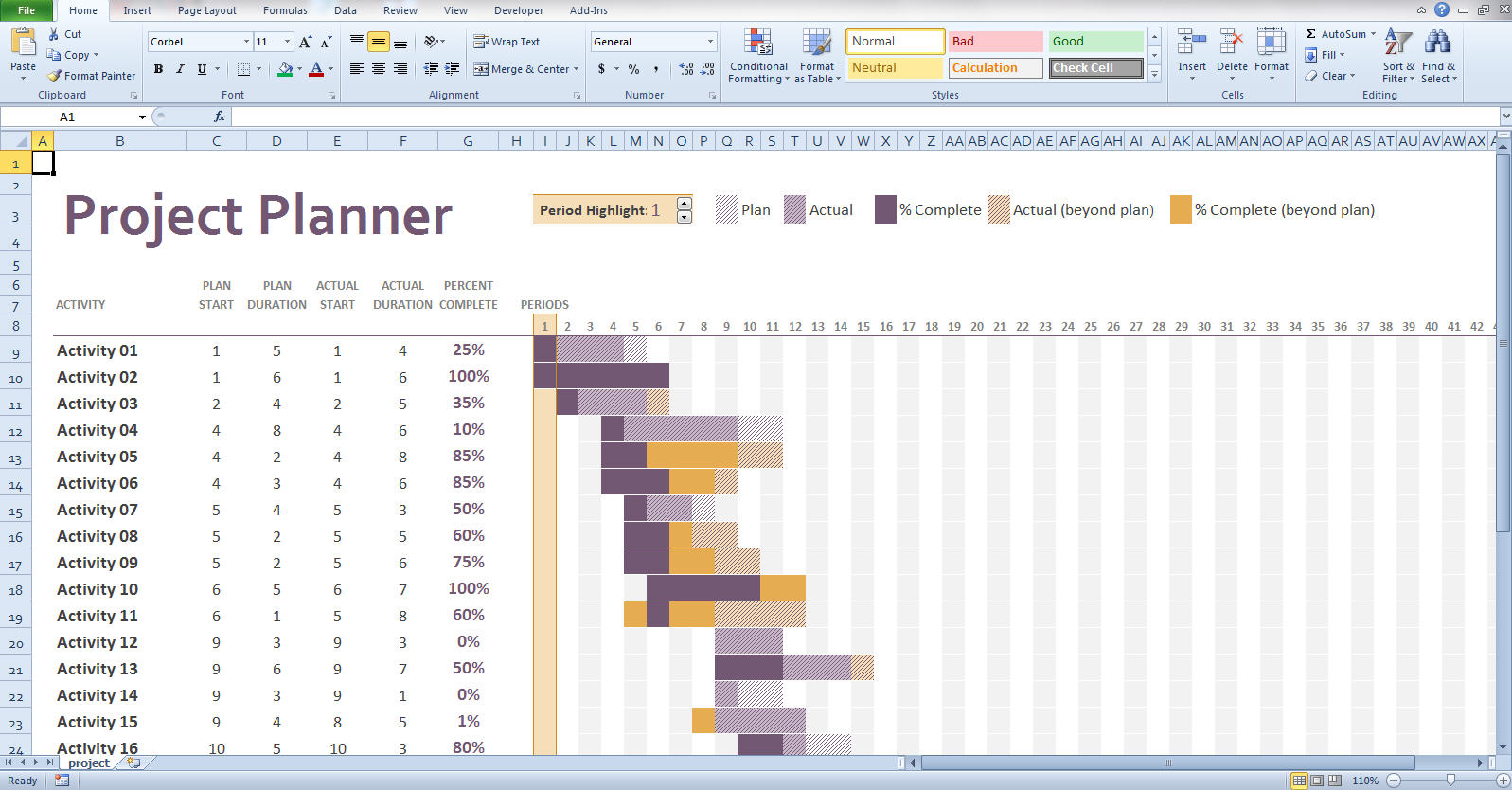
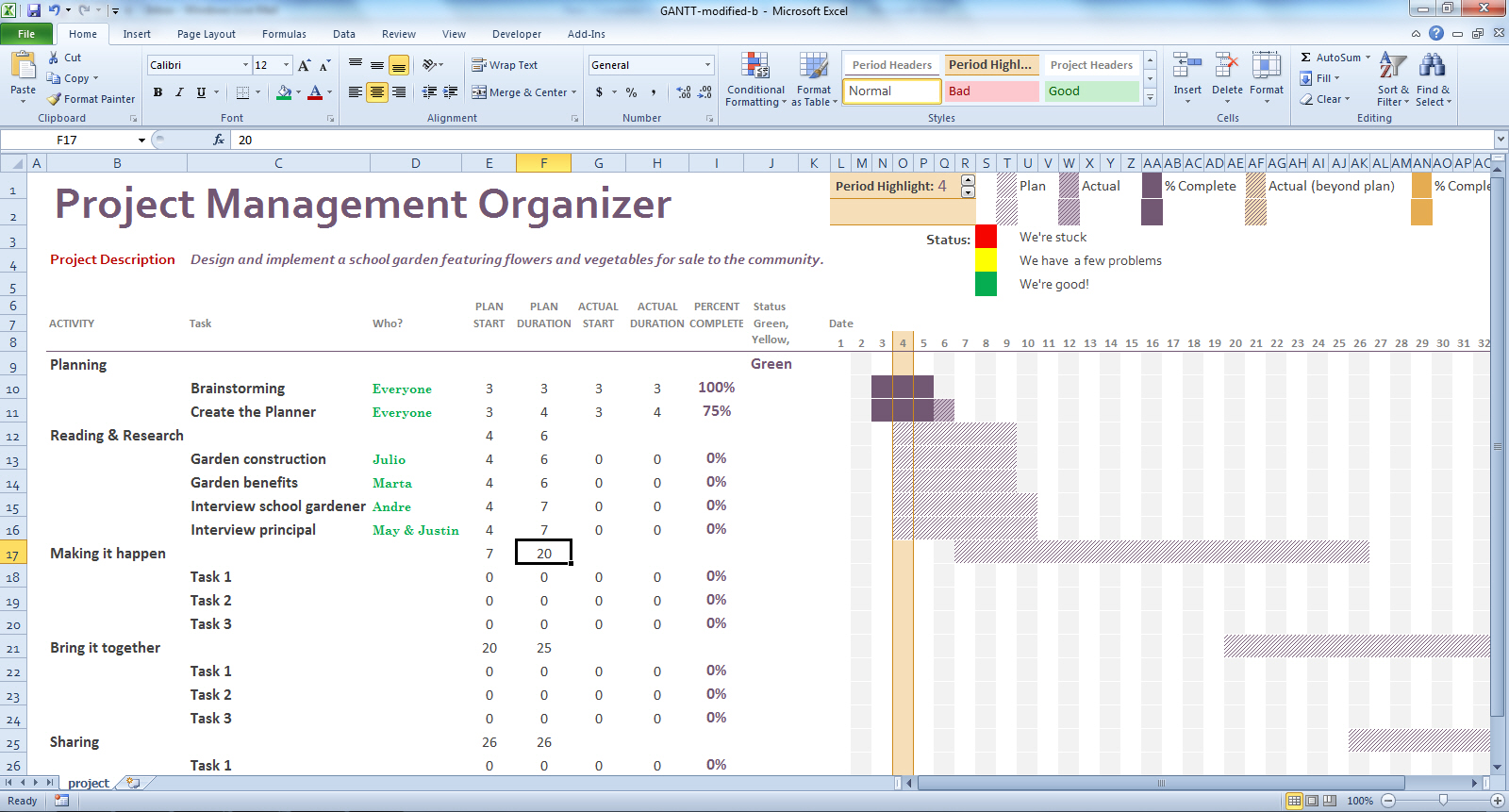
If you choose to use Excel or other spreadsheet software, you might find that templates for Gantt project management organizers are helpful because the setup is already done. In figure 2 you can see a basic template from Microsoft downloads, found here. Figure 3 shows a modified Gantt Project Management Organizer using Excel for use in upper-elementary and secondary grade classrooms, and you may download this template if you want to try it out.
Figure 2: Generic Excel Gantt chart
Figure 3: An Excel Gantt chart modified for school projects.
Both of these organizers allow students to quickly enter data about what they plan to do, how much they have accomplished, and how they are proceeding. The neat thing is that Excel and other spreadsheets or software automatically create the timeline showing what is planned, and what is actually accomplished. These examples show a start date for the first of the month, but teachers can create their own templates just by deleting columns for dates that don’t match the timelines for completion.
Choose the digital tool you plan to use (e.g., Smartsheet, Excel). Next, train a few students, perhaps one from each project group or team, to be the expert on using the project management technology. The teacher should not be the only resource for using the tool.
Help students define the major parts of the task. In the example in figures 1 and 3- above, the teacher defined large categories as
1. Planning, Reading and research,, making it happen, etc.
or
2. Research, interviewing, and so on.
At first, students will need help breaking down the specific tasks for each category. A model the teacher creates or from past student project will be helpful in guiding students to decide just what the specific tasks might be.
Start the project!
In schools and at the university, we often engage students in projects of all kinds. However, students need to know more than what the project is and what its goals or objectives are. They also need the 21st century skills to manage large projects that will help them succeed in their schooling and in their careers. Have you tried using digital project management tools, or even a traditional paper-based Gantt chart? If so, tell us about it by posting a comment.
By guest posters W. Ian O’Byrne & Sue Ringler Pet, & regular blogger Thomas DeVere Wolsey
The nature of literacy is rapidly evolving and these changes demand an expanded view of “text” to include visual, digital and other multimodal formats (Rose & Meyer, 2002; New London Group, 2000; Alvermann, 2002). A richer and more complex definition of literacy requires a complex theoretical framing of the “multiple realities” that exist between educational research and practice (Labbo & Reinking, 1999). Several colleagues* decided to experiment with the pecha kucha presentation style at a session of the Literacy Research Association, December 5th, 2013. What they learned from the session and their ideas for PK-12 classrooms and teacher preparation coursework is summarized in this post of Literacy Beat. Our pecha kucha session used multiple methods united by similar perspectives to investigate shifts in the space and stuff (Lankshear & Knobel, 2006) of learning.
Evolving pedagogical models for new literacies and emerging technologies hold “explosive possibilities” (Barab & Kirshner, 2001) for reading and writing spaces. Specifically, these studies examine literacies as cutting across chronotopes of time and space (Bakhtin, 1937) and evolving into “communities of inquiry” in which participants require new knowledge and identities (Gee, 2005).
Since the technological advances documented in these studies drove much of the change that we see in information and communication, researchers and educators attempted to answer the important question: How can the use of new and digital literacies in instruction enable “explosive possibilities” for meaning-making and identity construction? These studies examined literacies and digital texts while documenting perceived changes in social practice through the lens of teachers and students as agents of change.
What is Pecha Kucha?
Pecha kucha, Japanese for the sound of conversation, is a presentation method in which 20 slides are shown for 20 seconds each (6 minutes and 40 seconds in total). The format utilizes images more than words, keeps presentations concise and fast-paced, powers multiple-speaker events, keeps the interest level up, and gives more people the chance to show. Would you like to hear several Japanese speakers pronounce the term? Click here.
Teachers and Students use Pecha Kucha
Pecha kucha is well-suited for the age of the Common Core and other rigorous standards. The Common Core calls for students to evaluate information from diverse sources, present information in an appropriate style, and make strategic use of digital media. Further, the pecha kucha style requires student presenters to be concise and choose their words and images wisely and well. Students might present pecha kucha via webcast or video (think, YouTube or Vimeo) so that parents and other community members can participate. They may work in small groups around selected topics. Who says every presentation has to be made to the entire class, anyway?
Teacher Educators and Teacher Candidates use Pecha Kucha
The IRA standards for Literacy Professionals call for teacher candidates to employ traditional print, digital, and online resources to “meet the needs of diverse students” and “prepare learners for literacy tasks of the 21st century.” Arguably positioned in one of the most influential roles with regard to the explosive possibilities of digital literacies in PK-12 education, teacher educators must continually model well-considered integration of digital tools in university classrooms. Within the context of a disciplinary literacy course, for instance, professors may choose the pecha kucha platform for in-class presentations in lieu of the tired Powerpoint® platform, especially in cases where visuals are preferable to print text, to effectively encapsulate and express important concepts, terms, or ideas. In this setting, pecha kucha presentations can be posted and revisited on Blackboard or similar course platforms for review. Professors may also invite undergraduate and graduate students to learn and employ pecha kucha to explore and represent basic literacy concepts with digital images and metaphors — and teach them to classmates. Teaching and/learning such “basic” literacy terms (e.g., phonemic awareness, syntax, semantics) through a multimodal digital platform (pecha kucha) may lead to enriched understandings of the ways in which reading involves the coordination of multiple systems including traditional “components” theory of teaching reading instruction as well as sociocultural theories of literacy acquisition.
How to Create Pecha Kucha: Resources and More
What are the steps to creating a pecha kucha presentation?
This website lists presentation steps in pecha kucha format and a template is available there, as well.
A few tips for beginners might be helpful to teachers who want to coach their students and minimize frustration.
Richard Edwards suggests that pecha kucha can be easily adapted to two-person teams; that is, a 20 slide X 20 second presentation by one student can become a 10 slide X 20 second presentation by two students. He also staggers presentations over class sessions such that no one class session is devoted to a long series of pecha kucha presentations, which, like traditional presentations, can be quite tiring for the audience.
Because pecha kucha is image intensive, it is very important that students learn the basic principles of Fair Use and apply them. This post from an earlier LiteracyBeat column may be a good start. Learn more about Creative Commons and how it works to give students and other users the tools to share and use the creative work of others.
Similar to pecha kucha, Ignite presentations include 20 slides but they advance at the rate of 15 seconds each (total of five minutes). Some fairly good information about both ignite and pecha kucha are available from Trinity Valley Schools (opens as a PDF).
Assessing Pecha Kucha
Of course, any presentation in a classroom is an opportunity to learn and a chance to demonstrate what has been learned. Assessment includes the possibility of feedback about content knowledge, processes leading to learning, and presentation, speaking, and listening proficiency appropriate to the grade level. Mr. Holliday designed this rubric as a means of assessing and providing feedback on the pecha kucha format. This university rubric from iRubric takes into account content knowledge and this one, by Danny, is designed with the junior high or middle school audience in mind. Educator Jeff Utecht suggests that participants rate the pecha kucha presentation using a form in Google Docs for quick analysis and feedback. Also on the blog post are additional ideas and a rationale for using pecha kucha.
Typical assessments measure and provide feedback as to how the presenter met the pecha kucha criteria (including 20 slides X 20 seconds each, 6 minutes 40 seconds total), concision, design, and cohesion, as well as content. Choo (2010) suggests that makers and composers of digital texts consider the following:
• How do words function to “relay” or contribute to the meaning of an image?
• Where will the image be placed in relation to the words and why?
• How much of the frame-space will the image occupy, compared to the words?
• Is the focal point of the text on the image or on its words, and why? (p. 172)
Here is one attempt at pecha kucha by DeVere recreated from the December 2013 presentation at Literacy Research Association. It is not quite perfect (you will notice it is longer than the allotted time!), I am sure you’ll agree, but do play the video and let us know what you see.
What have you done in your PK-12 or university classroom with pecha kucha?
*Presenters at the Literacy Research Association, Dallas, TX: Kelly Chandler-Olcott (Chair), Stergios Botzakis (Discussant), Sue Ringler Pet, Greg McVerry, Junko Yukota with William Teale, Joan A. Rhodes, Katina Zammit, William Ian O’Byrne, Thomas DeVere Wolsey
Guest posters:
W. Ian O’Byrne is an assistant professor of educational technologies at the University of New Haven. Read his blog post on the topic of pecha kuchahere.
Sue Ringler-Pet works at Iona College, and you can read more about her here.
References:
Alvermann, D.E. (2002). Adolescents and literacies in a digital world. New York: Peter Lang.
Barab, S.A., & Kirshner, D. (2001). Guest editors’ introduction: Rethinking methodology in the learning sciences. The Journal of the Learning Sciences,10(1-2), 5-15.
Bolter, J.D. (1991). Writing space: The computer, hypertext, and the history of writing. Mahwah, NJ: Lawrence Erlbaum Associates.
Choo, S.S. (2010). Writing through visual acts of reading: Incorporating visual aesthetics in integrated writing and reading tasks. High School Journal, 93(4), 166-176.
Gee, J. (2005). Semiotic social spaces and affinity spaces. In D. Barton & K. Tusting (Eds.). Beyond communities of practice. Cambridge: Cambridge University Press.
Labbo, L. & Reinking, D. (1999). Negotiating the multiple realities of technology in literacy research and instruction. Reading Research Quarterly, 34(4), 478-492. doi: 10.1598/RRQ.34.4.5
Lankshear, C. and Knobel, M. (2006). New Literacies: Everyday Practices and Classroom Learning. 2nd ed. Maidenhead & New York: Open University Press.
The New London Group. (1996). A pedagogy of multiliteracies: Designing social futures. Harvard Educational Review, 66(1), 60–92.
The WordPress.com stats helper monkeys prepared a 2013 annual report for this blog.
Here’s an excerpt:
The concert hall at the Sydney Opera House holds 2,700 people. This blog was viewed about 17,000 times in 2013. If it were a concert at Sydney Opera House, it would take about 6 sold-out performances for that many people to see it.


 Bridget Dalton
 berdwyer
 Blaine Smith
 danagrisham
 jillcastek
 TDWolsey