Pecha Kucha, a Presentation Format with Many Possibilities

By guest posters W. Ian O’Byrne & Sue Ringler Pet, & regular blogger Thomas DeVere Wolsey

The nature of literacy is rapidly evolving and these changes demand an expanded view of “text” to include visual, digital and other multimodal formats (Rose & Meyer, 2002; New London Group, 2000; Alvermann, 2002). A richer and more complex definition of literacy requires a complex theoretical framing of the “multiple realities” that exist between educational research and practice (Labbo & Reinking, 1999).  Several colleagues* decided to experiment with the pecha kucha presentation style at a session of the Literacy Research Association, December 5th, 2013. What they learned from the session and their ideas for PK-12 classrooms and teacher preparation coursework is summarized in this post of Literacy Beat. Our pecha kucha session used multiple methods united by similar perspectives to investigate shifts in the space and stuff (Lankshear & Knobel, 2006) of learning.

Evolving pedagogical models for new literacies and emerging technologies hold “explosive possibilities” (Barab & Kirshner, 2001) for reading and writing spaces. Specifically, these studies examine literacies as cutting across chronotopes of time and space (Bakhtin, 1937) and evolving into “communities of inquiry” in which participants require new knowledge and identities (Gee, 2005).

Since the technological advances documented in these studies drove much of the change that we see in information and communication, researchers and educators attempted to answer the important question:  How can the use of new and digital literacies in instruction enable “explosive possibilities” for meaning-making and identity construction? These studies examined literacies and digital texts while documenting perceived changes in social practice through the lens of teachers and students as agents of change.

What is Pecha Kucha?

Pecha kucha, Japanese for the sound of conversation, is a presentation method in which 20 slides are shown for 20 seconds each (6 minutes and 40 seconds in total). The format utilizes images more than words, keeps presentations concise and fast-paced, powers multiple-speaker events, keeps the interest level up, and gives more people the chance to show. Would you like to hear several Japanese speakers pronounce the term? Click here.

Teachers and Students use Pecha Kucha

Pecha kucha is well-suited for the age of the Common Core and other rigorous standards.  The Common Core calls for students to evaluate information from diverse sources, present information in an appropriate style, and make strategic use of digital media. Further, the pecha kucha style requires student presenters to be concise and choose their words and images wisely and well. Students might present pecha kucha via webcast or video (think, YouTube or Vimeo) so that parents and other community members can participate. They may work in small groups around selected topics. Who says every presentation has to be made to the entire class, anyway?

Teacher Educators and Teacher Candidates use Pecha Kucha

The IRA standards for Literacy Professionals call for teacher candidates to employ traditional print, digital, and online resources to “meet the needs of diverse students” and “prepare learners for literacy tasks of the 21st century.” Arguably positioned in one of the most influential roles with regard to the explosive possibilities of digital literacies in PK-12 education, teacher educators must continually model well-considered integration of digital tools in university classrooms. Within the context of a disciplinary literacy course, for instance, professors may choose the pecha kucha platform for in-class presentations in lieu of the tired Powerpoint® platform, especially in cases where visuals are preferable to print text, to effectively encapsulate and express important concepts, terms, or ideas. In this setting, pecha kucha presentations can be posted and revisited on Blackboard or similar course platforms for review. Professors may also invite undergraduate and graduate students to learn and employ pecha kucha to explore and represent basic literacy concepts with digital images and metaphors — and teach them to classmates. Teaching and/learning such “basic” literacy terms (e.g., phonemic awareness, syntax, semantics) through a multimodal digital platform (pecha kucha) may lead to enriched understandings of the ways in which reading involves the coordination of multiple systems including traditional “components” theory of teaching reading instruction as well as sociocultural theories of literacy acquisition.

How to Create Pecha Kucha: Resources and More

What are the steps to creating a pecha kucha presentation?

  • This website lists presentation steps in pecha kucha format and a template is available there, as well.
  • A few tips for beginners might be helpful to teachers who want to coach their students and minimize frustration.
  • Richard Edwards suggests that pecha kucha can be easily adapted to two-person teams; that is, a 20 slide X 20 second presentation by one student can become a 10 slide X 20 second presentation by two students. He also staggers presentations over class sessions such that no one class session is devoted to a long series of pecha kucha presentations, which, like traditional presentations, can be quite tiring for the audience.
  • Because pecha kucha is image intensive, it is very important that students learn the basic principles of Fair Use and apply them. This post from an earlier LiteracyBeat column may be a good start.  Learn more about Creative Commons and how it works to give students and other users the tools to share and use the creative work of others.

Similar to pecha kucha, Ignite presentations include 20 slides but they advance at the rate of 15 seconds each (total of five minutes). Some fairly good information about both ignite and pecha kucha are available from Trinity Valley Schools (opens as a PDF).

Assessing Pecha Kucha

Of course, any presentation in a classroom is an opportunity to learn and a chance to demonstrate what has been learned.  Assessment includes the possibility of feedback about content knowledge, processes leading to learning, and presentation, speaking, and listening proficiency appropriate to the grade level. Mr. Holliday designed this rubric as a means of assessing and providing feedback on the pecha kucha format. This university rubric from iRubric takes into account content knowledge  and this  one, by Danny, is designed with the junior high or middle school audience in mind. Educator Jeff Utecht suggests that participants rate the pecha kucha presentation using a form in Google Docs for quick analysis and feedback. Also on the blog post are additional ideas and a rationale for using pecha kucha.

Typical assessments measure and provide feedback as to how the presenter met the pecha kucha criteria (including 20 slides X 20 seconds each, 6 minutes 40 seconds total), concision, design, and cohesion, as well as content. Choo (2010) suggests that makers and composers of digital texts consider the following:

•           How do words function to “relay” or contribute to the meaning of an image?

•           Where will the image be placed in relation to the words and why?

•           How much of the frame-space will the image occupy, compared to the words?

•           Is the focal point of the text on the image or on its words, and why? (p. 172)

Here is one attempt at pecha kucha by DeVere recreated from the December 2013 presentation at Literacy Research Association. It is not quite perfect (you will notice it is longer than the allotted time!), I am sure you’ll agree, but do play the video and let us know what you see.

What have you done in your PK-12 or university classroom with pecha kucha?

*Presenters at the Literacy Research Association, Dallas, TX: Kelly Chandler-Olcott (Chair), Stergios Botzakis (Discussant), Sue Ringler Pet, Greg McVerry, Junko Yukota with William Teale, Joan A. Rhodes, Katina Zammit, William Ian O’Byrne, Thomas DeVere Wolsey

Guest posters:

W. Ian O’Byrne is an assistant professor of educational technologies at the University of New Haven. Read his blog post on the topic of pecha kucha here.

Sue Ringler-Pet works at Iona College, and you can read more about her here.

References:

Alvermann, D.E. (2002). Adolescents and literacies in a digital world. New York: Peter Lang.

Barab, S.A., & Kirshner, D. (2001). Guest editors’ introduction: Rethinking methodology in the learning sciences. The Journal of the Learning Sciences,10(1-2), 5-15.

Bolter, J.D. (1991). Writing space: The computer, hypertext, and the history of writing. Mahwah, NJ: Lawrence Erlbaum Associates.

Choo, S.S. (2010). Writing through visual acts of reading: Incorporating visual aesthetics in integrated writing and reading tasks. High School Journal, 93(4), 166-176.

Gee, J. (2005). Semiotic social spaces and affinity spaces. In D. Barton & K. Tusting (Eds.). Beyond communities of practice. Cambridge: Cambridge University Press.

Labbo, L. & Reinking, D. (1999). Negotiating the multiple realities of technology in literacy research and instruction. Reading Research Quarterly, 34(4), 478-492. doi:    10.1598/RRQ.34.4.5

Lankshear, C. and Knobel, M. (2006). New Literacies: Everyday Practices and Classroom Learning. 2nd ed. Maidenhead & New York: Open University Press.

The New London Group. (1996). A pedagogy of multiliteracies: Designing social futures. Harvard Educational Review, 66(1), 60–92.

Rose, D. H., & Meyer, A. (2002). Teaching every student in the digital age: Universal design for learning. Alexandria, VA: ASCD. Retrieved from http://www.cast.org/teachingeverystudent/ideas/tes/

2013 in review

The WordPress.com stats helper monkeys prepared a 2013 annual report for this blog.

Here’s an excerpt:

The concert hall at the Sydney Opera House holds 2,700 people. This blog was viewed about 17,000 times in 2013. If it were a concert at Sydney Opera House, it would take about 6 sold-out performances for that many people to see it.

Click here to see the complete report.

Literacy Research Association Conference 2013

All five authors of this blog on literacy attended the Literacy Research Association’s 63rd Annual Conference in Dallas, Texas this past week. All of us are long time members of LRA, with my attendance dating back to 1992. This year’s conference theme was Transformative Literacy: Theory, Research, and Reform, a theme to which the five of us can really relate.

In our posts over the past three years, we have discussed many of these issues and contributed what we can to the discussion. The conference offered a broad spectrum of literacy research–from more traditional elements to the latest thinking in technology applications for literacy. The conference was amazing–the Omni Hotel is new, clean, elegant, and most important–FRIENDLY. There were numerous instances of kindness and care from the staff of the hotel that touched us–particularly as we all became somewhat “housebound” by the freezing weather front that swept down from the arctic.

When most of us arrived on Tuesday, December 3, the weather was a balmy 79 degrees Fahrenheit, but by Thursday, the temperature never rose higher than 27 degrees and by Friday, the high was 23 degrees with winds that exacerbated the cold. It was ironic to look out at the heaters on the outside patios and see icicles!  Contrast these two views  a view from the hotel. The first is Wednesday and a similar view on Thursday. Brrrr!

photo(1)

photo(2)

Inside, it was another story. This conference was put together with wonderful sessions–thanks to all the Area Chairs and Reviewers who selected the sessions and to all the presenters for their literacy research!

A highlight of the conference included a Presidential speech by Rick Beach of the University of Minnesota on the possibilities and affordances of online literacies. In addition, the speech was broadcast live to YouTube and links were provided during the speech so the audience could follow along. http://tinyurl.com/pgnbp2u Log in an take a look at a very valuable resource for online and multimodal composing! If you want to try Google Hangouts, go to Ian O’Byrne’s test flight at https://plus.google.com/u/0/111576401886299659895/posts/aKsxDawviHA?cfem=1 

The President’s Reception was held on Wednesday evening and the Literacy Beat bloggers were there. In addition, many of the people who work hard to make the conference a success, such as Board members and committee chairs were in attendance. Ian O’Byrne and Greg McVery, both essential to the new technologies for communication at LRA and Andrea Boling (Chair of the Technology Committee and e-Editor at LRA) at the President’s Reception on Wednesday evening.

kThree Tech

The next picture is of the five of us–Literacy Beat authors:  from the right, is Bernadette Dwyers, Bridget Dalton, Jill Castek, DeVere Wolsey, and yours truly. We always treasure the opportunities to interact in the same space and time (as we mostly always communicate from afar) and this conference was no exception. It should be noted that Bernadette is on the Board of the International Reading Association and that DeVere is the incoming LRA Publications Committee Chair. photo(4)

We all made presentations at the conference, caught up with our colleagues, and participated in various interests group throughout the conference.

Because of the freezing conditions, getting out of Dallas was somewhat challenging. One group of colleagues from Vanderbilt University, their flights cancelled, rented a car and drove home–a trip of 12 hours! Almost everyone experienced a delay, a cancellation, or a complete disaster. One colleague went to the airport in the middle of the night, put herself on the standby list and waiting almost 12 hours, eventually making it home.

For those of our readers who attend conferences, we’d like to encourage you to attend next year, if possible–on Marco Island in Florida, December 3-6, 2014. Hope we won’t have snow and hope to see you there!

Essential Reading

A post from Bernadette

ira_essentials_150

Articles on the International Reading Association (IRA) websiteIRA E-ssentials, provide a range of  “actionable teaching ideas”  on a growing range of literacy topics. These articles are provided free with your IRA membership on the members only section of the website. They are  also available to non–members for a cost of $ 4.99 per article once you create an account on reading.org. You can download these pdf articles to your computer or any portable reading platform for on-the-go reading access. What is really appealing about the E-ssential topic range is that they are written by well-respected authors in the in the field of literacy (including our own Literacy Beat blogger, DeVere Wolsey). These concise articles include further suggested readings on the topic and incorporate links to multimedia content including websites, blogs and videos. All are strongly situated in real classrooms with strong classroom exemplars. Connections to the Common Core State Standards in the US are also included. Topics  are wide ranging and so far include critical literacy, vocabulary development, visual literacy, assessment, text complexity, writing workshop, motivation and engagement, graphic novels, and adolescent  literacy. Here are some of my current favourites to whet your appetite:

Digital discussions: Using Web 2.0 tools to communicate, collaborate, and create -Brian Kissel, Karen Wood, Katie Stover, & Kim Heintschel.

In this article the authors explore how students can communicate through social media like Facebook and Twitter; how students can collaborate  with others in a global classroom through blogs and wikis; and how students can become creators and composers through VoiceThread and Audioboo.

I hadn’t thought of that: Guidelines for providing online feedback that motivates students to learn– Diane Lapp, with Thomas DeVere Wolsey & Patrick Ganz

Interactions in the classroom are no longer confined to face-to-face (FtF) discussions. In this article the authors provide insights into providing formative instructional feedback  using a range of digital tools that applies the strengths of FtF feedback, in terms of intent, tone, and format, in an online environment.

Critical Literacy With New Communication Technologies -Vivian Vasquez & Carol Felderman

In this article the authors explore components of critical literacy in the classroom including the relationship between language and power and the importance of inquiry-based questions stemming from the interests of children. With the introduction of digital technologies Freire’s notion of ‘reading the word and the world’ takes on new meaning in a  flattened world of global communities. The authors explore the  transformative power of digital technologies to develop critical literacies in the classroom.

Vocabulary Video Contest from the New York Times’ Learning Network

I’ve been exploring Vocab Vids as an engaging, multimodal approach to vocabulary learning.  I’ve seen how students from third to twelfth grade, as well as undergraduate and graduate students,  invest themselves in exploring word meaning, brainstorming skit ideas, and then shooting a video to express the word.

Image

I was delighted to receive a message last week that led me to the New York Times Learning Network’s blog featuring their Vocabulary Video contest (hurry, the contest ends, Dec. 5!).  In celebration of nearing publication of 1000 words in their word of the day blog, they have invited students from ages 13-10 to create and upload 15 second videos illustrating one of the featured daily words.

Even if you don’t enter the contest, I recommend that you check out the Learning Network’s  post to learn more about vocabulary videos.  They feature several teacher blogs and online references that are likely to be helpful in supporting vocabulary instruction.  I was happy to see that they also featured my Literacy Beat post, Vocab Vids.

Image
If your students post their vocab vids, please let me know.  I would love to see them and hear about your process.

What do the PIAAC results suggest?

A post by Jill Castek

In light of the PIAAC data being released last month (PIAAC stands for Program for the International Assessment of Adult Competencies) I’ve been thinking a lot about opportunities for school-based and life-long learning.  This post focuses on what PIAAC is and reasons why might be interested in further exploring these data, and what they might suggest about the integration of technology into teaching and learning opportunities.

What is PIAAC? 

PIAAC is a survey coordinated internationally by the Organization for Economic Cooperation and Development (OECD). It assesses key cognitive and workplace skills and measures competencies needed by adults in the 21st century, including literacy, numeracy and problem solving in technology-rich environments.

PIAAC was designed to better understand the skills of the adult working-age population (ages 16-65) both nationally and internationally. It provides  international comparison of the adult workforce that will enable the United States to better understand its global competitiveness and benchmark how well education and training systems are meeting emerging skill demands. With these data, researchers can examine and analyze what conditions and factors impact skills growth, maintenance, or loss over a working-age life cycle.

Twenty-four participating countries and regions, including the United States, assessed adults in 2011–2012.  Data from this survey were released in October 2013. Nine countries will administer an additional round of PIAAC in 2014.

What do the PIAAC data show? 

There are a number of interesting and possibly surprising results brought to light by the PIAAC data.  To examine some of these patterns, check out the publications put together by the OECD available at http://www.oecd.org/site/piaac/publications.htm

In perusing these data, I learned that only between 2.9% and 8.8% of adults demonstrate the highest level of proficiency on the problem‑solving in technology‑rich environments.  Given the prevalence of technology in our world, and the proliferation of technology in our lives, I would have expected a much higher level of proficiency for the wider population.  This suggests to me that not only do we need to integrate technology more systematically into K-12 education, but that we also need to offer multiple opportunities for skill development across the lifespan.  Not doing so puts our learners at a disadvantage for college and career readiness and limits their participating in our digitally-centered world.

Education and Skills Online 

The developers of the PIAAC assessment have designed a suite of assessment tools that can be used by researchers within their own studies for a fee.  This assessment is called Education and Skills Online (E&S Online).  It is designed to provide individual level results that are linked to the PIAAC measures of literacy, numeracy, and problem solving in technology rich environments.  These valid and reliable assessment tools are a computerized measure that assesses a set of cognitive and non-cognitive skills that individuals need for full participation in modern societies. The suite of tools incorporates flexibility and adaptability to provide reliable and valid measures of critical skills associated with work, home, and community. The skills and knowledge measured include being able to understand and use printed and electronic texts, reason with numbers, and solve problems in technology environments.  If you’re a researcher working with technology, using such a measure of learning to determine the skill level of your learners (and benchmarking them to national norms) may offer you new and valuable insights.  It might also inspire you to provide more opportunities to guide learners in their use of technology.

There is a great deal to explore with the PIAAC data in terms of national and international trends.  A quick Google search for PIAAC will offer you a variety of resources to explore.  I look forward to your reflections and ideas.  Comments are encouraged and welcomed!

Vocabulary Self-Collection Plus, Part 2

By Linda Smetana, Dana L. Grisham and Thomas DeVere Wolsey,

Last week, we introduced Vocabulary Self-Collection Plus (VSSPlus). Our goal in modifying this time-tested approach (Haggard, 1982) for the digital age (Grisham, Smetana, & Wolsey, in press) was to create an intersection where students might interact with each other in face-to-face spaces to add depth to their vocabulary and concept knowledge. At the same time, we wanted to use technology in a generative way (Grisham & Smetana, 2011) so that students became proficient users of technology while learning academic vocabulary related to their science lesson. This week, want to introduce the technologies we used, and share some lessons learned.

We chose two presentation methods, PowerPoint® and Thinglink, for the students’ e-dictionary entries.  However, many other tools are possible options.  Students might use Voicethread, Prezi, or Popplet, for example. In our work with these fifth-graders, we chose to limit the tools to one that is more familiar to them, and one that would be new.  Embedded in the technology task, we also helped students create audio recordings and showed them how to further deepen their word learning using the Wordsift website.

Wordsift

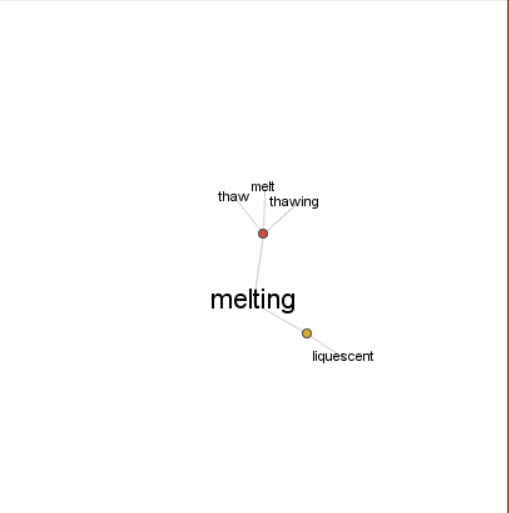
In Wordsift, students type in a word and produce a visual that links synonyms and related words. For example, “melting point” is a science term students in fifth-grade might be expected to know. By entering “melt” into the Wordsift visual thesaurus, students see related terms including Latinate versions and synonyms.  Please see figure 1.  In addition, Wordsift has many other capabilities including creating a word cloud, executing an image search, or sorting words according to academic word lists. Students in our exploratory group did not have access to screen capture tools, but a few used drawing tools to recreate the visual thesaurus they created in Wordsift.

Figure 1: Wordsift Result for “Melt”

Wordsift-melt

Wordsift

PowerPoint

While PowerPoint is a familiar tool to many, some features are not widely known.  We recently asked a group of teacher candidates if they knew PowerPoint could support narration they created, and only two responded that they knew of this feature. In our work with fifth-graders, the students use voice recorders to create the audio, and then they attached those to the PowerPoint slide.  We found that saving the slide as a PowerPoint show (rather than a regular PowerPoint) kept all the audio intact and could be used on any computer using free PowerPoint Show software if the regular version of PowerPoint was not available. Many of the students in the class started out exploring Thinglink, but because they were more comfortable with PowerPoint and recognized the time constraints of the task, switched to that format.

Learn more about adding audio narration to PowerPoint by clicking here.

Thinglink

The Thinglink tool intrigued students, but it required some playing around as they tried to figure out how best to use the tool. In PowerPoint, students could add text and images in any order, but in Thinglink, they needed to locate an appropriate image first.  Then, they could use the editing tools to tag the image with the text such as their definitions and rationales.  Find out more about Thinglink and view some examples by clicking here. An additional challenge was to upload the audio portion of the VSSPlus presentations to a podcast sharing site (we used Podbean), then link the podcast to the Thinglink.  To save time and avoid student frustration, we did this for the students.  For this reason, it was very important that students included their group names on the Thinglink as well as in their audio narration making it possible to easily match up the files.  Figure 2 is an embedded Thinglink created by students you can try.

Figure 2: Thinglink: Boiling Point (Click the image to view the interactive Thinglink)

The E-dictionary

We used Wikispaces to create the first page of the e-dictionary which you can see in figure 3 below. Additional pages for future learning can be added easily.  Students and parents can view the work at will, and learn from each other’s presentations. Other wiki tools, blogs, or even a learning management system (Canvas, BlackBoard, etc.) might be used to host the e-dictionary.

Figure 3: E-dictionary on Wikispaces

edictionary

E-Dictionary

Moving Forward

The first time out took a little over three hours because students had to learn to use certain aspects of the technology (inserting images, finding images, creating audio files, and so on). However, in the future, they will not have this hurdle, and the task will proceed much more rapidly.  The important aspect of this task is that students had to discuss the terms amongst themselves, evaluate the relevant aspects of images they chose together, plan their audio components, and work as a team to assemble the final product. Throughout the process, they became deeply aware of the relevant attributes of the concept represented by the term and also what it was not, in some cases.

For future VSSPlus projects, we would appoint a Wikispaces librarian whose job is to put the final presentations in the e-dictionary.  Some students were more adept at using the audio recording tools, and would become the audio engineers.  Thinglink aficionados are appointed the go-to person for Thinglink questions, and PowerPoint specialists who know how to link or insert audio, use the drawing tools, and save in PowerPoint Show format would have a place to shine. Finally, a means of sharing the work is needed.  A data projector with each group presenting their work to the class is a good start. If the classroom has a few computers or laptops, students could rotate through stations viewing and listening to the presentations at some stations while doing other academic work at different stations.

We hope you will try VSSPlus. Let us know what ideas you have to change it up and how well your students learned from the experience.

References

Haggard, M. (1982) The vocabulary self-collection strategy: An active approach to word learning.  Journal of Reading, 26(3), pp. 203-207.

Grisham, D.L. & Smetana, L. (2011) Generative technology for teacher educators. Journal of Reading Education, 36, 3, 12-18.

Grisham, D. L., Smetana, L., & Wolsey, T.D. (in preparation).  Post-reading vocabulary development through VSSPlus. In T. Rasinski, R. Ferdig, & K. Pytash, (Eds.). Technology and reading [working title]. Bloomington, IN: Solution-Tree.

Vocabulary Self-Collection Strategy Plus (VSS+)

by Dana L. Grisham (with Thomas DeVere Wolsey and Linda Smetana)

The Need for Vocabulary Learning

The need for breadth and depth of vocabulary accelerates through the grades as students encounter more challenging academic texts in print and on the Internet (CCSS, 2010). Improving students’ vocabulary is critical if students are to develop advanced literacy levels required for success in school and beyond, in the world of higher education and the workplace (Biancarosa & Snow, 2006; Graves & Watts-Taffy, 2008; Lubliner & Grisham, 2012).

Research suggests that students with a well-developed vocabulary learn many more words indirectly through reading than from instruction (Cunningham & Stanovich, 2001). If wide reading promotes vocabulary development, then conversations about their reading with adults and peers also strengthen students’ word learning (Biemiller & Boote, 2006). The goal of effective vocabulary instruction is to promote a lively interest in words through student expression and participation in a learning community that enjoys playing with words, builds on individual interests as well as curriculum needs, and emphasizes self-efficacy in word learning (Beck, McKeown, & Kucan, 2008; Graves & Watts-Taffy, 2008). As we have noted in this blog, the impact of technology on vocabulary development also needs to be considered (Castek, Dalton & Grisham, 2012).  In other contexts, we have suggested that technology integration should be generative in the sense that learners should use technological tools to satisfy their curiosity and to generate creations for learning and for the demonstration of learning (Grisham & Smetana, 2011).

Vocabulary instruction may occur before reading (preteaching important vocabulary), during reading (teaching what emerges as needed), and after reading. Vocabulary Self-collection Strategy or VSS (Haggard, 1982), is an after reading strategy.

The Common Core (2010) requires that technology be integrated into instructional and independent learning sequences.  Research has shown that the use of technology and technology-based instruction enhances student learning. In the post-reading vocabulary assignment we explore here, teachers may use use several forms of technology to increase student interest in vocabulary and a variant of the VSS strategy to engage students in more robust vocabulary learning.

Vocabulary Self-collection Strategy Plus (VSS+) occurs after a selection has been read and is based on the principles of VSS (Haggard, 1982), a researched-based strategy that captures the essence of vocabulary learning:  multiple exposures to a word, multiple readings of a text, collaboration of students and teacher, oral discussions and presentations, selecting words that are important to know, writing a script and recording a podcast, Internet search for illustrations, and building semantic webs. Recently, two colleagues (Thomas DeVere Wolsey and Linda Smetana) and I worked in a fourth-grade classroom in a public school in Northern California, to teach the students how to make an online dictionary (e-dictionary) page using the VSS+ strategy. The three of us spent three hours with Mr. D’s 33 students, first in the classroom, then in the computer lab at their school.

VSS+ is a structure that becomes familiar to students so they can use it with more independence over time. It takes more time in the beginning as teachers and students get used to the technology, the time, and the process.  To teach VSS+ we wanted to use text with interesting or unknown words or text dense with academic language. Mr. D provided us with a passage from the Science textbook in use in his classroom. Mr. D pre-taught some of the vocabulary and students had already read and discussed the package when we arrived.

Collaboration and peer learning are essential to the VSS+ strategy. Mr. D had the students divided into cooperative groups of 4 students. In order to differentiate instruction to meet the learning needs of students, they may be grouped heterogeneously or homogeneously as needed. Mr. D’s students were grouped heterogeneously.

To teach the VSS+ strategy, we began in the classroom with a PowerPoint slide and a demonstration of the strategy.  Using a think aloud protocol, I modeled the strategy by presenting a nominated word to the class, and provided suggested answers to the following questions. In the demonstration, we used an example that we constructed on “continent” (see below). These are the three elements that students must consider as they nominate a word.

a.     Where is the word found in the text?  (Page number; read the sentence aloud)

b.     What do the team members think the word means?

c.     Why did the team think the class should learn the word?  The team must tell the class why the word is important enough to single out for emphasis (a rationale).

During the team presentations of nominated words, we facilitated discussion, listened to students’ projected meanings of the word, and invited class members to contribute additional clarifications of the words. A chosen target word was allocated to each team to prepare an e-dictionary page.

 Then came the fun part!  We adjourned to the computer lab where we asked students in Mr. D’s class to use two formats for their e-dictionary pages:  PowerPoint (like our example below) and a program called Thinglink.

In the lab, under teacher supervision, team members used the Internet to locate images and or definitions for the target word and then collaboratively determined which of the images/definitions best fit their prediction of the word meaning.

We proposed the following formatting for the eDictionary:

Word and Written Definition

Image selection from the Internet, Photos, Illustrations or Student Drawings (if a scanner is available)

Semantic web (we used WordSift)

Student audio recording about the word (critical thinking about own word learning)

Arrangement of the PowerPoint or Website page

Audio recording by students of the main elements of the word exploration

Posting to website (classroom e-Dictionary)

In the following example, the three of us used PowerPoint to make a sample e-dictionary page using the word “continent.” In the PowerPoint page is an audio recording that cannot be loaded into WordPress. To hear this recording, please visit

http://media60.podbean.com/pb/5d2ff0db75b8e90568ffd2295b4362b8/52693971/data1/blogs25/353339/uploads/ThinglinkContinents.mp3

Slide2

Next week in Literacy Beat, Linda, DeVere and I will talk more about the work we did with Mr. D’s students and share examples of their PowerPoint and Thinglink pages with you.

References

Biancarosa, C., & Snow, C. E. (2006). Reading next—A vision for action and research in middle and high school literacy: A report to Carnegie Corporation of New York (2nd ed.). Washington, DC: Alliance for Excellent Education.

Biemiller, A. & Boote, C. (2006). An effective method for building meaning vocabulary in primary grades. Journal of Educational Psychology, 98, 44-62.

Blachowicz, C. L. Z., & Fisher, P. (2000). Vocabulary instruction. In R. Barr, P.

Mosenthal, P. S. Pearson, & M. Kamil (Eds.), Handbook of Reading Research, vol. III, (pp. 503-523). White Plains: Longman.

Castek, J., Dalton, B. & Grisham, D. L. (2012). Using Multimedia to Support Generative Vocabulary Learning. In J. F. Baumann & E. J. Kame’enui (Eds.). Vocabulary Instruction: Research to Practice (2nd Edition). New York: Guilford.

Common Core State Standards Initiative. (2010). Common Core State Standards for English Language Arts & Literacy in History/Social Studies, Science, and Technical Subjects. Washington, DC: CCSSO & National Governors Association.

Cunningham, A.E. & Stanovich, K. E. (2001).  What reading does for the mind. American Educator, 22, 1/2, 8-15.

Graves, M.E. & Watts-Taffy, S. (2008).  For the love of words:  Fostering word consciousness in young readers. Reading Teacher, 62, 99.185-193.

Haggard, M. (1982) The vocabulary self collection strategy: An active approach to word learning.  Journal of Reading, Vol. 26, No. 3 (Dec., 1982), pp. 203-207.

Grisham, D.L. & Smetana, L. (2011) Generative technology for teacher educators. Journal of Reading Education, 36, 3, 12-18.

Lubliner, S. & Grisham, D. L. (2012). Cognate Strategy Instruction: Providing Powerful Literacy Tools to Spanish-Speaking Students. In J. Fingon & S. Ulanov (Eds.), Learning from Culturally and Linguistically Diverse Classrooms: Promoting Success for All Students (pp. 105-123). New York: Teachers College Press.


1

Access to Texts on a Global Scale

Recently, I had the privilege of working with teacher educators, class teachers and children on a development aid project on literacy in Zambia, Africa. In one classroom I visited there were sixty little boys sitting at weather-beaten desks and the teacher was attempting to teach literacy from a single class reader-the one and only available book in the classroom. As literacy educators we know the importance of connecting the right book, to the right child, at the right time. However, access to texts, and more importantly equality of opportunity in access to texts, is a real issue in developing countries (and indeed among marginalised communities worldwide).

The World Internet Usage Statistics (www.internetworldstats.com) indicate that almost 35% of the world population are now online and that growth in access to the Internet in developing countries is advancing at a rapid rate. So perhaps access to books on the Internet may prove a feasible path to fostering literacy, and nurturing a lifelong love of books and reading, among children, both in developing countries and in marginalised communities worldwide. In this blog post I will review a number of organisations who are attempting to do just that.

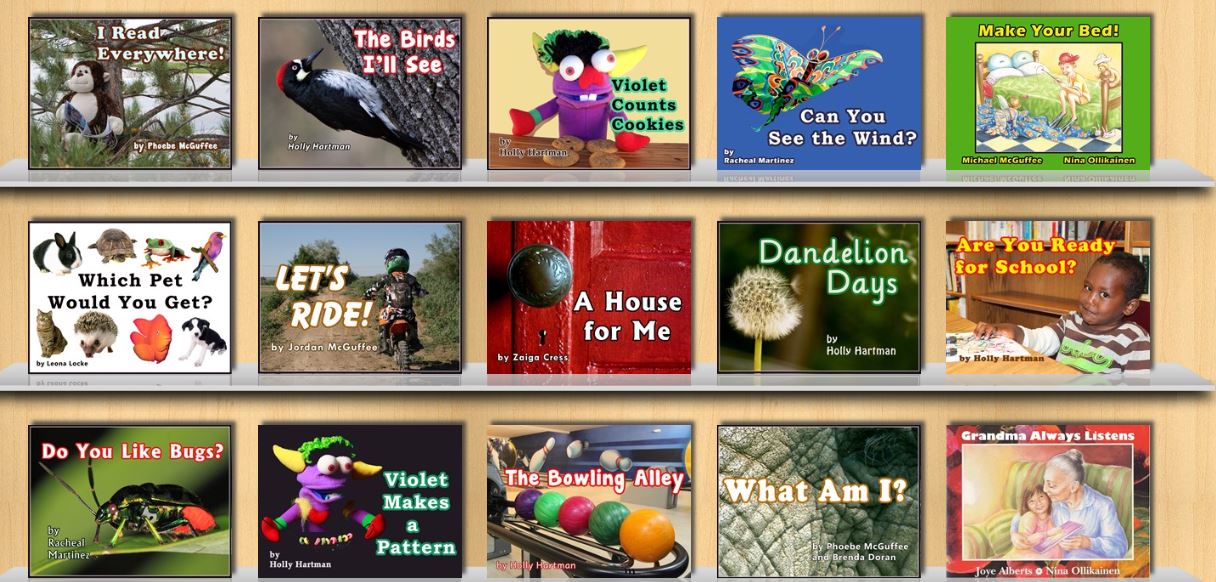
Book abundance is the vision and mission of Unite for Literacy (www.uniteforliteracy.com). Mark Condon began creating libraries of inexpensive, culturally appropriate and linguistically rich picture books for children in marginalised communities in the 1990s. This initiative has grown into a “Wondrously Infinite Global Library” as noted on the Unite for Literacy Website. The site provides access to a growing number of electronic picture books that honour and celebrate the culture and home languages of a diverse range of children. These picture books can be read aloud in English but also, crucially, in a range of about 12 other languages such as, Spanish, Chinese, Arabic, French, Russian and Vietnamese. Examples of the range of texts are shown in the screen saver from the Unite for Literacy website below

MArk condon

“The path to a literate life is a story that must pass through the heart.”  Mark Condon

We Give books (http://www.wegivebooks.org) is a website created by the Penguin Group and Pearson Foundation Group which provides Internet access to a range of  fiction and informational text books suitable for children up to the age of 10. These electronic texts can be read across a range of digital platforms and electronic devices. The site provides access to a range of award winning and recently published texts. For every book read from the digital library We Give Books donate books (almost two and a half million to date!) to charities and worthwhile causes in communities around the world.

When I was growing up swapping books among friends was one of our favourite pastimes. Little Free Library (http://littlefreelibrary.org) is based on the similar concept of ‘bring a book, take a book’.

little free library 3

This movement started in the US but is now slowly growing across the globe ( as shown in the map below) and may provide community-generated access to books. For examples of the creativity of people in creating mobile Little Free Library book stores visit Pinterest http://www.pinterest.com/ltlfreelibrary/.

little free library 2

Finally, you will find a more extensive list of sites providing free electronic texts for children at http://www.techsupportalert.com/free-books-children

Note: Post updated 1-30-2017, video removed that was no longer available.

Collaborative Digital Reading Response

A post by Jill Castek

I’ve gotten excited about the possibility of engaging students (both K-12 and university) in collaborative digital reading responses.  I have found that encouraging students to use embedded discussion tools (where they can dialogue about WHAT they’re reading WHILE they’re reading) prompts engagement in the reading process and supports deep and meaningful discussion.  I’ve been exploring a range of digital tools that facilitate this process (Diigo, DocAS, and iAnnotate).  I’ve recently learned about a new option called Ponder.  This post focuses on the affordances of these tools.

Ponder is a collaborative reading tool that links your students together in a community where each individual member can create reading responses in the form of annotations and reflect on the annotations of other students.  In the process of engaging in an online dialogue, students deepen their understanding of material become more active and engaged readers.

Image

Ponder has a few notable benefits:  1) it’s free, 2) it’s already set up to support teachers (clustering students in to classes), 3) it enables content sharing amongst all the individuals who are invited into the class, and 4) it makes a suite of powerful analytics available to better understand what students are getting out of the reading they’re doing.

Ponder is different from other social sharing sites like Diigo because it requires readers to extract a key excerpt from a reading assignment, reflect upon it by assigning a pre-populated “sentiment” to it (e.g. I’m confused, I’m skeptical, I disagree, among many others), and then tie it to the concepts they are studying by tagging it.  Instantly, the reading responses are viewable by other students and available for additional comment.  Assigning a pre-scripted annotation  to an except through Ponder, as opposed to a free response using a sticky note as in Diigo has both plusses and minuses.  First, it support students in thinking through, and in essence, synthesizing a response as opposed to simply posting an initial reaction.  And secondly, the statements provided can act as a scaffold for learning how to construct a reading response.  On the flip side, students may very well want to say something original to their peers about the content or pose a question for further reflection.   Unfortunately, these are not viable options through Ponder.

Ponder provides analytic tools to help teachers and instructors monitor reading engagement and identify students who are falling behind before it becomes a barrier to success.   Teachers can then use the reading responses students have entered in Ponder to help them identify portions of the readings that were confusing. Analytics can also determine which segments contain particularly controversial ideas that can be used to target focused and purposeful in class discussions.

While I’ve primarily used Diigo for collaborative response, I’m intrigued by the idea of playing with the pre-populated response options in Ponder as a means of reflection.  It may free up the burden of saying something original and encouraging students to think critically about the text and the ideas it contains in a more supported way.  I’m interested to collect students’ preferences to learn more.

One additional affordance is of interest.  Ponder tracks and archives the web articles that readers follow up to read after the assigned reading.  These topics show up as related themes and are displayed on the class Ponder home page.  These web texts offer additional reading allowing reader to dig deeper into the topic of the reading.  The fact that these suggested readings stem from students’ actual web explorations has crowd sourcing potential.

If you’re interested in trying out Ponder, leave a comment and let us know how it goes.  I’ll do the same and we can compare notes.   Happy reading!