Webwatch: Teach the Books You Love

Guest post by Literacy Beat friend Susan Lenski at Portland State University

Teach the Books You Love (http://ttbyl.net) is a free online database of books for grades 5 through 12 that are aligned to the CCSS. With many states and districts adopting the Common Core State Standards, it’s becoming harder to teach the books that you love, or books that are not a part of the public school canon. Many school districts only want teachers to teach with books recommended by the Common Core, and often they require in-depth analysis and alignment to teach anything else. Ttbyl.net is a collection of books that have all been aligned with the Common Core. All of the books have qualitative and quantitative text complexity measures listed, along with summaries, rationale for teaching, suggested CCSS, and even some teacher resources. Teachers can then match books to the needs of their students and come up with vibrant new ideas for their curriculum, and justify it to their administration.

TTBYL

Teach the Books You Love

Social Media Quizzes and Differentiation

by Thomas DeVere Wolsey

In previous posts, we explored how social media quizzes can assist with differentiation by interest. Social media quizzes may also be used to differentiate by ability to some extent.  This reblogged and adapted post from Teaching the Language Arts provides one example.

Social media quizzes  can help students take control of their own differentiation through interests or by ability (knowledge).

Lesson planning Jedi

Are you a lesson-planning Jedi?

Now you can have fun taking this social media quiz to gauge your lesson-planning skills. It will test your knowledge of how to create literacy-based lesson plans, as explained in Chapter 4 of Teaching the Language Arts: Forward Thinking in Today’s Classrooms.

Poetry and Technology: Good Friends

By Thomas DeVere Wolsey

At first glance, poetry and digital technology might not seem to have much in common. In this post, we learn that the two are friends from way back.  For example, Poets.org, in 2004, suggested that lines of poetry can be integrated into an email signature. It’s just one way to make poetry visible and accessible.

Kevin Hodgson wrote last week on the Middleweb blog about the digital poetry books his students created. They used Google Slides as the venue, and explored various forms of poetry. Along the way, they learned to attribute sources, design slides that are visually appealing, and use hyperlinks to put the reader in the driver’s seat.

Digital Poetry Books

Digital Poetry Books

“The end result was a win-win-win: I not only had my students engaged in the writing of poetry across various forms, but also they were able to use technology to publish a digital book of original writing, learning along the way about how the World Wide Web works, how to use elements of web design for writing, and understanding the need to attribute art to the original owners.” http://www.middleweb.com/22690/how-we-took-poetry-writing-into-digital-spaces/

Teacher Keri McAllister created three technology-based work stations to help students learn more about poetry as they listened, commented on, and created poetry. Her poetry workstations included the iPod workstation, the techy workstation with blogging, and the podcasting workstation. Click the photo below to hear Keri talk more about her use of technology to teach students about poetry on Teaching Channel.

McCallister

Keri McAllister on Teaching Channel

Brett Vogelsinger, on Teachthought.com, suggests several ideas for engaging students with poetry with technology as the vehicle.  Two that stand out to me are the use of Pinterest and PollEverywhere. Using PollEverywhere, according to Brett, permits students to explore the power of word choice, a key attribute of poetic forms.

If you want to explore the ways technology and poetry get along further, Edutopia provides several suggestions for using technology to celebrate poetry. Their list includes links to a poetry listening booth where students can listen to poems read aloud by the poets, a tool for finding poets near you, and an online poetry publisher from Scholastic.com. Do you students use iPads? Check out this list of poetry apps.

Read more on Literacy Beat about eye poems and Evernote, too here and here.

Webwatch: iGameMom, Games for Learning

By Thomas DeVere Wolsey

Happy Mother’s Day to our readers and to my terrific Literacy Beat co-bloggers!

Rose

By TDWolsey

Have you spent time searching the App Store for just the right learning game only to download an app and find it was not quite what you imagined? One of my favorite new sites is iGameMom where the contributors review learning apps for mobile devices they believe are worthy for children of different ages. Finding the right learning game is easy on iGameMom. The site is well-organized with reviews grouped by age and subject area. Because this blog focuses on literacy, this post highlights that section of iGameMom. However, there are many cool apps in other subject areas to check out.

Within the literacy category, you can locate apps for developing letter recognition and related skills, spelling, reading, and language. Recently, iGameMom reviewed Expand Vocabulary with Word Art, a game that pairs humorous artwork (as you know, Literacy Beat often features topics related to visual literacy, so this app was a great find!) with vocabulary learning in a game environment.  Apps reviewed on iGameMom can also be located by the price including those that are free. If you download an app, you may want to use the link provided on the site because it helps to support the site without any cost to you for doing so.

iGameMom

iGameMom: Games for Learning

In addition, there are several resources from the web linked on iGameMom that you may find useful. A list of free apps for iPad that iGameMom recommends are grouped by topic or skill to be developed.  The literacy-related lists include vocabulary development, handwriting (yep, handwriting—still an art in our digital age!), storytelling, grammar and more.

Infographic: Humanizing the Online Class

By Thomas DeVere Wolsey

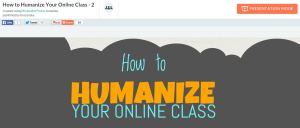
Many posts on Literacy Beat relate to visual literacies in digital environments, and this week I wanted to share with you an infographic (thanks to our LiteracyBeat friend, Peggy Semingson) that describes ways to humanize the online class or course. Email and threaded discussion communications can seem cold and dry at times. But teaching is an art of the heart and soul as much as it is about the stuff of any content.  I think you are going to like this infographic! Also, be sure to check out the presentation mode to break down the elements of the infographic. The presentation mode can be activated in the top, right of your browser.

Humanize

PiktoChart – Click to open the infographic.

Peggy Semingson added: “Infographic was created by Michelle Pacanksy-Brock at Cal State Univ., Channel Islands (Instructional Designer). Her blog/website is here: http://www.teachingwithoutwalls.com/. I actually also came across her interactive syllabus example in the Online Learning Consortium class on The Interactive Syllabus.” Read more from teachingwithoutwalls here

Read more on Literacy Beat about Infographics.

Which Robber Baron Are You? Quizzes to Inspire Writing

By Thomas DeVere Wolsey

You might be like me if you scroll through your Facebook news feed clicking “like” but come to a screeching halt when you find a social media quiz like this one, Which Social Networking Site Are You? on Cha Cha.  It turns out that I am Google+. Want to know which Avenger you are from the Marvel series? Take this quiz on The Escapist. According to this quiz, I’m Hawkeye.

Hawkeye
Hawkeye

Take this quiz

These quizzes that focus on the quiz taker and often combine popular culture are a little addictive. But what if they were educational tools, too? I set up a free account on Qzzr to find out.

Standards in this example:

History–Social Science Standards for California Public Schools

8.12 Students analyze the transformation of the American economy and the changing social and political conditions in the United States in response to the Industrial Revolution.

(4) Discuss entrepreneurs, industrialists, and bankers in politics, commerce, and industry (e.g., Andrew Carnegie, John D. Rockefeller, Leland Stanford)  (1998, p. 38).

Common Core State Standard for writing and related substandards.

I created a social media quiz that asks students, “Which Robber Baron are you?” Based on their responses, they are given a prompt for writing based on the popular RAFT technique [click here]. In this example, I gave students the option to choose the topic based on their responses. I controlled or assigned the role, audience, and format. When I learn more about social media quizzes, I will add the R, A, and F into the quiz, as well.  Try out the quiz, below—you know you want to!

Robber Baron

Click the image to take the quiz (opens in a new window)

To set this up, I designed an Excel template with two sheets (see below). One sheet is for the overall profile for each choice; in this case, Leland Stanford, John D. Rockefeller, Andrew Carnegie, and J. P. Morgan. For each, I wrote a profile in second person (you are….) which I post as an outcome. If you would like to see the Excel spreadsheet I used, please click here. Each profile is set up according to criteria I determined in advance: Early life, interests, business focus, and so on.  The Qzzr tool allows me to choose an outcome (in this case, one of the Robber Baron profiles along with a format type), and I enter the questions from the Excel sheet into Qzzr. Just copy and paste from Excel into Qzzr and voilà!
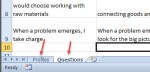
Excel

Tabs for each sheet are on the bottom left.

Next, I create a link to a writing prompt based on the students’ responses in Qzzr and place that in the final outcome description (for example, “ You are John D. Rockefeller”).  I linked the prompt to this blog, but you may use a variety of platforms to deliver the prompt to students (e.g., Google Drive, your course management system). The great thing about Qzzr is that if the students don’t like the assigned topic, they can go again.

In this example, I wanted students to compare the assigned Robber Baron with another in the same industry. The prompt, which you may download here, is based on the format of the prompts provided at Achievethecore.org for informative writing.

Other quiz tools you may like:

http://www.proprofs.com/quiz-school/

http://www.playbuzz.com/

Good luck, and have fun, too. Learn more about differentiation on LiteracyBeat here. Also, check out other educational uses of social media quizzes here.

Images:

The images were found using Creative Commons image search, and the photos of the Robber Barons are in the public domain. Background image in Qzzr: https://openclipart.org/image/300px/svg_to_png/178502/robber.png

Purposes for Reading—A Digital Simulation

By Thomas DeVere Wolsey

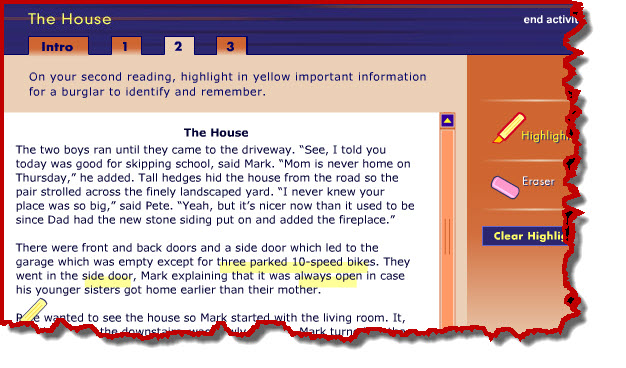
Students sometimes have difficulty understanding why they might want to reread a text. A simulation, part of an online professional development program from Annenberg Learner, clearly demonstrates how different purposes for reading result in attending to different words in the text.  This simulation, titled “The House,” allows readers to interact with a short text by reading for three different purposes.

House Simulation

Source: Annenberg Learner, Teaching Reading 3-5

Teachers may want to project this on a digital display for the whole class or allow students to work in pairs on a computer then discuss their how their highlighted text changes depending on the purpose for reading. Students come to see how highlighting a text can help them pay greater attention to what it says, as well. The digital highlighter and eraser tools are easy and fun to use. To try it, click here  then choose “The House Interactive” link.

Connecting Multicultural Education and Multiliteracies

by Thomas DeVere Wolsey

During the last year, Dr. Diane Lapp and I had the opportunity to work with several prominent thought-leaders to explore how multiple literacies and multicultural education intersect and promote greater learning and understanding amongst our students. The result, under the guidance of Dana Grisham, was a themed issue of Reading and Writing Quarterly that was just released online. In the introduction, Diane and I wrote, “Digital technology, whose users comprise ever-changing communities, permits previously disconnected worlds to find commonalities and explore differences. Technology has the potential to connect students and educators across cultures, and, at the same time, make it possible for students to participate more fully in their own cultures” (Wolsey & Lapp, 2015, p. 97).

cover of Reading & Writing Quarterly  journal

The six articles in the current special issue of Reading and Writing Quarterly each address topics that demonstrate how technology can facilitate learning, build students’ understanding of their culture, and construct bridges across and to other cultures. The table of contents may be found below. Please take a few minutes to visit the special issue on the Taylor and Francis website (preview and abstracts) or through your university electronic library resources.
• Imagining Writing Futures: Photography, Writing, and Technology by Cheryl A. McLean & Jennifer Rowsell

• Fostering Students’ Science Inquiry Through App Affordances of Multimodality, Collaboration, Interactivity, and Connectivity by Richard Beach & David O’Brien

• iPad Deployment in a Diverse Urban High School: A Formative Experiment by Nancy Frey, Douglas Fisher & Diane Lapp

• The Council of Youth Research: Critical Literacy and Civic Agency in the Digital Age by Antero Garcia, Nicole Mirra, Ernest Morrell, Antonio Martinez & D’Artagnan Scorza

• Multicultural Education and Multiliteracies: Exploration and Exposure of Literacy Practices With Preservice Teachers by W. Ian O’Byrne & Shane A. Smith

• A Digital Tool Grows (and Keeps Growing) From the Work of a Community of Writers by Nancy L. Roser, Melissa Mosley Wetzel, Ramón Antonio Martínez & Detra Price-Dennis

Reference:
Wolsey, T.D. & Lapp, D. (2015). Introduction to teachers and students as creators in blended learning environments. Reading and Writing Quarterly, 31(2), 97-101. doi: 10.1080/10573569.2014.963906

Curating Videos on the Web for Children

By Thomas DeVere Wolsey

Sometimes, searching for and selecting the best content online can take as much time as actually watching, reading, or engaging with the content itself. This is especially true for parents and teachers who often make the selections for children.  This is so for text and image-based digital content but also for video.  Youtube EDU provides some guidance for teachers and parents.  In this LiteracyBeat post, I will tell you a little bit about a new service that curates video content from a variety of sources and for specific audiences: Pluto TV

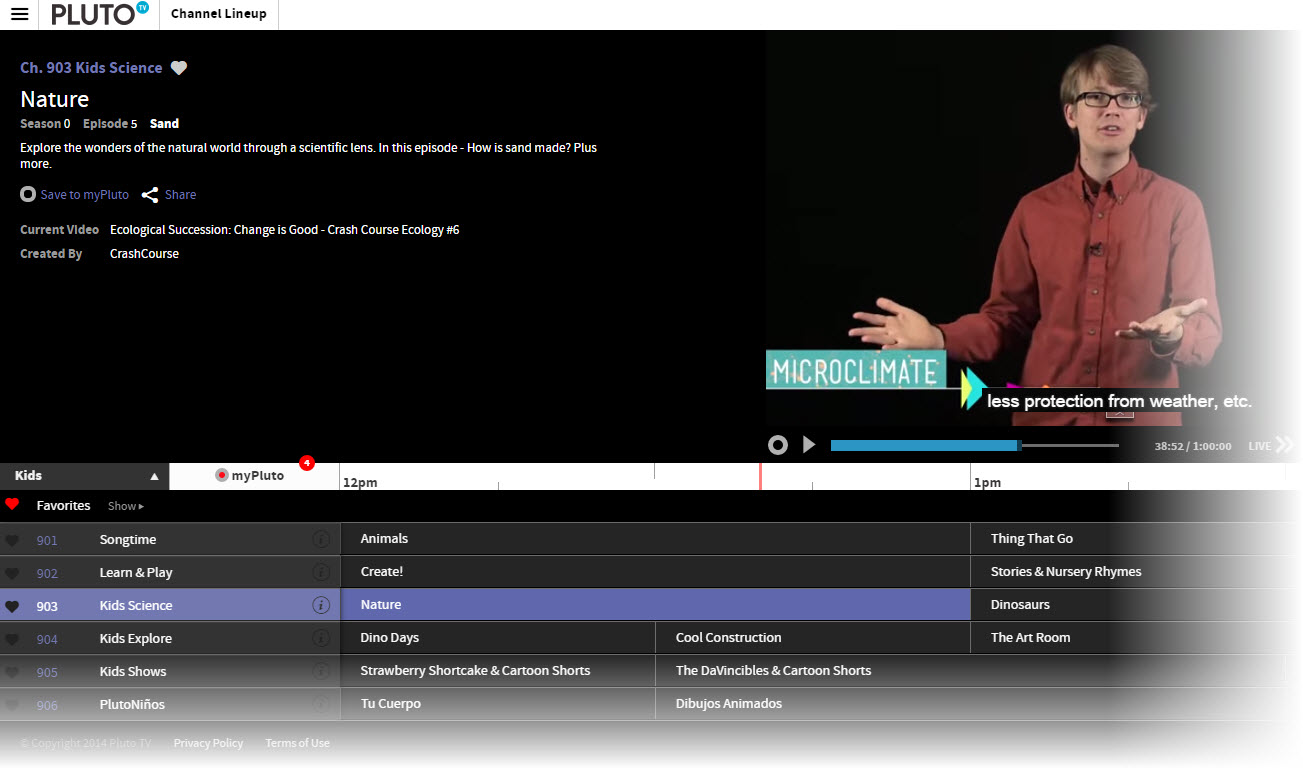
Where YouTube EDU uses an electronic discovery system to identify content, Pluto TV employs about 15 human beings who search for and curate videos. For parents, teachers, and children, the curation process is particularly important because each of the children’s channels (currently channels 901-906, click the “Channel Lineup” button on the top left) on Pluto are aimed at a different demographic, a very important feature that differs from television channels that may air content for preschool children in the morning and elementary-age children in the afternoon. Moreover, the curated content filters out shows on popular channels that don’t always deliver the educational or useful content parents expect. There is also a Kid’s Mode with a parent lock feature.  Shows can be saved for future viewing or a reminder sent that a show is about to air.

Pluto Screencap

Pluto TV screenshot – Kid’s Channel Lineup

The interface is a familiar one that looks like the channel line-up on your television service provider.  Each show plays at a specific time and it is possible to save a show or set up a reminder to watch it later. Of course, Pluto is well-designed to work on multiple devices and there is an app to improve the experience, as well.  Learn more about Pluto here.

Read more in the Los Angeles Times.

The Whole-Class Great Debate: A Discussion Strategy for English Language Learners

By Thomas DeVere Wolsey & Dana L. Grisham

A rule of thumb we have come to find helpful in any language learning environment is that the more one uses a language, the more likely it will be that proficiency develops in that language. Of course, effective instruction, useful models, and other resources are all important, as well.  A resource from the Common Core State Standards website suggests that English language learners, among other things, should have:

  • Opportunities for classroom discourse and interaction that are well-designed to enable ELLs to develop communicative strengths in language arts;

  • Ongoing assessment and feedback to guide learning (p. 2).

Recently, we had the opportunity, as part of a delegation to meet with education leaders in China, to observe a class of middle school age students debate a topic as a way of integrating speaking, listening, and presentation tasks at Tiantong Education Group’s teaching center in Shenyang, China All of the students are English language learners.. The teacher called the process “debate” but we have modified this title a bit to differentiate it from other debate protocols to “Whole-class Great Debate.”

2014-10-14 17-39-10

The students had just returned to class after a national holiday, and, as you may be aware, China is grappling with pollution that causes health problems for many citizens (for example, read this news article about pollution in Beijing).  Students were asked to “state up their opinion” as to whether it was a good idea to stay home during the holiday or to go somewhere, such as the beach.

Students sat in rows, two on each side, facing each other. Initially, a student on each side states an opinion that staying home or going out for the holiday is their preferred option.  Each side then adopted one of the two stated positions.  They met in small groups to come up reasons in support of staying home or going away. Next, a student stated the opinion to which the other side responded. Students they returned to their group to determine counterarguments to those they heard. The process began again. A selected student (a volunteer in the class), then summarized the group’s position.

So far, this seems much like a typical classroom debate. However, to keep the students engaged in the discussions and to encourage them to listen to one another, the teacher developed protocols for speaking to the class. Students were encouraged to stand up and speak up taking turns from one side or the other. The spontaneous nature of standing and speaking motivated students to listen so they might speak. However, at times, more than one student from a side might want to speak. They learned to call “I’m, first” but sometimes it was hard to tell who was actually first. To keep everything moving and in control, students could use a version of “rock paper scissors” to decide who would actually speak first. Finally, each side met again to review their opinions and the counterarguments to their opinions, and a final summary speaker was elected.

ELLs at Tiantong Education Center

The teacher did choose a colleague to come in and evaluate the debate and select a winner based on a rubric for developing and stating an opinion, but it was clear that the debate’s main goal was interaction in English requiring students to listen carefully to each side, discuss their opinions and those of the other side, then speak publicly about it.  The teacher recognized the strengths of each team’s presentation. We hope you enjoy watching this video of the Whole-class Great Debate.

IAIE Representatives

Representatives from IAIE include Jin Zhang, Dana Grisham, Thomas DeVere Wolsey, Marc Grisham.

Reference

Common Core State Standards Initiative. (2012). Application of Common Core State Standards for English language learners [PDF]. Retrieved from http://www.corestandards.org/assets/application-for-english-learners.pdf