Purposes for Reading—A Digital Simulation

By Thomas DeVere Wolsey

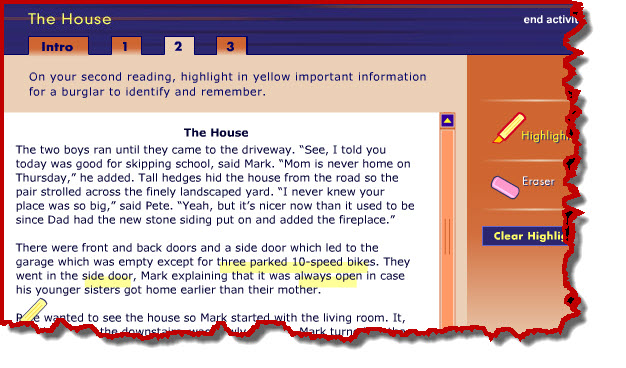
Students sometimes have difficulty understanding why they might want to reread a text. A simulation, part of an online professional development program from Annenberg Learner, clearly demonstrates how different purposes for reading result in attending to different words in the text.  This simulation, titled “The House,” allows readers to interact with a short text by reading for three different purposes.

House Simulation

Source: Annenberg Learner, Teaching Reading 3-5

Teachers may want to project this on a digital display for the whole class or allow students to work in pairs on a computer then discuss their how their highlighted text changes depending on the purpose for reading. Students come to see how highlighting a text can help them pay greater attention to what it says, as well. The digital highlighter and eraser tools are easy and fun to use. To try it, click here  then choose “The House Interactive” link.

Gone Fishin’

The Literacy Beat Team is taking some time off during the winter break and holidays, but we will be back in January!

Gone Fishing

Gone Fishing

Curating Videos on the Web for Children

By Thomas DeVere Wolsey

Sometimes, searching for and selecting the best content online can take as much time as actually watching, reading, or engaging with the content itself. This is especially true for parents and teachers who often make the selections for children.  This is so for text and image-based digital content but also for video.  Youtube EDU provides some guidance for teachers and parents.  In this LiteracyBeat post, I will tell you a little bit about a new service that curates video content from a variety of sources and for specific audiences: Pluto TV

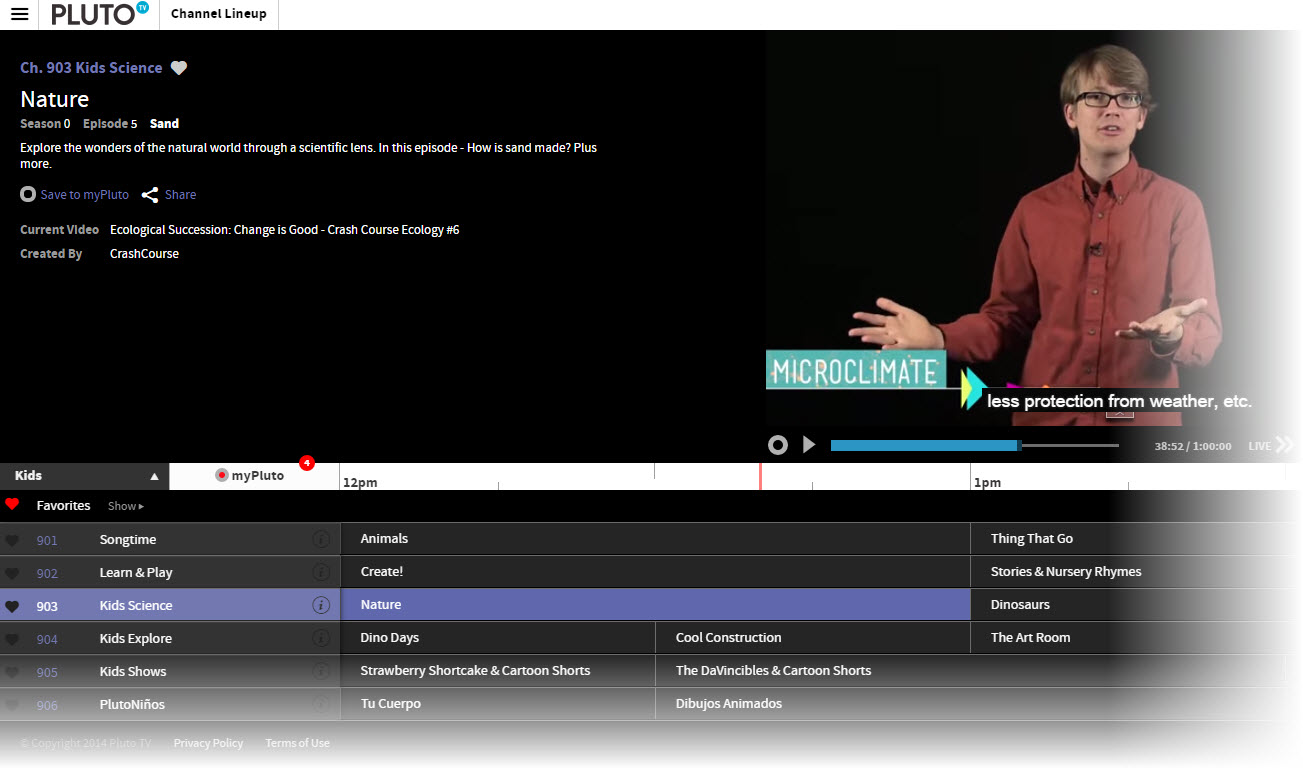
Where YouTube EDU uses an electronic discovery system to identify content, Pluto TV employs about 15 human beings who search for and curate videos. For parents, teachers, and children, the curation process is particularly important because each of the children’s channels (currently channels 901-906, click the “Channel Lineup” button on the top left) on Pluto are aimed at a different demographic, a very important feature that differs from television channels that may air content for preschool children in the morning and elementary-age children in the afternoon. Moreover, the curated content filters out shows on popular channels that don’t always deliver the educational or useful content parents expect. There is also a Kid’s Mode with a parent lock feature.  Shows can be saved for future viewing or a reminder sent that a show is about to air.

Pluto Screencap

Pluto TV screenshot – Kid’s Channel Lineup

The interface is a familiar one that looks like the channel line-up on your television service provider.  Each show plays at a specific time and it is possible to save a show or set up a reminder to watch it later. Of course, Pluto is well-designed to work on multiple devices and there is an app to improve the experience, as well.  Learn more about Pluto here.

Read more in the Los Angeles Times.

The Whole-Class Great Debate: A Discussion Strategy for English Language Learners

By Thomas DeVere Wolsey & Dana L. Grisham

A rule of thumb we have come to find helpful in any language learning environment is that the more one uses a language, the more likely it will be that proficiency develops in that language. Of course, effective instruction, useful models, and other resources are all important, as well.  A resource from the Common Core State Standards website suggests that English language learners, among other things, should have:

  • Opportunities for classroom discourse and interaction that are well-designed to enable ELLs to develop communicative strengths in language arts;

  • Ongoing assessment and feedback to guide learning (p. 2).

Recently, we had the opportunity, as part of a delegation to meet with education leaders in China, to observe a class of middle school age students debate a topic as a way of integrating speaking, listening, and presentation tasks at Tiantong Education Group’s teaching center in Shenyang, China All of the students are English language learners.. The teacher called the process “debate” but we have modified this title a bit to differentiate it from other debate protocols to “Whole-class Great Debate.”

2014-10-14 17-39-10

The students had just returned to class after a national holiday, and, as you may be aware, China is grappling with pollution that causes health problems for many citizens (for example, read this news article about pollution in Beijing).  Students were asked to “state up their opinion” as to whether it was a good idea to stay home during the holiday or to go somewhere, such as the beach.

Students sat in rows, two on each side, facing each other. Initially, a student on each side states an opinion that staying home or going out for the holiday is their preferred option.  Each side then adopted one of the two stated positions.  They met in small groups to come up reasons in support of staying home or going away. Next, a student stated the opinion to which the other side responded. Students they returned to their group to determine counterarguments to those they heard. The process began again. A selected student (a volunteer in the class), then summarized the group’s position.

So far, this seems much like a typical classroom debate. However, to keep the students engaged in the discussions and to encourage them to listen to one another, the teacher developed protocols for speaking to the class. Students were encouraged to stand up and speak up taking turns from one side or the other. The spontaneous nature of standing and speaking motivated students to listen so they might speak. However, at times, more than one student from a side might want to speak. They learned to call “I’m, first” but sometimes it was hard to tell who was actually first. To keep everything moving and in control, students could use a version of “rock paper scissors” to decide who would actually speak first. Finally, each side met again to review their opinions and the counterarguments to their opinions, and a final summary speaker was elected.

ELLs at Tiantong Education Center

The teacher did choose a colleague to come in and evaluate the debate and select a winner based on a rubric for developing and stating an opinion, but it was clear that the debate’s main goal was interaction in English requiring students to listen carefully to each side, discuss their opinions and those of the other side, then speak publicly about it.  The teacher recognized the strengths of each team’s presentation. We hope you enjoy watching this video of the Whole-class Great Debate.

IAIE Representatives

Representatives from IAIE include Jin Zhang, Dana Grisham, Thomas DeVere Wolsey, Marc Grisham.

Reference

Common Core State Standards Initiative. (2012). Application of Common Core State Standards for English language learners [PDF]. Retrieved from http://www.corestandards.org/assets/application-for-english-learners.pdf

Voter Information Project

We are so pleased to have readers from around the world and hope each votes whenever the opportunity arises. This week, we ask our readers in the United States to check out:

Mom’s Recipe Box, Old Lesson Plan Folders, and My iPad

By Thomas DeVere Wolsey

In an old file box for 4X6 index cards, my Mom kept favorite family recipes. Some of these cannot be found online because they were traded among her friends and relatives long before Pinterest or Facebook made it possible to share a recipe link online.  I wanted to share copies of these with my brother and sisters, but making copies on paper seemed the wrong way to go.  By layering applications, I found I could recreate those 4X6 index cards, make many of them searchable, and share them with family and friends.  I used Evernote and Scanner Pro along with tags that corresponded with Mom’s original index card system (each letter represented a category of recipe, such as “cookies” and I could also add tags for recipes by season or author). Using these apps was far more efficient than using the traditional flatbed scanner in this instance.

Mom's recipe box

Mom’s recipe box

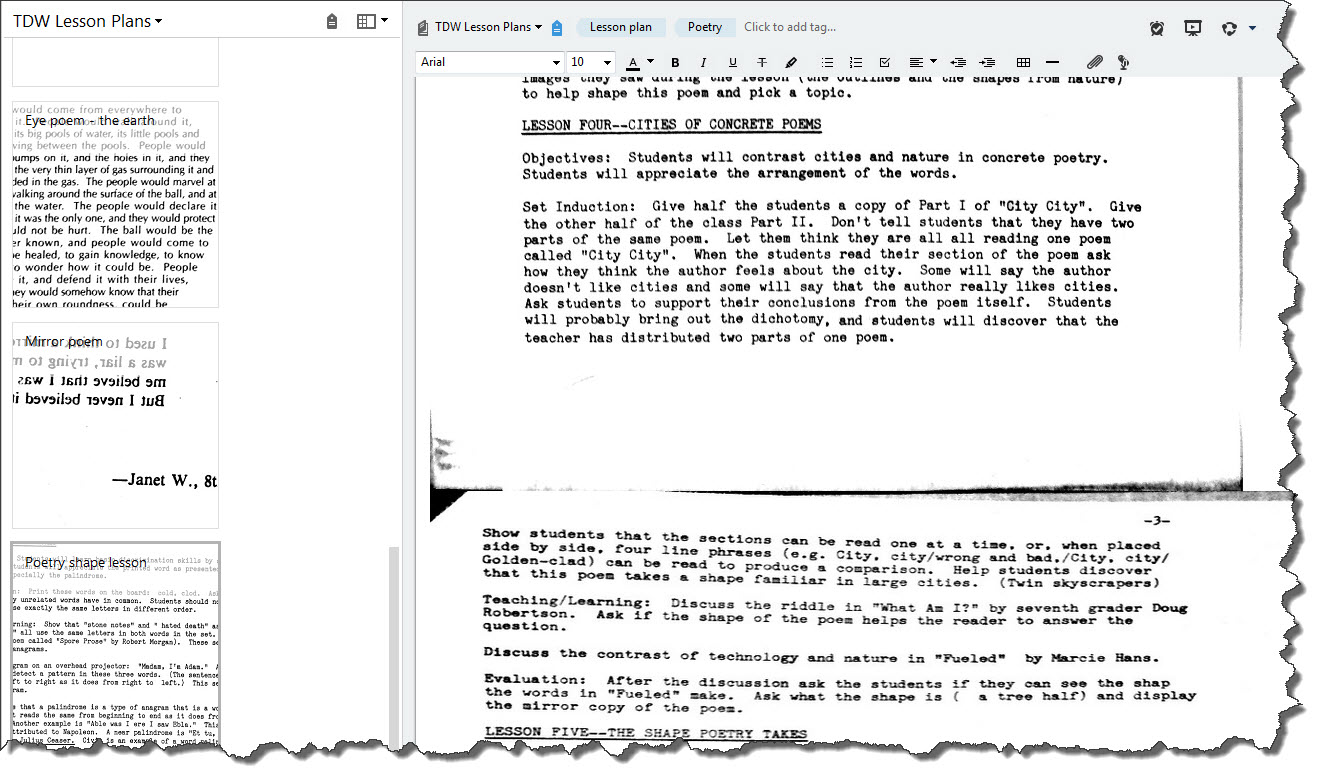
There are many tools for archiving and sharing recipes (click here for one example)  from file boxes, but I also wanted to archive and share the many file  folders full of lesson plans and resources, such as student work samples, that I collected over the years. The same tools I used to store and share Mom’s recipe box worked well here. My manila file folders full of news clippings, handwritten notes, typed lesson plans, and student work samples could easily be converted to a notebook in Evernote. I added tags that roughly matched the file folder label and additional tags for “student work sample” or “lesson plan.”

Eye poem lesson plan

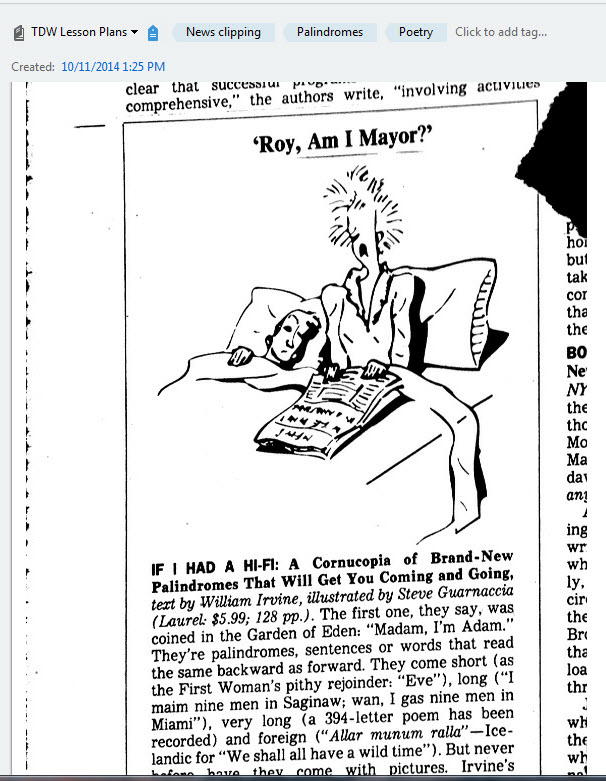
News Clipping

News Clipping via Scanner Pro and Evernote

Some of the items in the folders would fit well in my flatbed scanner with a multisheet feeder. But notes and news clippings might not. Some of the pages were so old I thought they might jam the sheet feeder. My iPad solved this problem along with a scanner app (I used Scanner Pro by Readdle, but there are others). The scanner app uses the camera in the iPad or iPhone to create a scan of whatever paper you have and save it in image format (such as .jpg) or as a PDF file.  I usually choose the PDF format.

Scanner Pro can be easily linked to Evernote so that scans are automatically sent to Evernote.  In Evernote, you can annotate the file with new notes, tag the note, and share the note or the notebook with others. Be sure you consider copyright and fair use guidelines, of course, when sharing the work of others.

An eye  poem by Mario (Mariachi)

An eye poem by Mario (Mariachi)

Evernote has a free and a paid or premium version. The free version will work for many teachers, but if you want to upload many files, a paid version may be a better option; fortunately, the paid versions are reasonably priced. I paid $2.99 for Scanner Pro, an investment well worth the price. Scanner Pro allows me to sync automatically to Evernote and other applications. With it, I can adjust borders easily on the rare occasions when the software doesn’t quite capture the edges of whatever sized document I am scanning.

Resources:

Evernote Also be sure to check out Bernadette’s post, here.

Scanner Pro by Readdle

Textisms: Violating Ye Olde Grammar Rules

By Thomas DeVere Wolsey

Are textisms ruining students’ capacity for using standard English? Textisms, J2LYK, are those abbreviations and other shortcuts kids and many adults use when writing in some digital formats such as short message systems (SMS- an abbreviation for short message system referring to those messages sent via wireless communication devices, usually a cell phone) or when using social media such as Twitter. Many people seem to think so.  However, the evidence is growing that this is not the case.
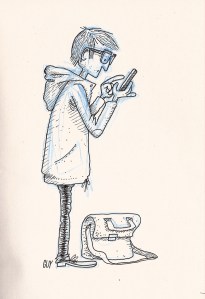
Sketch Texting

Sketch Texting by Guillaume Perreault (CC BY-NC-ND 2.0)

Children, as they grow, are quite adept at understanding the contexts for different registers of language. If they are taught when a given register is appropriate and when it may not be, their ability to adapt to the context seems to increase (see Townsend & Lapp, 2010). Moreover, affinity groups often develop jargon that is unique or understood only by participants in that group. For example, those who participate in online discussions on Facebook or using SMS and are interested in horses, understand that “UD” is a textism for “unplanned dismount” (Cloud 9 Ranch, 2012). You can guess what happened to the rider. Online gamers have textism all their own, as well. Many other textisms are very familiar to wide audiences. LOL, OMG, ROFL–all good examples of those that many people recognize. Of course, textisms are mediated by the technology used to create and transmit the message, as well. The 140 character Tweet is an example demonstrating that a limited number of characters imposed by the technology might encourage use of emoticons, abbreviations, and so on.

A 2009 study (Plester, Wood, & Joshi) found no correlation, or relationship, between students’ use of textisms and their capacity to use traditional spellings and language features. A new study (Wood, Kemp, & Waldron, 2014) examines the  long-term results when children and young adults use textisms, especially as those textisms relate to purposeful violations of grammatical conventions as opposed to errors. The results demonstrated that the subjects in the study showed no negative correlations between their abilities to use conventional grammar appropriate to their ages and their use of textisms. The study seems to suggest that use of textisms means that students are adding a literacy skill to their repertoire rather than replacing one skill set with another.

References:

Cloud 9 Ranch. (2012). How many of these textisms do you use? [Facebook post]. Retrieved from https://www.facebook.com/permalink.php?story_fbid=235772239879305&id=222644657746917

Plester, B., Wood, C., & Joshi, P. (2009). Exploring the relationship between children’s knowledge of text message abbreviations and school literacy outcomes. British Journal of Developmental Psychology, 27(1), 145-161. doi: 10.1348/026151008X320507

Townsend, D. R. & Lapp. D. (2010). Academic language, discourse communities, and technology: Building students’ linguistic resources. Teacher Education Quarterly, Special Online Edition. Retrieved from http://teqjournal.org/townsend_lapp.html

Wood, C., Kemp, N., & Waldron, S. (2014). Exploring the longitudinal relationships between the use of grammar in text messaging and performance on grammatical tasks. British Journal of Developmental Psychology. Early online release. Retrieved from http://onlinelibrary.wiley.com/doi/10.1111/bjdp.12049/full doi: 10.1111/bjdp.12049

Image Credit:

Perreault, G. (2010, December 5). Sketch texting [drawing]. Retrieved from https://www.flickr.com/photos/guillaumeperreault/

Read more:

Texting Benefits for Teens
IM, SMS, Texting: A Glossary for Teachers
Spell Check and Writing Tasks in High School

Gone Fishing

Gone Fishing

The Literacy Beat Team is re-energizing and will be back in September with new posts and new ideas. Bernadette Dwyer took this photograph while in Vietnam in 2012. Time to relax and refresh!

Gone Fishing

Talking Drawings

by Rebekah Lonon with Karen Wood and Thomas DeVere Wolsey

This is the third in a three-part series exploring conversation and collaboration opportunities using digital tools. Rebekah Lonon describes how she uses “talking drawings” to promote academic discussions in her classes and explains how she uses the Educreations digital tool with her students.

My second-grade students enjoy using the talking drawings strategy regularly in all content areas. I always begin by having the class close their eyes and imagine a mental image of a word or concept. Once they open their eyes, they immediately draw the image they made in their minds. This gives me great insight into their prior knowledge of the topic, and it helps me tailor my instruction for the coming unit. I recently used this strategy to introduce a unit about properties of matter, and I learned that my students associated the word “matter” with something being wrong (“What’s the matter?”). I knew then how my unit needed to be planned.

When it is available for our use, I like to incorporate a digital tool. In this case, I used www.educreations.com because it provides an online venue for creating related drawings. Educreations is also available as an app for mobile devices. After their initial drawings, students independently read a passage, entitled “Why Does Matter Matter?” by Kelly Hashway (n.d.) from the website http://www.superteacherworksheets.com about the states of matter and then they discussed their drawings and thoughts with a partner. Next, they returned to Educreations to create a new drawing, based on their new knowledge. If technology is scarce, students can create their drawings in pairs or small groups, using paper with Crayons or markers. To reflect on what they learn and, as a means of integrating writing with the reading and drawing process, I always ask them to compare their original  and after reading drawing. In this instance, one partner group exclaimed aloud, “Matter DOES matter!” as they drew examples of each state of matter. Another partner group continued their reflection process as they wrote in their journals.  Seeing their developing knowledge when using this strategy is an effective assessment tool for me.

View the video to hear Rebekah explain talking drawings using Educreations.

Bibliography: 

Hashway, K. (n.d.). Why does matter matter? [PDF]. Retrieved from http://www.superteacherworksheets.com/matter/matter-article_WMTBN.pdf

McConnell, S. (1992/3). Talking drawings: A strategy for assisting learners. Journal of Reading, 36(4), 260-269.

Wolsey, T.D., Wood, K., & Lapp, D. (in press). Conversation, collaboration, and the Common Core: Strategies for learning together. IRA e-ssentials series: What’s New?Newark, DE :International Reading Association.

Wood, K. D., & Taylor, D. B. (2006). Literacy strategies across the subject areas. (2nd ed.). Boston, MA: Pearson Education, Inc.

About the contributors:

Rebekah Lonon teaches 2nd-grade for Charlotte Mecklenburg Schools, North Carolina

Karen Wood is a professor at the University of North Carolina at Charlotte.


Jigsaw and Graffiti Wall

by Lindsay Merritt with Karen Wood and Thomas DeVere Wolsey

This is the second in a three-part series exploring conversation and collaboration opportunities. Lindsay Merritt describes, in the post below, how she uses jigsaw and a graffiti wall to promote academic discussions in her classes.

Lindsay writes:

In my classroom, I use the jigsaw strategy to help my students “own” their work and their learning.  I started to use jigsaw (e.g., Aronson, 2000) because I found that often when I presented a lesson students looked at me blankly because they were overwhelmed by too much teacher talk, or my directions were not clear. When I began using the jigsaw process, students become the “experts” in their topics, and had the opportunity to share, discuss, and collaborate with their classmates.  My role became one of planning, monitoring, guiding instruction, and having the pleasure of seeing first-hand the “ah ha” moments of my students’ learning.

My class has been studying Africa through our social studies curriculum.  We are learning that Africa is not a country, but a continent made up of many different countries and cultures.  I could not think of a better way to share this information than through the jigsaw strategy. Students worked in five groups, one for each of the regions of Africa (east, south, north, west, and central).  Their job was to look through the informational text, Hands on Africa (Merrill, 2000) and become experts on their region’s culture, location, geography, and countries within.  As they worked I was able to hear them reading together, discussing, and then writing in-depth sentences focusing on these key areas.  Every student was engaged and participating. This process afforded me a perfect opportunity to continually assess their learning.

I then selected one student from each region to form a larger group to share their information.  Students made sure to present their information clearly so that their classmates could understand.  The students took their “expert” roles seriously and even started making connections among the regions. Once they finished sharing they went back to their home groups to create a visual display of their readings to put on the Africa graffiti wall.   When they wall display was ready, the students had five minutes to view the wall and write down any new information or connections they could make to the information we were learning in the unit.  I was thrilled to see my students so excited about the learning process and truly taking ownership for their learning.

In this video, Lindsay describes the jigsaw and graffiti wall approach:

Digital tools we have used to build on jigsaw and graffiti wall approaches include:

Voicethread

Padlet

Diigo 

Bibliography:

Aronson, E. (2000, May/June). Nobody left to hate. The Humanist, 60(3), 17-21.

Merrill, Y. Y. (2000). Hands on Africa: Art activities for all ages. Salt Lake City, UT: Kits Publishing.

Wolsey, T.D., Wood, K., & Lapp, D. (in press). Conversation, collaboration, and the Common Core: Strategies for learning together. IRA e-ssentials series: What’s New?Newark, DE :International Reading Association.

About the contributors:

Lindsay Merritt teaches 3rd-grade at Hope Academy in  Cabarrus County, North Carolina

Karen Wood is a professor at the University of North Carolina at Charlotte.