Lesson Planning as Collaboration in Digital Environments

Thanks to Susan Toma-Berge for this guest post on LiteracyBeat this week.  Susan is Coordinator of the Multiple Subjects Program at the University of California, Irvine. ~DeVere

Collaborating with colleagues and students is almost effortless since I started using Google Apps with my students, primarily Google Drive.  Recently, our campus adopted Google Apps for Education, which gave us the option of merging our existing campus email with Gmail.  I thought that alone was pretty harmless and uneventful, until I started exploring the possibilities.  Now my ability, and that of the teacher candidates with whom I work, to collaborate on documents, gather information, and archive information has increased and the process is much more streamlined.

Class Discussion

When I first learned of Google Drive a few years ago, I knew only of Google Docs.  Our campus email was not integrated with Google at the time so I had two separate email accounts – my campus email and my Gmail.  I used my personal Gmail account and utilized Google Docs as a way to archive important documents (like drafts of my dissertation).  I attempted multiple times to use Google Docs in my teaching by writing out discussion questions for students to answer in small groups during class.  I was able to do this by creating a Google Doc, then share it though the link provided when I added other viewers who could edit.  I then either emailed the link to my class, or added it to my class website.  The goal was to be able to have all my students work on different questions then have the ability to project the whole document to the class for our whole group discussion.  It was meant to replace using chart paper and markers that were a staple of our group discussion and sharing.  The students would then have notes from each of the other small groups who worked on different questions, and all these notes were saved on my course website for the remainder of class.

Without fail, I had students who could not access the document for one reason or another.  Some had difficulty if they did not have a Gmail account.  Others simply could not see the text on their own laptops.

Collaborating

In the not so recent past, asking my students, all pre-service teachers, to collaborate on a document meant sitting down together hunched over the same computer screen with one typing.  This style of collaborating had benefits, because they were able to share ideas and instantly put them in words.  The downside was finding a time for both of them to work together to devote to this task.

If they could not meet in person, the task meant working independently at their own computers then merging text together once they shared their writing through email or with a flash drive.  This was effective because each could each compose on their own time and share when done.  The downside to this method was limited face to face collaboration and the writing was frequently disjointed because they usually divided the task into parts.  This type of collaboration also made it difficult to keep track of the most current version of the document, especially if multiple revisions were emailed back and forth.

Now that all my students’ campus emails are linked with Gmail, they all have Google accounts so they have many more options for collaborating.  They meet face-to-face during class time, but work on group assignments using Google Docs.  When working on a lesson plan together, my student teachers have reported sitting at their own computers at home while writing up a shared lesson plan.  They use the chat feature to discuss what ideas are included.  The collaboration is in real time and both student teachers have the most recent version of their document.

Pairs of student teachers used Google Docs for their weekly lesson plans, as well.  They maintained a shared document with the mentor teacher so everyone was aware of the week’s plans and any changes made.  The mentor teacher shared these plans with me so I was also able to monitor my pre-service teachers’ weekly progress. Each lesson evolved, collaboratively, over time and in the cloud. See figure one, below, for an example of the final product.

final lesson plan

Figure 1: Final Collaborative Lesson Plan Contributed by Jasmine Hwang and Tawnee Houses

The unit plan (figure 2, below) was created by a mentor teacher, Johnnie Perry, when he had two student teachers in his classroom. They used the Google doc to keep updated versions of their weekly plans available to all three of them.

figure 2

Figure 2: Shared Unit Plan by Johnnie Perry, master teacher, and two student teachers

Collaborative Research

I also teach a class in the masters of art in teaching (MAT) program where my students are required work in a small group to write an action research proposal.  The majority of my students wrote their group papers using Google Docs.  Even though they met face-to-face twice a week in class, group members had to open their own computers as they discussed the themes of their literature review or selected instruments for data collection.  During this conversation, one or more members of the group put these ideas in writing during this collaboration. As an instructor, it was gratifying to hear these rich conversations and see their projects develop as multiple colored dots, representing each author’s cursor, floated across the screen.  This type of collaboration ensured all students in the group had the same version, even if one member was away that day.  These students also mentioned using Google Hangouts to discuss their writing when they composed from home.

Potential

I’m positive that we have just scratched the surface on how using a cloud-based shared document, like Google Docs, can aid collaboration and writing, especially for student and novice teachers.  The potential for teachers to share ideas and put them down on “e-paper” is unlimited – even at brick-and-mortar institutions like mine, where most of the classes are “on-the-ground.”  How do you facilitate collaboration for your student teachers and teachers in training?


Goodnight, iPad!

by Dana L.  Grisham

Goodnight, Moon, by Margaret Wise Brown (1947) with pictures by Clement Hurd, is a classic piece of children’s literature often given as a baby shower present in board book form. According to Wikipedia, it was one of the “Top 100 Picture Books” of all time in a 2012 poll by School Library Journal.

The story is about a little bunny who has been tucked in bed and is about to go to sleep. He looks around the room at pictures–a cow jumping over the moon, three little bears, and at real animals such as two little kittens and a mouse. He also looks at a quiet old lady who was whispering “hush.”  The little bunny says “goodnight” to the room; to the moon, the cow, the light and the red balloon (a favorite of my own granddaughters) and the book ends with a goodnight to “noises everywhere.”

Goodnight, Moon

Goodnight, Moon

Let us fast forward to 2011. A new book makes the scene, called, Goodnight, iPad, by Ann Droyd (surely a pseudonym)*, published by Blue Rider Press (Penguin Group).

Goodnight, iPad

Goodnight, iPad


In this book, instead of a little old lady saying “hush,” there is a little old lady trying to sleep. Why can’t she sleep? Because in a “bright buzzing room” there are a number of electronic devices being use by critters vaguely resembling bunnies (think baby “minions”) who are wide awake. Even the fireplace is a giant TV with a “virtual” fire. Eminem is singing as a ringtone for a mobile phone and there are taps that signal text messages “with no end.” The old lady has had it! She gathers up their devices and throws them out the window,  saying “Goodnight” to each of them, while ignoring some pretty dramatic protests from the bunnies/minions. She tucks them all in bed and now she can, at last, sleep in peace and quiet.

The last panel is one of the little guys in bed with a book, a flashlight, a cat, and a mouse. What are they reading? Goodnight, Moon, of course!

Last panel

Last panel

 What can we take away from a comparison of these two iconic books?

First, our lives have changed irretrievably in terms of everyday activities. Technology, which Don Leu described as “deictic” or constantly changing over a decade ago (Leu, 2000), has unmistakably gathered momentum and may be seen as revolutionary rather than evolutionary.

Second, EVERYONE, virtually without exception, around the entire planet, is involved in the revolution. Mobile devices, tablets, Youtube, social networking sites, e-games, and LCD HDTVs, ringtones and texting, Twitter, and so on….digital literacies!

Third, we have technophobes who gloomily predict the end of civilization as we know it (Goodnight, iPad seems to fit) contrasted with technogeeks, who want more changes faster and see the resulting energy as a renaissance and a leveling of society (Gorbis, 2013). Who do we believe?

Finally, what does this mean to education? Kevin Leander (2009)  has characterized the responses that educators (and others) have to the changes we are experiencing. He notes four types of response to digital literacies: (1) resistance or steadfast adherence to print-based literacies; (2) replacement, or discounting of print-based literacies; (3) return, or valuing of digital literacies only as they support print literacies; and (4) remediation, or the attempt to redefine  literacy learning through adoption of a “parallel” pedagogy that values both print and digital literacies. I was trying to decide my own stance on “literacies” and found myself in the remediation phase. Interesting that, for the first time in my life, I am in remediation!

But literacies are social as well as academic and the popularization of online communication has brought that further into focus. Are we headed for an era when so-called “school literacies” are denigrated to the resistance phase?

Needless to say, I don’t have the answers, but I do have some observations on how literacy proceeds in the early years and how technology is involved in that development. The observations are of my own children and grandchildren and while that is not at all scientific, there are some semi-respectable precedents for it (think Skinner box).

Example 1.

When my son, who is a pilot in the Army National Guard, was sent on a second tour of duty in Afghanistan in 2012, he left behind his wife and a two-week old baby son. This tour of Afghanistan differed greatly from his first tour in 2003, when letters (pen and paper) and emails were the extent of communication. Once, when a Blackhawk helicopter crashed, he was allowed to phone home to tell his parents that it did not involve him. That was revolutionary at the time.

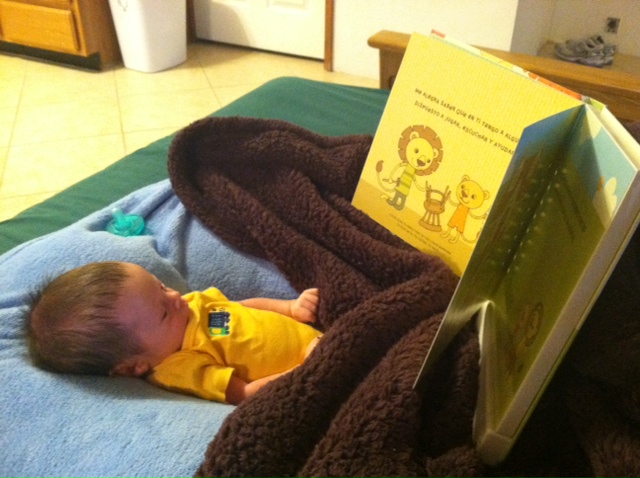
On this tour, he was able to purchase reliable Internet time in his quarters on the base in Bagram and Apple technology allowed him to Facetime almost daily with his wife. In addition, they purchased a camera system that worked with iPad and iPhone and he was able to observe the baby in his crib. In terms of more traditional literacies and technology, he purchased a book about dads and babies and audio-recorded his voice so that he could “read” to his son while deployed. Attached is a picture of the baby listening to his father “read” the book.

Listening to Dad read.

Listening to Dad read.

Happily, my son came home safely and now reads “real” books to his son, including his favorite Red Truck (Hamilton, 2008). Can Red Truck make it up the hill? Red Truck can! Red Truck will! ZOOOM! Red truck goes to the rescue and when my son reads to my grandson, they make the sounds dramatically together. Incidentally, Red Truck is available as an ebook.

Zooom!

Zooom!

Example 2.

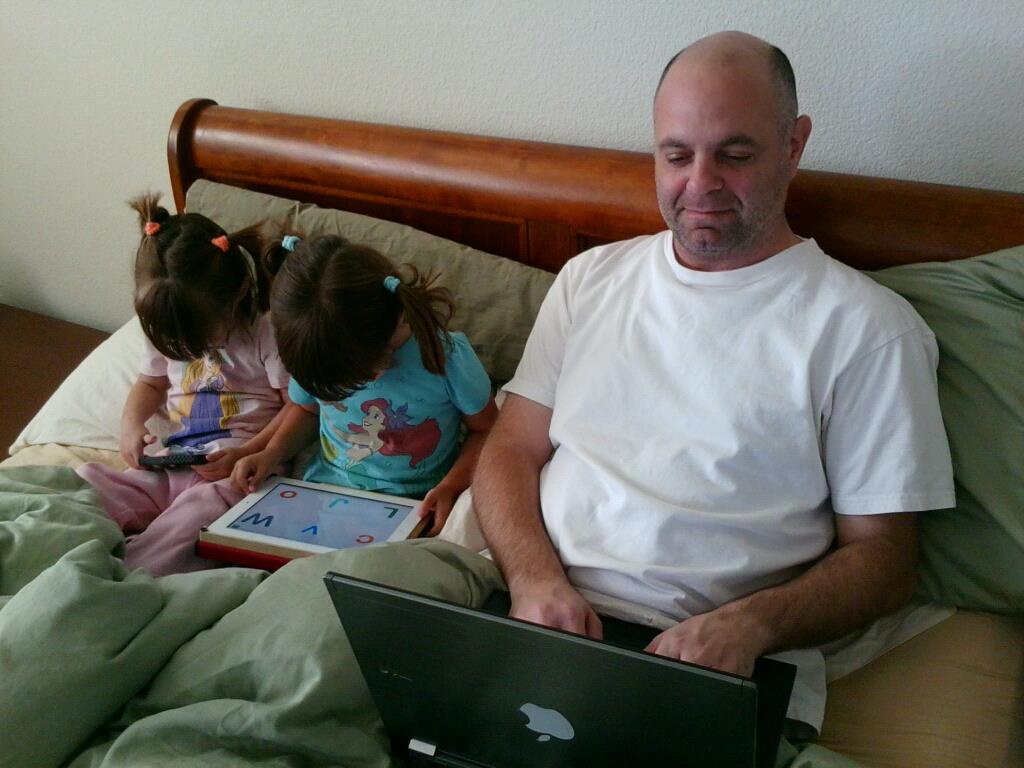
I also have twin granddaughters who are now four and a half. In my September 2012 Literacy Beat blog, I shared a picture entitled “Digital Morning,” which I’m reposting below. You can see Dad on his laptop, and the twins–one on an iPad and one on an iPhone.

Digital Morning

Digital Morning

The twins love to read print books, but they also love to explore literacy online.

Both of them LOVE the iPad and use it for lots of things, such as puzzles, art, coloring, and literacy learning.  Recently, they have been exploring two Apps, Reading Ravens (http://www.readingraven.com/ ) and Hooked on Phonics (https://itunes.apple.com/us/app/hooked-on-phonics-learn-to/id588868907?mt=8).  Both provide experiences with phonological awareness, with phonics, with word patterns, tracing letters on the screen, and with beginning reading. Both are interactive in different ways. Both take very different paths to the same end. Both are very engaging to my four-year-old granddaughters.  In my next post, I will explore these two Apps and provide a list of resources for early literacy development.

I began this column with the book Goodnight, iPad because iPads play an increasing role in literacy these days. One resource that I have found valuable is Using Apps for Learning with Literacy Across the Curriculum, by Rick Beach and David O’Brien (2012). In a review of the ebook, Don Leu termed the increasing use of iPads as “…perhaps the most profound change taking place in literacy and learning today” (p. ii). Naturally, I downloaded this book to my iPad and it offers a useful framework for thinking about how to employ the apps across grade levels and content/discipline areas. They include an Apps for Learning with Literacy website and a resource Wiki for readers. Last each of 12 chapters provides a wealth of resources for educators. Enjoy!

* Actually by David Milgrim, an author, illustrator, and cartoonist, who is “very interested in how we got to be who we are.” Check him out at http://www.davidmilgrim.com.

References

Beach, R. & O’Brien, D. (2012). Using apps for learning with literacy acros the curriculum.

Gorbis, M. (2013). The nature of the future: Dispatches from the socialstructed world. New York: Free Press.

Leander, K. (2009). Composing with old and new media: Toward a parallel pedagogy. In V. Carringtron and M. Robinson (Eds.), Digital literacies: Social Learning and classroom practices (pp. 147-162). Los Angeles, CA: Sage.

Leu, D. J., Jr.  (2000). Literacy and technology: Deictic consequences for literacy education in an information age. In M. L. Kamil, P. Mosenthal, P.D. Pearson, and R. Barr (Eds.), Handbook of Reading Research, (Vol. 3, pp. 743-770). Mahwah, NJ: Erlbaum.

On the Beat at the 18th European Conference on Reading

A post from Bernadette

The 18th European Conference on Reading was held in in the beautiful town of Jönköping in Sweden from August 6th to the 9th. Over the space of four days delegates, from around the globe including, Europe, US, Canada, Russia, Asia, South Africa and Australia, met, listened, debated and forged collaborative links around issues relating to the conference theme of New Literacies, New Challenges. In this blog post I thought I would give you a flavour the wonderful keynote addresses presented during the conference. Local speakers provided stimulating and interesting keynote addresses to both open and close the conference. Professor Elsie Anderberg, from Jönköping University, addressed the issue of The Function of Language Use in Reading Comprehension in her opening address. Professor Stefan Samuelsson (Linköping University) provided intriguing insights from an international collaborative research project on Behaviour-Genetic Studies of Academic Performance in School Students.

Professor Jackie Marsh from the University of Sheffield provided a wonderful and thought provoking keynote address on Digital Futures: Learning and Literacy in the New Media Age addressing issues including family digital literacy practices and children’s use of virtual worlds. Jackie then provided fascinating insights from the Digital Futures in Teacher Education’ Project on aspects related to pedagogical strategies and design of curriculum. Rather than trying to ‘colonise’ children’s home practices with digital literacies, she urged us to try to build on and extend such literacies links; thereby bridging the dissonance between in-school and out-of-school literacies.

Digital Futures in Teacher Education

Digital Futures in Teacher Education

http://www.digitalfutures.org/

Professor Don Leu (University of Connecticut) delivered an engrossing keynote address entitled, The New Literacies of Online Research and Comprehension: Reading with a Lens to the Past and with a Lens to the Future. Don got to the “Heart of the Matter”, and effectively captured the feeling of most of us working in the area of digital literacies, when he quoted Don Henley from The Eagles, “The more I know, the less I understand.” Don addressed issues related to the ubiquitous nature of the Internet and other digital technologies in society and the deictic nature of literacy in the 21st century. He spoke convincingly on the need to ensure equity in, and equality of, access to digital literacies for all students regardless of SES. You can view the PowerPoint presentation in the link below.

The conference organisers, Ulla-Britt Person, Lena Ivarsson and other colleagues in the Swedish Council of International Reading Association (SCIRA), together with colleagues on the International Development in European Committee of the International Reading Association (IDEC) and the Federation of European Literacy Associations (FELA) are be congratulated for the successful organisation of a wealth of presentations and workshops across the four days of the conference.

Presentations and hand-outs from the conference will be available soon on the IDEC website.

So a truly great conference in a wonderful venue! Mark your calendar for the 19th European Conference on Reading to be held in Klagenfurt in Austria on 14th -17th July 2015.

YouSeeU: A New Multimodal Tool for Teacher Educators

This year, for the second time, I taught a supervised reading course for California State University, Fresno, as part of their Reading/Language Arts Added Authorization (RLAA) for practicing teachers who want professional development focused on reading.

The course, LEE230, requires that teachers learn assessment, diagnosis, and intervention for struggling readers by tutoring a small group of students (or a single tutee) with supervision from the university. In the past, such a course would have been taught in a reading clinic on campus or a supervisor would have visited the teachers in their classrooms. But, as we have noted from previous experience (please see my Literacy Beat post from one year ago at https://literacybeat.com/?s=Qik), actually being present to supervise teaching is not necessary. As I noted in June 2012, “This class was taught in a 5-week time frame, so the pace was intense, and the teachers and I never met face-to-face. Teachers were required to spend 20 hours of tutoring a small group of students. Instead of coming to a clinic, teachers could select the small group from their own classrooms, from that of another teacher, or volunteer in a classroom if they were not currently teaching. All of these scenarios played out during the course.” All of this was true this spring, too, although Dr. Glenn DeVoogd arranged for a new tool to be used, called YouSeeU.

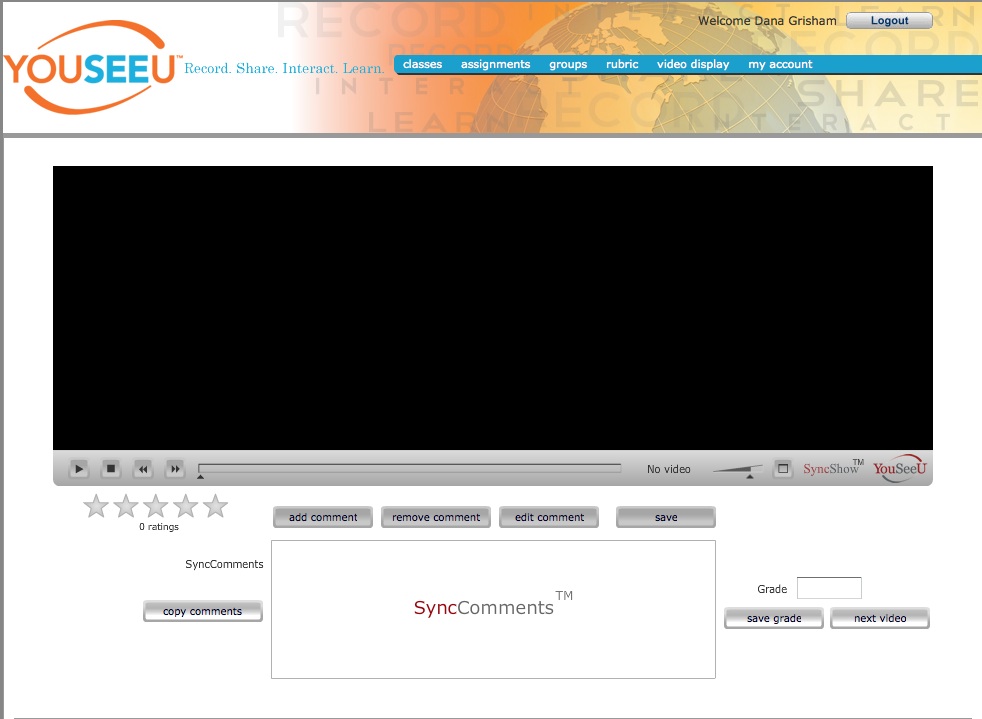
My introduction to YouSeeu (http://www.youseeu.com/) was a personally conducted orientation to the system by Josh Kamrath in a webinar. Josh was also available for problem solving (very few!) during the class. The home page provides information about the system, which—like QIK—was a free trial for this experimental course. The screen capture below gives you an idea of the website and there are several videos on the affordances of the website. At Fresno State, in a graduate level course, I used a very simple aspect of the program.

Image

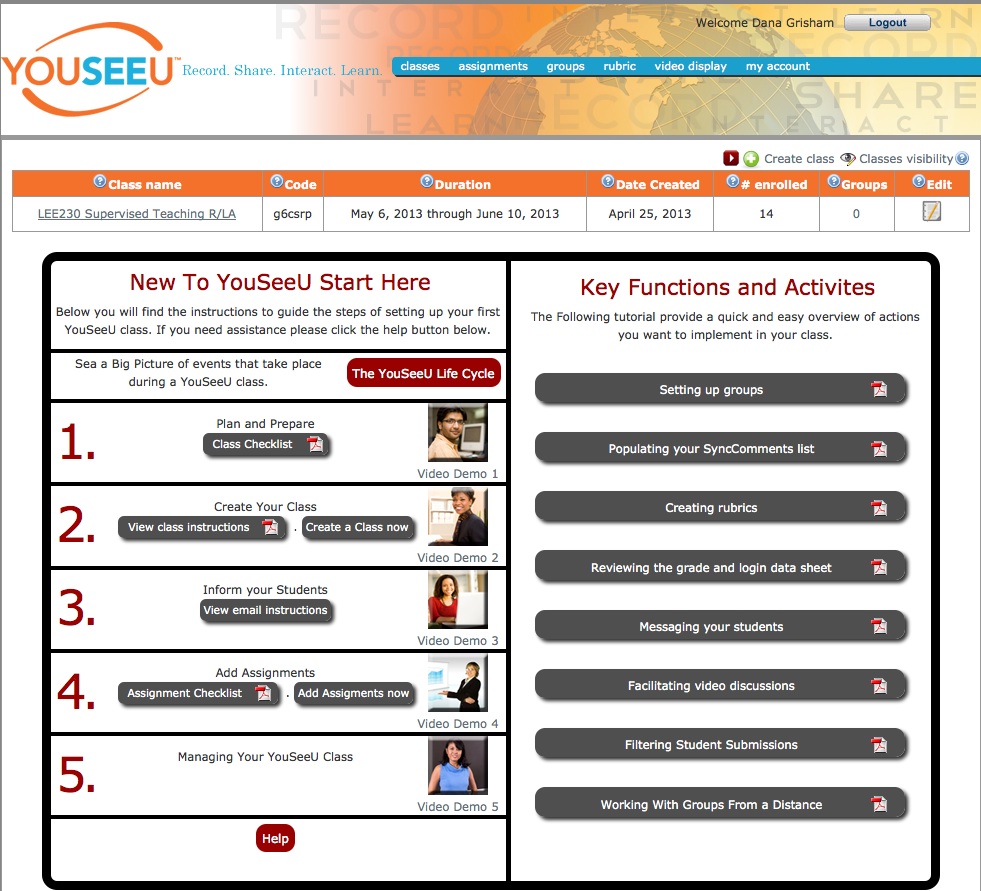
For my purposes, the teachers needed to provide 5-15 minute video segments of their tutoring accompanied by lesson plans and reflections on the process. My job was to analyze the lesson plans (which followed a prescribed format), then watch the video segment and provide feedback to the teacher. The entry portal for the course looked like this:

Image

Once you clicked on the class, the site took you to another page that provides you with a view of the video and a list of the students and the videos that they have submitted for review. Most interesting is the opportunity of commenting on the videos as they play. The comments are synchronized with the video, so that the teacher can view the video and see the comments as they arise in response to the teaching.

Image

 The following screen shot (with names removed) gives you an idea of what the scoring looked like, with options such as archiving. The student can set the parameters for who can view their video. All were originally set so that only I, as instructor, could view them. If I were to do this again, I think I would promote more peer review of the teaching, since teachers learn so much from each other.

Image

 Finally, I asked for and received permission from one of the teachers to share a video with my comments on it for this blog.   The embedding of this video is done below:

Tutoring a Small Group YouSeeU

I hope you enjoy reading about YouSeeU and seeing it in action. The Chief Education Officer, Jeff Lewis, was most cooperative and concerned about confidentiality (very important to them). YouSeeU is a commercial endeavor and the cost is.

Digital tools to foster reading and writing as shared literacy practices in the classroom

A post from Bernadette

Peer collaboration fosters student response and learning in important ways. When students collaborate in constructing meaning from text they have “multiple resources at the reading [writing] construction site” (paraphrased from Kucan & Beck, 1997). The ‘more knowledgeable other’ in such learning situations shifts and is distributed among group members. In collaborative learning situations, students acquire windows into the thinking processes of others and in so doing they both acquire knowledge and the processes by which such knowledge is constructed. The use of digital tools and apps allows students to collaborate synchronously and asynchronously. Students can research information and post their findings and annotations for others in the group to review. Members can then interpret, critique and synthesize information from a variety of online sources. Digital tools and apps that are useful to foster collaboration include Diigo, Subtext and Evernote. These digital tools and apps are portable across multiple devices and platforms.

Diigo  is a cloud-based information management tool that enables students to collect, highlight, bookmark, clip, share, and annotate websites. It allows students to archive their thinking at a particular moment by creating digital thinkmarks, tags and notes to highlight snippets of information on websites in the form of sticky notes, which they can then share and discuss with peers. Teachers can create an educator account with Diigo. This will enable you to generate student accounts and establish collaborative research groups within your classroom. Heidi Everett-Cacopardo has created a range of resources and video examples for Diigo on the New Literacies Essentials Google site here
Diigo%20-%20Web%20Highlighter%20and%20Sticky%20Notes,%20Online%20Bookmarking%20and%20Annotation,%20Personal%20Learning%20Network_-1
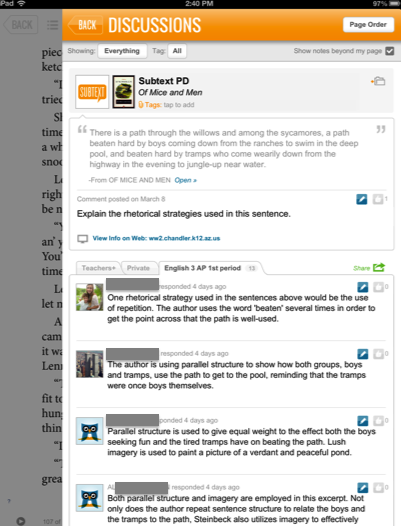
The Subtext app (currently available free on ITunes with a version for Android promised soon) allows students to annotate an ebook or website with questions and musings in the malleable moments of online reading. Students can share their ebook annotations with peers. Teachers can also set up private groups in their classrooms and embed instructions, layer weblinks, videos and assignments on the ebooks. There are a number of useful formative assessment tools, classroom management tools and social media-like features built into the app. Subtext is integrated with Google Drive and students can copy their highlights and notes into this medium, thereby closing the lines between reading and writing. See the example from the subtext website.

subtext annotations

Evernote  is a popular ‘Remember everything’ app to create and share digital notes and thinkmarks. You can also record audio notes with ease to share with others.  Capturing class notes from an Interactive Whiteboard is another  useful strategy for students. Another interesting feature is the ability to clip or capture websites and create annotations on the clipping. Watch the video embedded below from the Evernote website if clipping websites with Evernote is something you are not familiar with.  Again these notes can be synchronised across muliple portable devices.

References

Kucan, L., & Beck, I. L. (1997). Thinking aloud and reading comprehension research: Inquiry, instruction and social interaction. Review of Educational Research, 67 (3), 271-279.

Students revise their writing by listening to a digital reading of their text via Text-to-Speech tools and the VOKI Avatar

Good writers often read their writing out loud as they are composing and revising.  Sometimes the focus is on checking for meaning and the flow of the language.  Other times the focus is on checking that the sentences are the right length and are appropriately punctuated.  Of course, not everyone is comfortable doing this, and some may get so caught up in reading what they intended to say, that they aren’t able to listen critically and notice what’s not working.  This blog post features 2 tools, a text-to-speech reader that is available in most word processors and VOKI, a free talking head avatar.

Add a text-to-speech tool to your toolbar

Did you know that most computers and word processing programs now have a free text-to-speech tool that you can install on the toolbar?  I use a PC, so I’ll focus on the Microsoft tool that will read aloud written text in Word, Outlook, PowerPoint and OneNote. You can choose your voice and the rate of speed. You simply highlight a word or section of text and click the speak tool on your toolbar to listen to your text being read aloud.  Granted, TTS tools still have voices that are a bit robot-like.  However, the focus here is not on expressive reading, but rather, listening to catch major editing issues.

Directions for adding TTS to your Quick Access Toolbar can be found online at:

http://office.microsoft.com/en-us/word-help/using-the-speak-text-to-speech-feature-HA102066711.aspx

Listen and Revise with TTS

There are several ways to use TTS as a revision and editing support.  Of course, depending on the length of the text, you can always listen to the text in its entirety to get an overall sense of how it’s working.  Below are some targeted revision/editing strategies that can make the process more manageable for writers.

Targeted revision and editing with TTS

Paragraph Sense

Highlight a paragraph and then click on the Speak tool in your Word toolbar.

Listen and ask:

  1. Does this paragraph make sense?
  2. Does the lead sentence engage you and/or give you a sense of what the paragraph will be about?

Text Sense

Highlight the opening sentence of each paragraph and listen to hear how the paragraphs are building on one another to create an overall text that meets your genre requirements and writing goals.

Listen and ask:

  1. Do the opening sentences give you a sense of how the text is building to tell a story or present an argument?
  2. Are there some paragraphs that seem to be standing on their own, and aren’t connected to the rest of the text?
  3. Are there big jumps between paragraphs where I need to make a transition?

Run-on sentences and fragments

This is a quick and easy check.  The TTS tool will read along at the same rate, pausing only for punctuation. Run on sentences and fragments without punctuation will sound very strange!

Listen and ask:

  1. Do I have any very long sentences that are hard to understand?
  2. Do I have some sentences that aren’t complete?

Spelling check

Listening to check spelling will only capture misspellings that result in a phonetically different pronunciation. For example, typing ‘happee’ for ‘happy’ will sound okay.  Typing ‘hape’ or ‘hapy’ for ‘happy’ will not!  This process does help writers learn to listen for misspellings, which can be useful.  However, you will want to connect this kind of spelling editing check with the use of the embedded spell checker tool or an online dictionary.

Listen and ask:

  1. Do my words sound right?

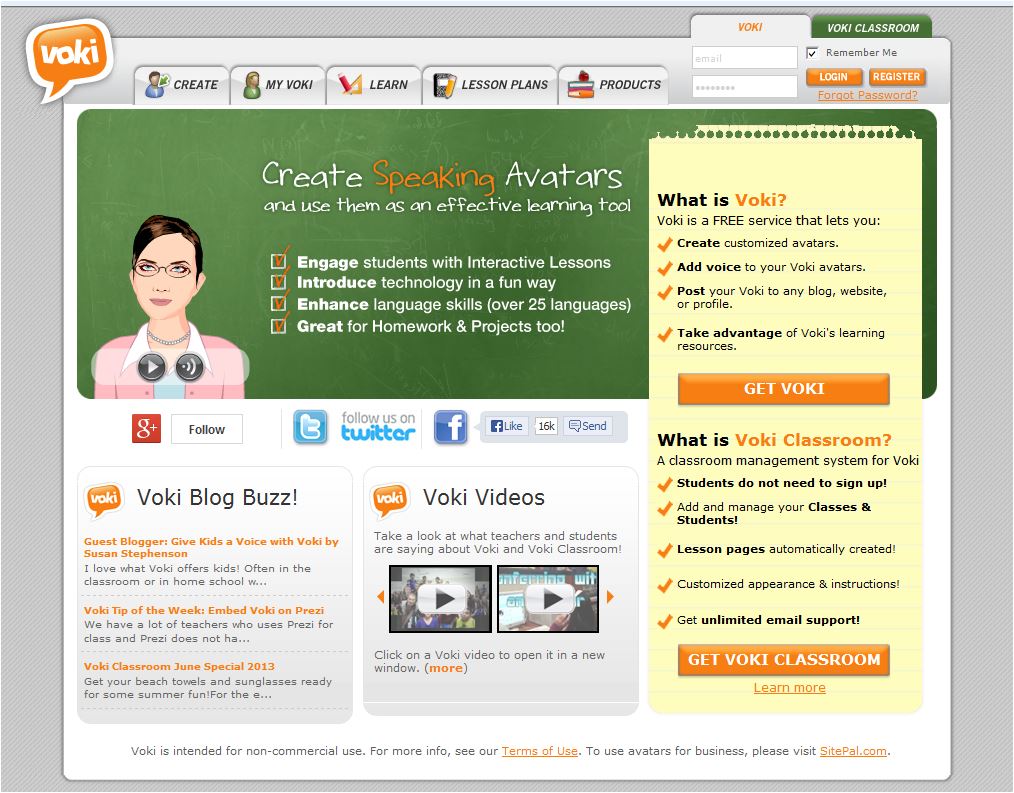
VOKI:  Listen to an animated Avatar read your writing to help you review and revise

http://www.voki.com/

Image

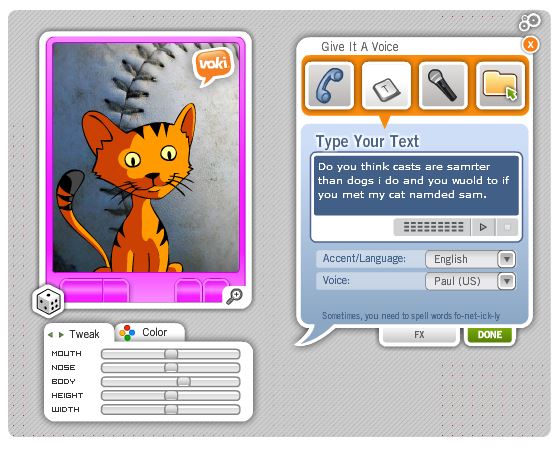
VOKI is a free online tool that even young children can use to create an avatar who will then read the text they have typed in aloud to them.  Clearly, this can be engaging for students, since it allows them to create a reader and watch the reader speak their text.  It only takes a few minutes to customize your avatar. Then, you choose the TTS read aloud option and enter your text.  If the text has been created in a word doc, you can copy and paste it into the text input box. You may preview it, save it, and/or email it.  All of your saved avatars will be available in your ‘my avatars’ space.

A word of caution – there is a 60 second restriction on each Avatar speaking segment on the free VOKI and 90 seconds on the school paid version.  You will be surprised at how much the avatar can read aloud in 60 seconds.  However, if the text is longer than 60 seconds, have students entered in portions (perhaps at the paragraph level or beginning, middle, end, of the text, etc.).

Image

This screenshot shows that I’ve created my cat avatar and typed in my text so that the avatar will read my text aloud with a TTS voice.

Hear from  students about how VOKI is a fun way to help them with their writing

The VOKI website features videos created by teachers illustrating how they use VOKI in the classroom. Watch this video of Mr. Young’s classroom to learn from his students how they use VOKI to help them review their writing.  One student realizes his text doesn’t make sense, another  decided that he needs more sentences, a third notices that periods are missing, and a fourth hears mispronunciations that some spellings need correction.

http://www.youtube.com/embed/Y9gHpIH9RTA

child typing text for VOKI avatar to read aloud

Please share your strategies for using TTS and Avatars to support your students’ literacy.

Exciting Summer Professional Development Offerings

A post by Jill Castek

Professional development and professional networking are important ways to stay up-to-date with new developments and innovations in teaching and learning.  This post features several upcoming opportunities to extend your knowledge and expertise.  Register soon as these events are right around the corner.

The Center for Literacy and Reading Instruction (CLaRI) is having a Literacy Conference celebrating their 50th anniversary.  The event takes place on Sat. June 29th, 2013 in Buffalo, NY (Baldy Hall basement level, UB North Campus). Sessions include several offerings focused on new literacies and the use of digital technologies to support literacy and content learning.

The Summer Institute in Digital Literacy: Innovative Teaching and Learning with Digital Media Texts, Tools & Technologies is being offered at the University of Rhode Island July 14 – 19, 2013 in Providence, RI.  This six-day institute will focus on how literacy is changing as a result of emerging media and technologies. Participants will consider the implications of this cultural and technological shift for teaching and learning at all levels.

The Massachusetts New Literacies Institute:  Online Reading Comprehension, Online Collaborative Inquiry, and Online Content Construction is being offered at the Microsoft NERD Center in Cambridge, MA from Aug. 5-9, 2013.  This week-long event will engage participants in using digital tools to create lessons that address three aspects of new literacies: Online Reading Comprehension, Online Collaborative Inquiry, and Online Content Construction.

The websites for these events contain a full schedule of events, list of speakers, and details about registration.  Don’t miss out on the opportunity to  network with educators who are working toward transforming teaching and learning with the infusion of new technologies.

If you’re not able to participate in person, visit the online materials, activities, and articles from the New Literacies Teacher Leader Institute centered at North Carolina State University. This group has made available all their materials from previous years’ professional development activities.  Also check out the Technology in Literacy Education Special Interest Group (TILE-sig) wikipage.  Resources found on  these sites will both guide and inspire you to integrate new and transformational teaching practices in your classroom.

If you know of other summer conferences our readers might find useful, please post a description and particulars in the comments.

Enjoy your summer break. Stay connected to Literacy Beat for resources and teaching ideas throughout the month of June!

UDL Studio: Deepening response to literature

UDL Studio, a free digital tool (funded largely by the Carnegie foundation) has recently been released by CAST. UDL studio is underpinned by the principles of Universal Design for Learning . UDL Studio  joins other successful digital tools created by CAST. See for example my blog post on LEA Meets Book Builder. UDL Studio enables anyone to create media-rich resources, to actively engage and motivate students, and to respond flexibly to the needs of each learner; thereby ensuring quality and equality in access to learning for all.

UDL Studio offers templates to scaffold you or your students as you create content using multimodal elements, such as text, image¸ video, audio, and animation. You can explore the project library to view previous projects created by UDL studio users.
For example, Katherine Cooper has created a project around Charles Dickens’ classic tale A Christmas Carol. In the screen shot you can see links to audio recording related to character study. Students can also record their prior knowledge of the story through multiple modalities, such as writing, recording, drawing, or uploading a file attachment.

Katherine Cooper

Katherine Cooper

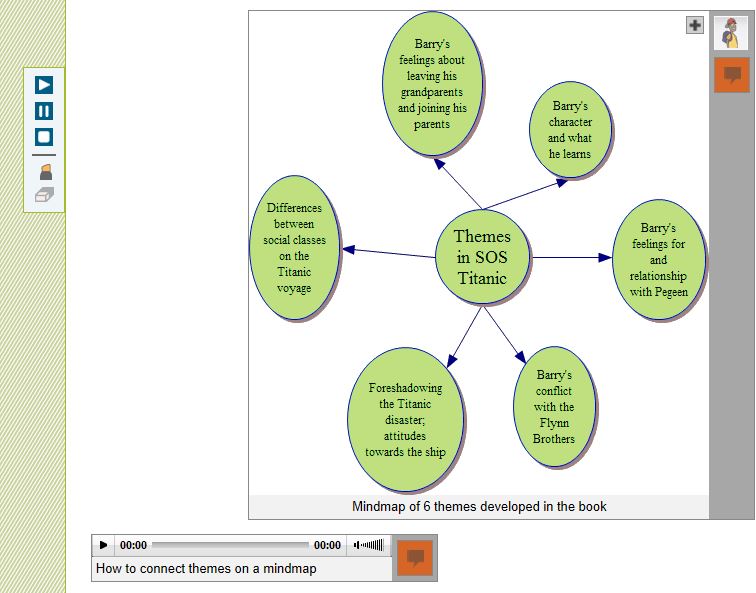
Meanwhile, Matthew Puma has created a resource to support his students while reading SOS Titanic by Eve Bunting. Students can explore historical information relating to the Titanic; inner feelings of the characters; and actions and events within the book. The screen shot below relates to a mind map of themes in the Titanic.

mind map SOS Titanic

My wonderful, final year, elective student teachers have begun to explore the possibilities presented by UDL Studio to encourage immersion in, involvement with, and interpretation of literature (Dwyer & Larson, 2013). We have begun a project around The Boy in the Striped Pyjamas/Pajamas by John Boyne. Our aim is to deepen engagement with the text through close reading to explore the structure of the text; the perspectives of the characters; the use of vocabulary; and historical perspectives relating to the text.

The Boy in the Striped Pyjamas

We really like the tips and resources page which asks you to reflect carefully on how the use of the digital tool enhances children’s understanding of text; enriches the reading experience; and represents information in an engaging manner. The plethora of free digital tools include:

Recording and editing software
Audacity: http://audacity.sourceforge.net/
Free Sound Editor: http://www.free-sound-editor.com/
Audio Pal: http://www.audiopal.com/index.html

Video search engines and editing software
• Blinkx Video Search Engine: http://www.blinkx.com/
• Truveo Video Search: http://www.truveo.com/
• Video editing http://www.stroome.com/

Sources for images
• Pics4Learning: http://pics.tech4learning.com
• Creative Commons image search: http://search.creativecommons.org/
• Free Photos: http://www.freeimages.co.uk

Animation tools
• Gifninja: http://www.gifninja.com/
• Picasion: http://picasion.com/
• GoAnimate: http://goanimate.com/

Reference
Dwyer, B. & Larson, L. (2013). The writer in the reader: Building communities of response in digital environments. In Kristine E. Pytash & Richard E. Ferdig (Eds.). Exploring Technology for Writing and Writing Instruction. US: IGI Global

Power Up What Works!

I want to share an excellent resource to support technology integration, the Center for Technology Implementation’s Power Up What Works website (http://powerupwhatworks.com).  With funding from the US Department of Education, EDC, AIR, and CAST have partnered on this project to develop a comprehensive set of online resources for using technology to support literacy and math (of course, I have focused my attention on the literacy materials!).

What makes Power Up unique is its special attention to the needs of students who struggle with learning, including students with special needs.    As a member of the Power Up Advisory Board, I’ve had the opportunity to see the resource evolve and want to share a few of my favorite features.

Image

Power Up with Technology Blog

Stay connected and get up-to-date information and teaching ideas through the Power Up with Technology blog.   The April 17 blog post caught my eye, since it was about “create your own interactives”, something that I find key to my own teaching. It highlighted three resources that offer lots of potential:

Did you notice that the blogger noted whether the resource was free and/or fee-based?  I find this incredibly helpful, since like most teachers, I have limited funds and want to take advantage of the high-quality free resources that are available online.

You can find the blog on facebook:  https://www.facebook.com/pages/PowerUp-What-Works/127625650650645?group_id=0

The Learning Center

http://powerupwhatworks.com/content/render/LearningCenter

The Learning Center has a wealth of information and resources to explore. Since literacy is my thing, I’ve spent most of my time in the Reading and Writing sections.  In Reading, the focus is on comprehension and vocabulary, while the Writing section focuses on supporting the writing process, from idea generation to publication.  Throughout, you’ll notice the links to the Common Core State Standards.  You can get information at the level and type that is useful to you. For example, each of the Reading sections includes an overview of the strategy (e.g., self-questioning, summarizing, visualizing, context clues, s semantic mapping and word analysis), a description of how to teach the strategy, an extended classroom example, a list of resources, research, and tech tips.

Image

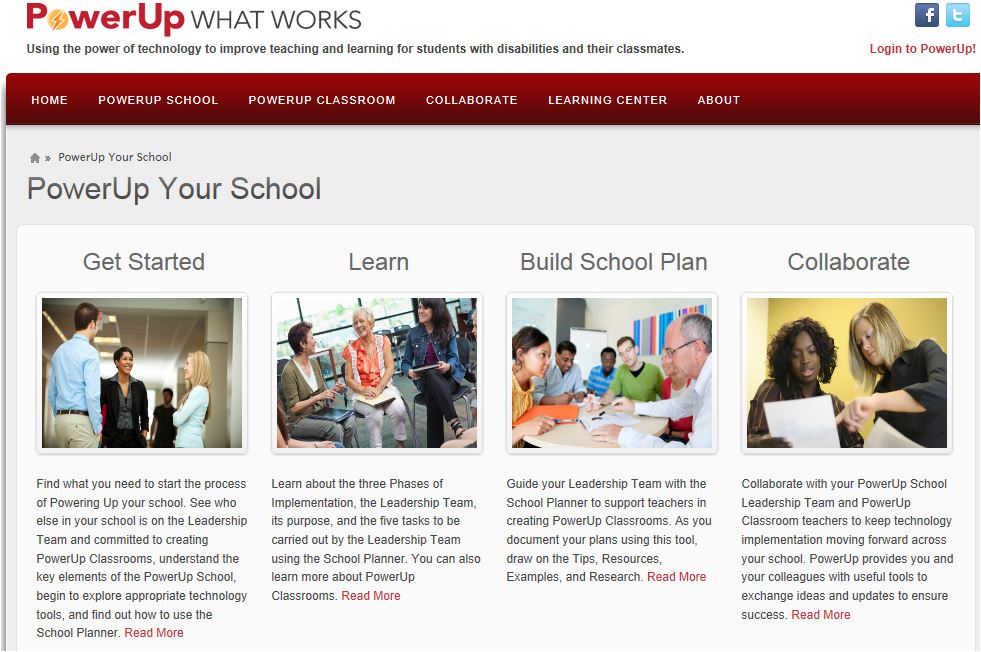
PowerUp Your School

Teachers are the ones leading the way on integrating technology into their teaching and their students’ learning.  While teachers are ‘making it happen’, sometimes one classroom at a time, we know that more is usually required to sustain effective technology integration over the long term.  If your school is interested in developing a school-wide plan for integrating technology, Power Up offers a range of resources to support you in developing a school-wide plan and building a team that will work together to support one another in making technology a meaningful part of children’s learning.

Image

I know the Power Up team is eager for feedback, so let them know what you find especially helpful and share suggestions for improvement.

News from the International Reading Association Conference

The International Reading Association conference took place April 19 – 22nd in San Antonio, Texas. We were thrilled that all of us were able to attend and participate in IRA board activities, committee meetings, SIG sessions, preconference institutes, and workshops. Below are highlights from the conference.

• Bernadette was officially inaugurated onto the IRA board of directors. Her vast experience with teaching and learning in Ireland has yielded a goldmine of ideas that will help IRA forge ahead in new and innovative directions. She is sure to share many useful insights about the use of technology to support reading, writing, collaboration, and learning. We’re excited about what lies ahead for Bernadette and for IRA.

• Dana was honored with the Computers in Reading Research Award. This award is given by the TILE-SIG to honor reading researchers who have made a significant contribution to research related to classroom literacy instruction and technology integration. Her recent book Transforming Writing Instruction in the Digital Age (co-authored with DeVere) provides professional development for teachers and techniques for integrating writing with Web 2.0 technologies. This ground breaking work, coupled with Dana’s work in digital vocabulary learning and teacher development, sets her apart as an exceptional scholar who is committed to supporting the work of teachers and teacher educators. Her keynote address will be presented at 2014 TILE-SIG session during the New Orleans conference.

• DeVere presented an interactive session at preconference institute organized by Kathy Ganske: Making a Difference through Writing. Participants explored two aspects of working in digital environments: How to work with digital sources to inform their writing and how to bring together digital images and composing processes, as means for increasing language learning. Participants learned how to use online tools their students can employ to draw or reuse images found on the Internet in service of writing as a means of learning. Examples of digital stories that combine images and words were provided, and participants with computers or smartphones had the opportunity to try some of the tools. By linking the parts of the brain that process images with those parts that process language, written work improves and so does student learning. Follow this link to view the presentation slides and resources.

• Bridget presented her innovative work on multimodal composition at the ‘Meet the Researchers’ poster session. She reported on a study conducted with Blaine Smith of Vanderbilt University that examined how two urban middle school youth collaboratively composed a digital video retelling of a folktale. Drawing on Camtasia real time video screen capture of the youth’s composing processes, their retelling products, and their perspectives on composing, they created an in-depth portrait of this pair of engaged, successful storytellers. The study supports the integration of multimodal composition into the literacy program, highlighting the value of teaching within a scaffolded digital composition workshop model.

• Jill, together with her colleague Heather Cotanch from the Lawrence Hall of Science, presented a workshop entitled Enhancing Literacy and Content Learning Using iPad Apps for Digital Content Creation. This hands-on learning experience involved participants in designing instructional experiences that actively engage students in creating digital content. Three digital content creation tools were used: 1) iMovie, a video creation app that makes shooting and editing a video simple, 2) ShowMe, an app that makes it easy to create a storyboard with images and drawing and includes a voiceover feature, and 3) VoiceThread, a collaborative, multimedia slide show that holds images and allows creators or viewers to add voice over, text, and video commentary. During the workshop, participants worked collabortively on iPads to create a product using one of the applications introduced. This full immersion approach mirrored what students face in the classrooms as they engage in digitally enhanced learning. Selected final products were shared and celebrated. Participant observations about the learning process were discussed with an eye toward design principles for implementation.

We hope you’re able to join the fun at next year’s IRA conference that will take place May 9-12, 2014 in New Orleans.